
A growing annuity is a series of payments made at regular intervals, each payment increasing at a fixed rate over time.
Excel doesn’t have a built-in function for calculating a growing annuity. However, I will show you how to calculate it by:
- Listing the increasing payments or deposits in helper columns.
- Using the NPV function and FV function to find their present and future values.
Calculate the Present Value of a Growing Annuity
If you want to calculate the present value of a growing annuity, you can use the NPV function.
Suppose you plan to save for retirement by contributing to a pension scheme each year for five years. You start with a contribution of $10,000 and increase it by 10% each year as your income grows. The scheme earns an annual interest rate of 5%.
You can calculate the present value of your growing contributions using the steps below.
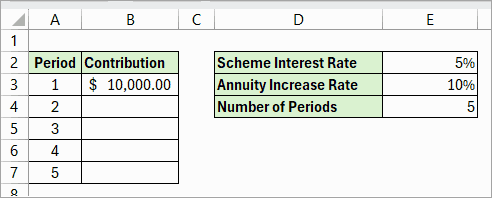
Step #1: Create a Dataset of Payment Schedule
First, you need to create the payment schedule as shown below.
Step #2: Calculate the Series of Payments
Below are the steps to create the series of payments.
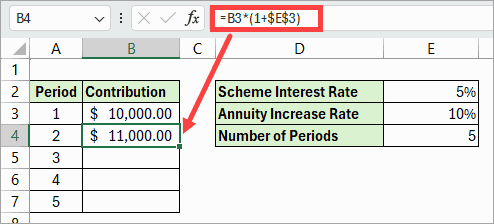
- Compute the payment for the second year or period using the formula below.
=B3*(1+$E$3)Note: Use an absolute reference for cell E3, which contains the annuity growth rate, so it remains fixed when you copy the formula down.
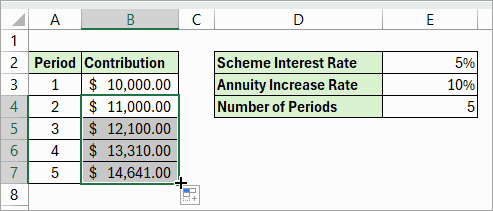
- Drag the fill handle in cell B4 to copy the formula down.
In case you are using dynamic arrays, you can use the formula below, and there is no need to drag it down.
=B3:B14*(1+$E$3)Step #3: Calculate the Present Value of the Growing Annuity
Here is the formula to calculate the present value of the growing deposits:
=NPV(E2,B3:B7)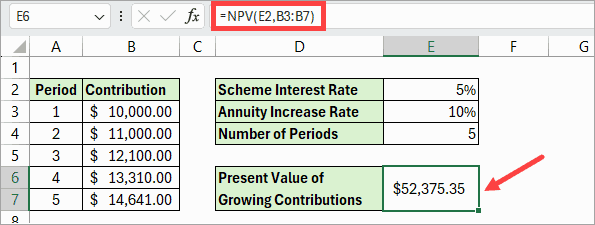
The present value of your growing deposits is $52,375.35.
Calculate the Future Value of a Growing Annuity
If you want to calculate the future value of a growing annuity, you can use the FV function.
Suppose you plan to save for retirement by contributing to a pension scheme each year for five years. You start with a contribution of $10,000 and increase it by 10% each year as your income grows. The scheme earns an annual interest rate of 5%.
You can calculate the future value of your growing contributions using the steps below.
Step #1: Create the Payment Schedule
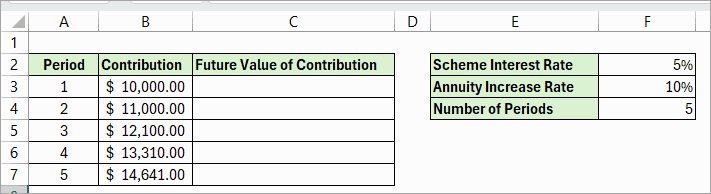
First, we need to create the payment schedule as depicted below.
Note that column B shows the growing deposits calculated in the previous section.
Step #2: Calculate the Future Value of Each Contribution
Below are the steps to create a series of future contributions.
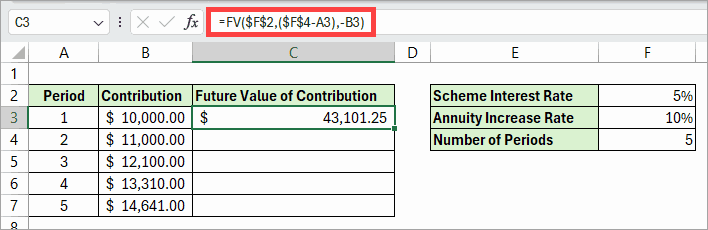
- In cell C3, calculate the future value of the first payment using the formula below.
=FV($F$2,($F$4-A3),-B3)Note: Use absolute references for cells F2 and F4, which contain the interest rate and the number of periods, respectively, so that they remain fixed when you copy the formula down the column.
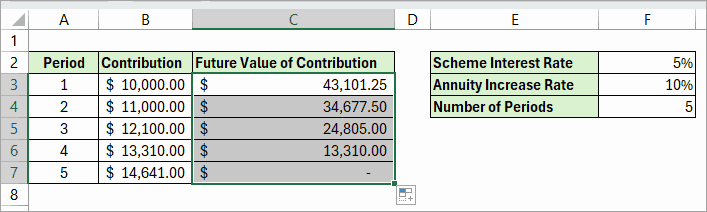
- Drag the fill handle in cell C3 to copy the formula down.
Step #3: Calculate Future Value of Growing Annuity
Here is the formula to calculate the future value of the growing contributions:
=SUM(C3:C7)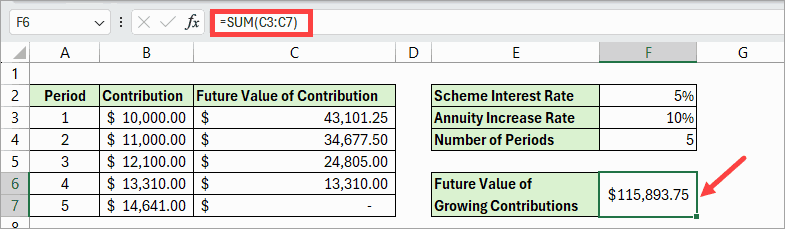
The future value of your growing deposits is $115,893.75.
I hope you found the tutorial helpful.
Other Excel articles you may also like:
