
The CSC function in Excel returns the cosecant of an angle supplied in radians.
Cosecant is the reciprocal of sine. In right-triangle work, it is the ratio of the hypotenuse to the side opposite the angle.
This article shows how to calculate slant distances, correct degree inputs, and recover angles without ACSC.
CSC Function Syntax in Excel
The CSC function needs one angle expressed in radians.
=CSC(number)
- number (required) is the angle in radians for which you want the cosecant.
When to Use CSC Function
- Calculate a hypotenuse or slant distance when you know the opposite side and an angle.
- Convert a measured Mach angle into a Mach number.
- Check an inverse-cosecant calculation built with ASIN.
- Model ratios that are defined as the reciprocal of sine.
- Flag or replace undefined results when an angle is zero.
Example 1: Calculate Drone Line-of-Sight Distance
Let’s start with a practical right-triangle calculation.
Below is the dataset. It lists drone jobs, altitudes above pilot eye level, elevation angles in degrees, and an empty column for line-of-sight distance.
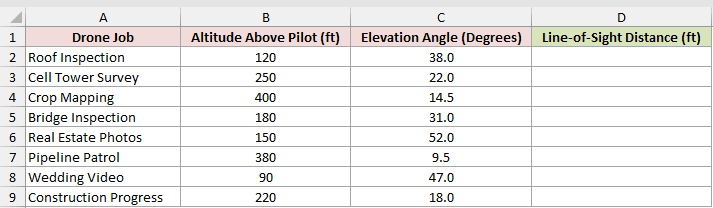
We want to calculate the straight-line distance from the pilot to the drone for every job.
Here is the formula:
=B2:B9*CSC(RADIANS(C2:C9))
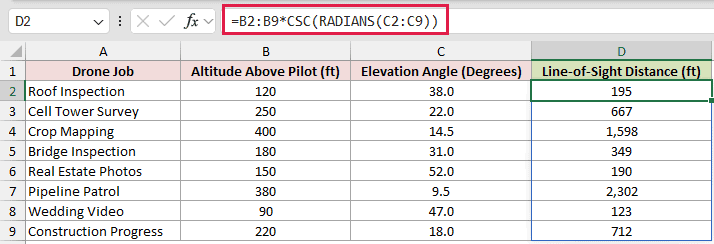
The altitude is the opposite side of the triangle. CSC returns the hypotenuse-to-opposite ratio, so multiplying the altitude by that ratio returns the line-of-sight distance.
Pipeline Patrol has a low 9.5-degree elevation angle. Its 380-foot altitude produces a much longer line-of-sight distance of 2,302 feet.
This range formula spills in Excel 2021, Excel 2024, and Microsoft 365. In Excel 2019 and earlier, enter the equivalent per-row formula and fill it down.
Pro Tip: Keep the cells below the formula empty. Any obstruction in the output range causes a #SPILL! error.
Example 2: Fix the Degrees Mistake
Here’s a unit mistake that can produce surprisingly believable answers.
Below is the dataset. It lists structures, attachment heights, wire angles in degrees, and empty columns for the mistaken and corrected wire lengths.

We first want to see the mistake caused by feeding degree values straight to CSC.
This is the formula to avoid:
=B2:B7*CSC(C2:C7)
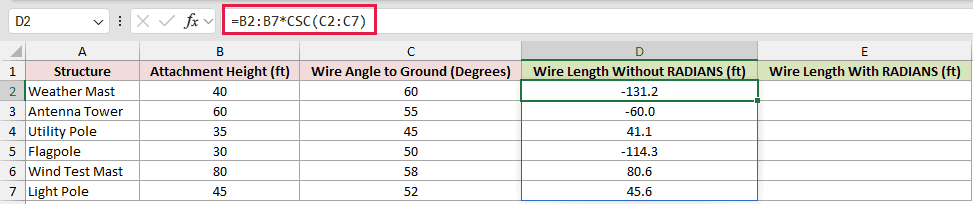
The formula is wrong because CSC reads the values in column C as radians. Negative wire lengths expose the problem immediately, but other mistaken values look reasonable.
Now let’s convert the angles before CSC evaluates them.
Here is the corrected formula:
=B2:B7*CSC(RADIANS(C2:C7))
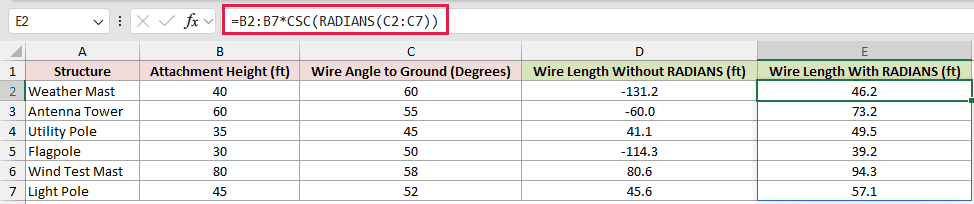
RADIANS converts every degree measurement in column C. The PI()/180 conversion is equivalent.
The Utility Pole mistake returns 41.1 feet, while the corrected formula returns 49.5 feet.
The Wind Test Mast mistake returns 80.6 feet instead of 94.3 feet. That wrong value still exceeds its 80-foot attachment height, so the height check does not flag it.
In this table, that check catches only the negative results. The believable positive mistakes all pass it, so converting with RADIANS is the real protection.
Example 3: Calculate Mach Number
Now let’s use CSC as the ratio itself, without multiplying by a side length.
Below is the dataset. It contains wind-tunnel test runs, measured Mach angles in degrees, and an empty column for Mach numbers.
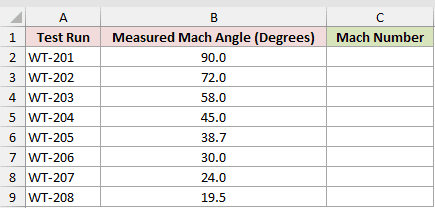
We want to convert each measured Mach angle into its corresponding Mach number.
Here is the formula:
=CSC(RADIANS(B2:B9))
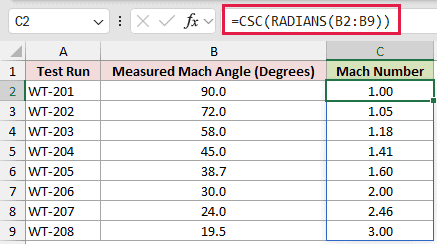
The Mach angle is the half-angle of the Mach cone. In this relationship, its cosecant is the Mach number.
A 90.0-degree angle returns 1.00, while a 30.0-degree angle returns 2.00.
Rows below 90 degrees represent supersonic flow. The 90.0-degree row is the sonic boundary.
Example 4: Find an Inverse Cosecant
Excel has no ACSC function, but ASIN provides a clean route back to the angle.
Below is the dataset. It lists optical materials and refractive indexes, with empty columns for critical angles and a CSC check.
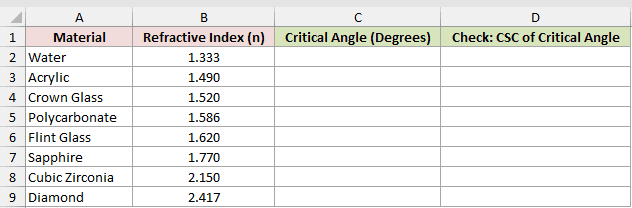
We want to calculate the critical angle represented by each refractive index.
Here is the inverse calculation:
=DEGREES(ASIN(1/B2:B9))
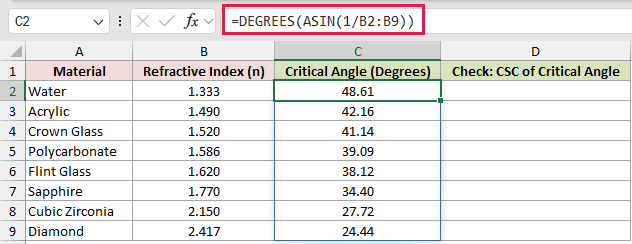
ASIN works on the reciprocal of each refractive index. DEGREES then converts the returned angle from radians into a degree measurement.
Next, we want to verify the calculation by feeding each critical angle back into CSC.
Here is the check formula:
=CSC(RADIANS(C2:C9))
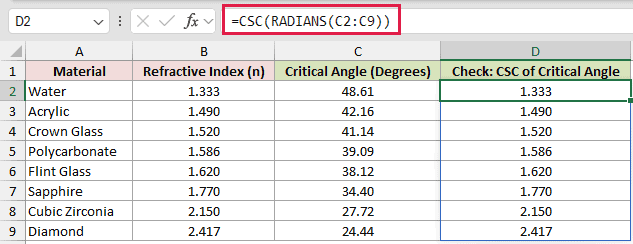
The check column returns the original refractive indexes. Diamond’s 2.417 index produces a 24.44-degree critical angle, and the CSC check returns 2.417.
Typing ACSC as a function name returns #NAME?. The ASIN method is the working inverse calculation in Excel.
Example 5: Guard Solar Air-Mass Results
Finally, let’s handle a real calculation that reaches zero and also includes a negative angle.
Below is the dataset. It lists solar times and sun elevations, with empty columns for an unguarded CSC result and a guarded air-mass result.
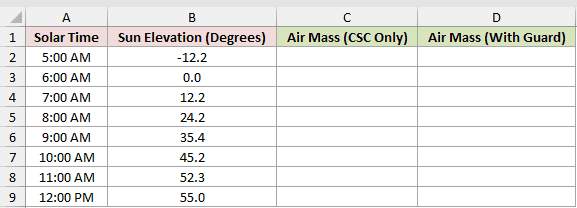
We first want to see why the unguarded CSC-only column is unsuitable around sunrise.
Here is the unguarded formula:
=CSC(RADIANS(B2:B9))
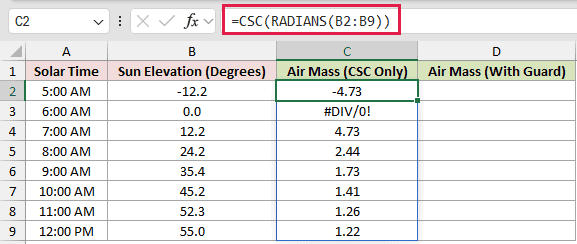
This unguarded version returns -4.73 at 5:00 AM, when the sun is below the horizon. At 6:00 AM, the exact zero-degree angle returns #DIV/0!.
We want the output to identify both nonpositive angles instead of calculating air mass for them.
Here is the guarded formula:
=IF(B2:B9<=0,"Sun below horizon",CSC(RADIANS(B2:B9)))
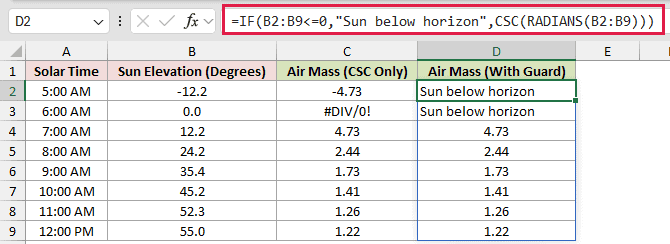
IF checks the angle before running CSC. The first two guarded cells return Sun below horizon, while the 7:00 AM row returns 4.73.
IFERROR would catch the division error at zero, but it would leave the negative result untouched. Testing the angle directly handles both cases.
Pro Tip: This air-mass calculation uses a flat-atmosphere approximation. It works best well above the horizon, while observations near the horizon need a refined atmospheric model.
Tips & Common Mistakes
- CSC expects radians. When your worksheet stores degrees, convert them with RADIANS before CSC evaluates them.
- CSC returns #DIV/0! for an exact zero or a truly blank cell. Empty text returns #VALUE! instead.
- Values at 180 and 360 degrees do not produce errors. They return 8.16E+15 and -4.08E+15 because the calculated sine is extremely close to zero.
- An input whose absolute value is 2^27 or more returns #NUM!. Nonnumeric text returns #VALUE!.
- CSC is available in Excel 2013 and later. In older versions, use the reciprocal of SIN for the same calculation.
Make the angle units explicit, and handle undefined inputs before calculating CSC.
Those checks keep plausible-looking results from slipping through unnoticed.
Other Excel articles you may also like:
