
The CSCH function in Excel returns the hyperbolic cosecant of a number, which is the reciprocal of its hyperbolic sine.
CSCH works with plain numeric inputs, not angles. Its output grows sharply near zero and decays toward zero as positive inputs grow.
In this article, I’ll show you how to reverse CSCH results with ASINH, model diamond’s heat capacity, and calculate a rod temperature profile.
CSCH Function Syntax in Excel
The CSCH function uses one required argument.
=CSCH(number)
- number (required) is the real number for which you want the hyperbolic cosecant.
When to Use CSCH Function
- Calculate the reciprocal of a hyperbolic sine without building the reciprocal expression yourself.
- Model heat capacity with an Einstein solid approximation.
- Rewrite thermal occupancy formulas to reduce overflow problems at large inputs.
- Normalize temperature profiles that would otherwise divide by a hyperbolic sine.
- Explore how hyperbolic cosecant behaves near zero and at large magnitudes.
Example 1: Spill and Reverse CSCH Results
Let’s start by seeing how CSCH behaves across a range of inputs.
Below is the dataset. Column A holds positive and negative inputs, while columns B and C provide the result scaffolding for CSCH and the recovered numbers.
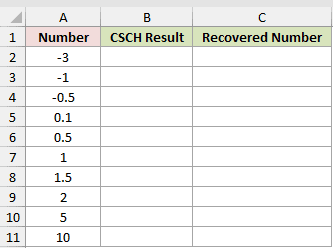
We want to calculate each hyperbolic cosecant, then recover the original inputs.
Here is the CSCH formula:
=CSCH(A2:A11)
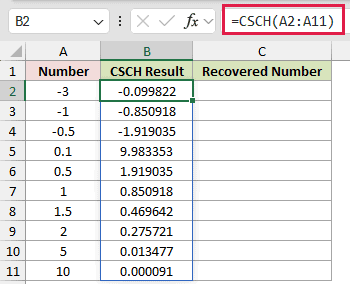
This single formula spills through B2:B11 in Excel 2021, Excel 2024, and Microsoft 365. In Excel 2019 and earlier, enter it per row and fill down.
To reverse those results, use this ASINH formula:
=ASINH(1/B2:B11)
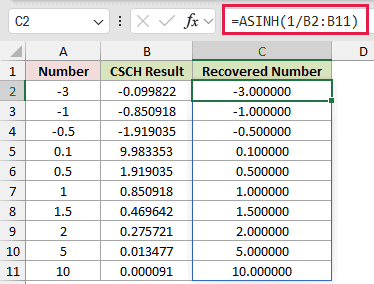
For example, -1 returns -0.850918, while 1 returns 0.850918. Equal magnitudes with opposite signs show that CSCH is an odd function.
The recovery formula returns -1.000000 and 1.000000 for those rows. It also recovers 2.000000 from a CSCH result of 0.275721.
Pro Tip: Excel has no ACSCH function. The ASINH expression above reverses CSCH while preserving the original sign.
Example 2: Model Diamond Heat Capacity
Now let’s use CSCH inside an Einstein heat-capacity model.
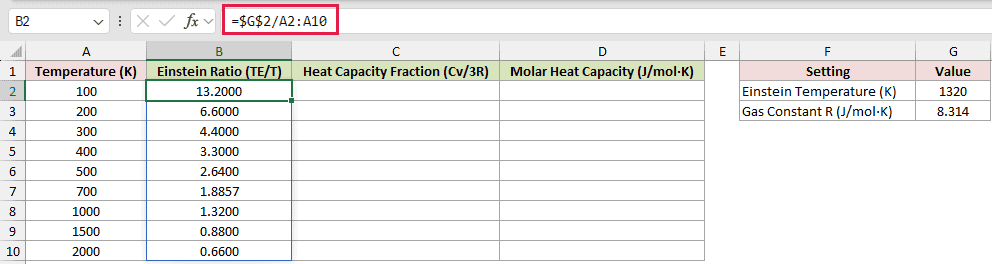
Below is the dataset. Column A holds temperatures. The card stores Einstein Temperature (K) 1320 and Gas Constant R (J/mol·K) 8.314.
Columns B through D provide the ratio and heat-capacity result scaffolding.
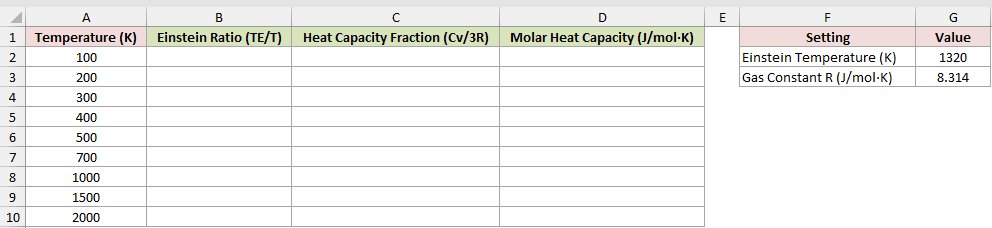
We want to estimate diamond’s molar heat capacity at each listed temperature.
First, calculate the Einstein temperature ratio:
=$G$2/A2:A10
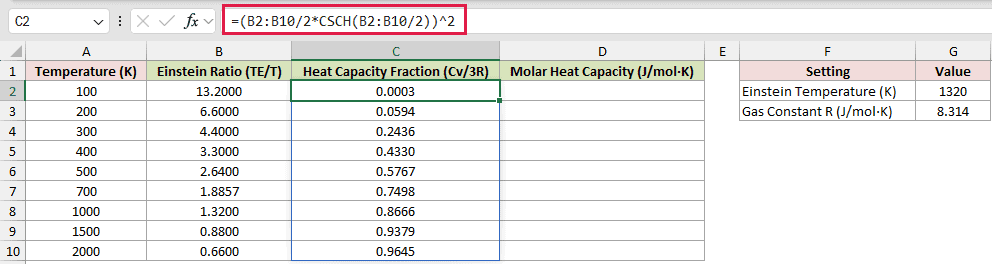
Next, turn that ratio into the fraction of the high-temperature heat-capacity limit:
=(B2:B10/2*CSCH(B2:B10/2))^2
Finally, convert the fraction into molar heat capacity:
=3*$G$3*C2:C10
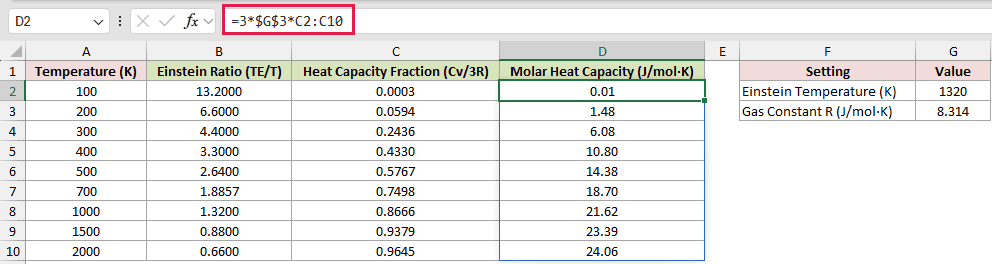
At 100 K, the Einstein ratio is 13.2000 and the heat-capacity fraction is 0.0003. At 2000 K, they are 0.6600 and 0.9645.
The last formula multiplies that fraction by three times the gas constant.
Molar heat capacity rises from 0.01 J/mol·K to 24.06 J/mol·K across the table.
The model approaches the 3R limit of 24.94 J/mol·K as temperature rises. The 1320 K Einstein temperature is a model input for diamond.
Example 3: Avoid EXP Overflow in Thermal Occupancy
Here’s a practical formula rewrite that matters when the input becomes large.
Below is the dataset. Column A lists frequencies, the card stores temperature and physical constants, and columns B through D provide result scaffolding. Column D is the EXP comparison.
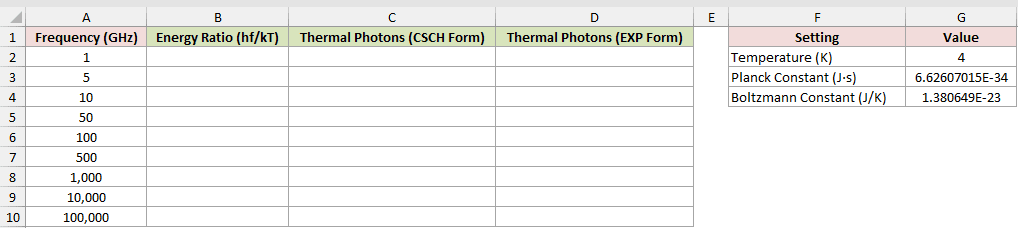
We want to calculate thermal photons per mode and compare two equivalent forms.
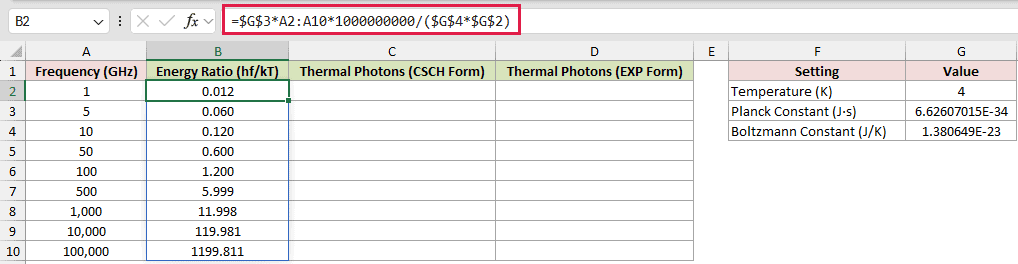
First, calculate the energy ratio. The 1000000000 factor converts the frequencies from GHz to Hz.
The result is hf/kT: Planck constant x frequency divided by Boltzmann constant x temperature, matching the Energy Ratio (hf/kT) column.
=$G$3*A2:A10*1000000000/($G$4*$G$2)
Here is the CSCH form:
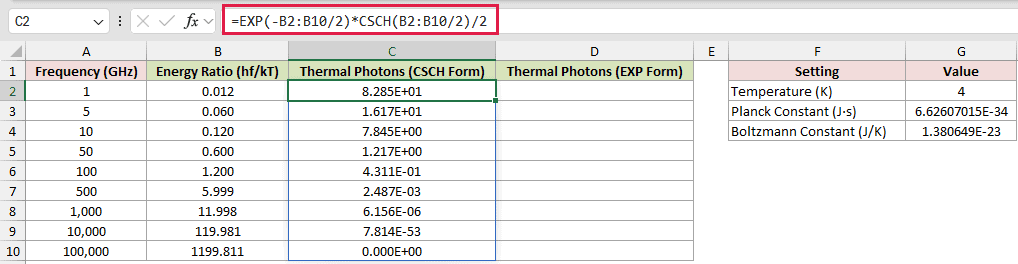
=EXP(-B2:B10/2)*CSCH(B2:B10/2)/2
For comparison, here is the classic EXP form:
=1/(EXP(B2:B10)-1)
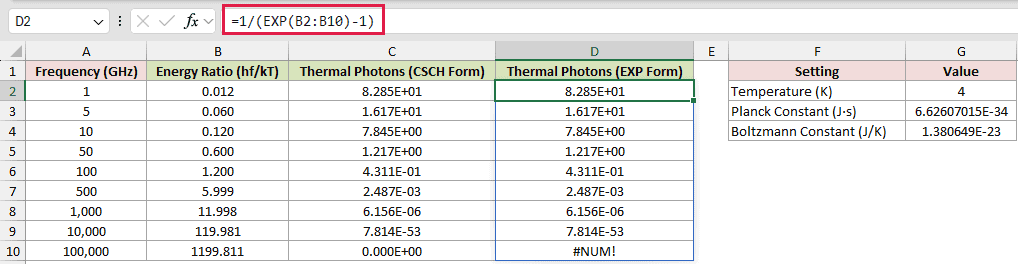
At 1 GHz, both forms return 8.285E+01. At 10,000 GHz, both return 7.814E-53.
In the 100,000 GHz row, the energy ratio is 1199.811. The CSCH form returns a valid 0.000E+00.
D10 deliberately shows #NUM! because EXP(1199.811) overflows in the comparison formula.
Example 4: Calculate a Rod Temperature Profile
Now let’s calculate the temperature between two held ends of a rod.
Below is the dataset. Column A lists distance from the hot end. The settings card holds both end temperatures, air temperature, rod length, and fin parameter.
Column B provides the result scaffolding for the rod temperature.
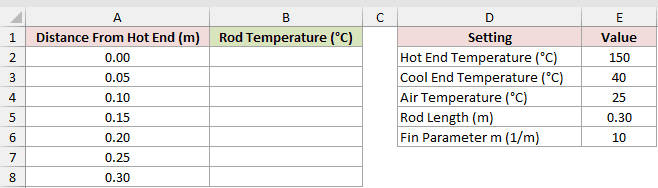
We want one spilling formula to return the temperature at every listed position.
Here is the formula:
=$E$4+(($E$2-$E$4)*SINH($E$6*($E$5-A2:A8))+($E$3-$E$4)*SINH($E$6*A2:A8))*CSCH($E$6*$E$5)
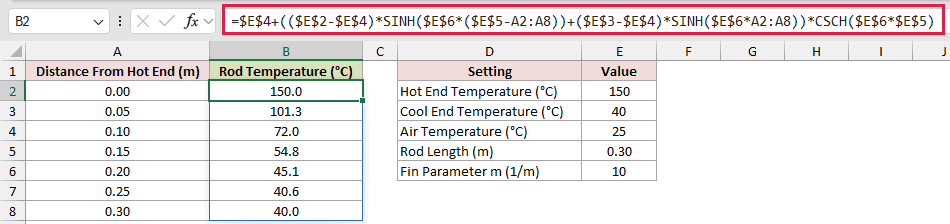
The two SINH terms describe the influence of the held ends. Multiplying their combined effect by CSCH applies the same normalization as dividing by SINH.
The rod starts at 150.0°C, drops to 72.0°C at 0.10 m, and reaches 40.0°C at 0.30 m.
The 25°C air setting pulls the middle of the profile downward, but the held cool end keeps the final value at 40.0°C.
Example 5: Compare CSCH With 1/SINH
Finally, let’s compare CSCH with its manual reciprocal across ordinary and extreme inputs.
Below is the dataset. Column A holds the inputs, column B provides the CSCH result scaffolding, and column C is the 1/SINH comparison column.
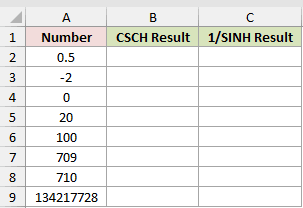
We want to see where the built-in function and the comparison agree or behave differently.
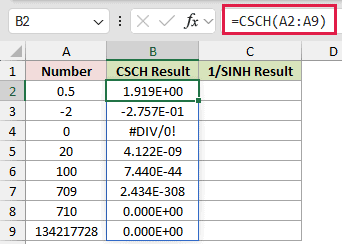
Here is the CSCH formula:
=CSCH(A2:A9)
And here is the reciprocal SINH formula for comparison:
=1/SINH(A2:A9)
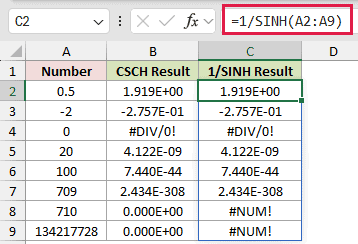
At 0.5, both return 1.919E+00. At -2, both return -2.757E-01, and at 709 both return 2.434E-308.
At zero, both columns deliberately show #DIV/0!. The hyperbolic cosecant is undefined there.
At 710 and 134217728, CSCH returns 0.000E+00. The 1/SINH comparison cells C8 and C9 return #NUM! because SINH overflows.
Those comparison errors are deliberate. They show why the built-in CSCH form is safer at very large positive inputs.
Tips & Common Mistakes
- CSCH takes a plain number, not a circular angle. Do not wrap its input in RADIANS.
- A truly blank input behaves like zero and returns #DIV/0!, while empty text returns #VALUE!.
- Numeric text such as “2” converts and returns 0.275721. TRUE acts as 1 and returns 0.850918.
- A blocked spill range returns #SPILL!. Keep the cells below and beside a spilling formula clear.
- CSCH is available in Excel 2013 and later. In earlier versions, enter
=1/SINH(A2)per row and copy it down. SINH overflows from 710, so this fallback returns#NUM!where CSCH returns 0. - IMCSCH handles complex inputs, while CSCH is for real-number calculations.
The examples show CSCH inside heat-capacity, thermal-occupancy, and rod-temperature models.
From 710 upward, CSCH still returns 0, while 1/SINH and EXP return #NUM!.
Other Excel articles you may also like:
