
Excel’s DAYS360 function returns the number of days between two dates using a 360-day year made up of twelve 30-day months.
This convention appears in some loans, leases, bonds, and other accounting calculations. It differs from counting the actual calendar days between the same dates.
In this article, I’ll show you how to calculate contract days and accrued interest, compare day-count methods, and prorate lease charges with DAYS360.
DAYS360 Function Syntax in Excel
The DAYS360 function has two required date arguments and one optional method argument.
=DAYS360(start_date,end_date,[method])
start_dateis the beginning date of the period.end_dateis the ending date of the period.methodselects the day-count convention. Omit it or useFALSEfor the U.S. method. UseTRUEfor the European method.
When to Use DAYS360 Function
- Calculate the number of 30/360 days in a loan or bond interest period.
- Accrue interest when an agreement uses a 360-day year and 30-day months.
- Compare U.S. and European 30/360 results for month-end dates.
- Prorate a monthly lease charge using a 30-day month.
Example 1: Calculate 30/360 Contract Days
Let’s start with a contract register.
Below is the dataset with contract IDs, start dates, end dates, and a column for the U.S. 30/360 day count.
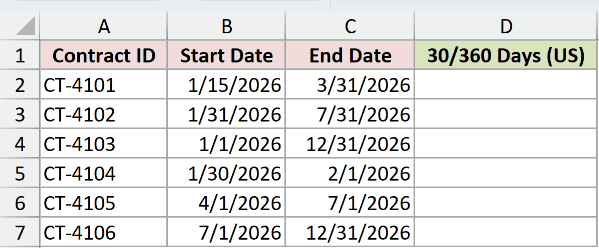
I want to calculate the 30/360 day count for all six contracts with one formula.
Here is the formula:
=DAYS360(B2:B7,C2:C7)
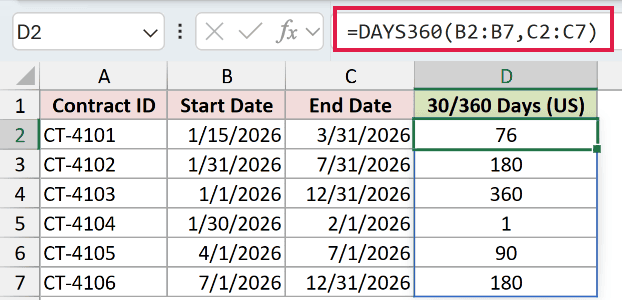
The formula pairs each start date in B2:B7 with the end date on the same row in C2:C7.
Because the optional method is omitted, DAYS360 uses the U.S. method. The first contract returns 76 days, while the full-year contract returns 360 days.
In Excel 2021, Excel 2024, and Microsoft 365, the results spill from D2 through D7. Excel 2019 and earlier require a row formula filled down.
Pro Tip: Keep the cells below D2 empty so the formula can spill. A blocked output range returns a #SPILL! error.
Example 2: Calculate 30/360 Accrued Interest
Here’s a loan accrual example.
Below is the dataset with each loan’s principal, annual rate, accrual dates, and an empty result column.
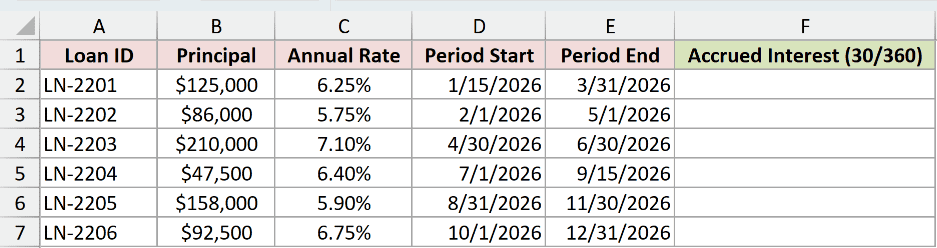
I want to calculate the simple interest accrued during each 30/360 period.
Here is the formula:
=B2:B7*C2:C7*DAYS360(D2:D7,E2:E7)/360
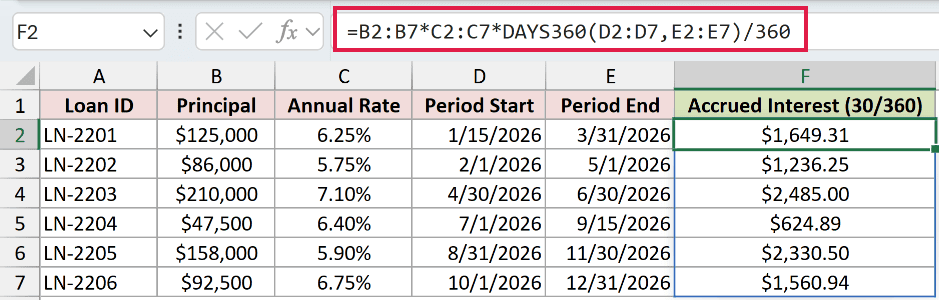
The formula multiplies each principal by its annual rate and its 30/360 day count. Dividing by 360 converts that count into a year fraction.
For loan LN-2201, DAYS360 returns 76 days. The calculation is $125,000 × 6.25% × 76 ÷ 360, which returns $1,649.31 after currency formatting.
Pro Tip: Check the loan agreement before using this formula. Some agreements use actual days, a different 30/360 convention, or another interest basis.
Example 3: Compare U.S. and European Methods
Month-end dates make the method argument easier to see.
Below are four date pairs with columns for the U.S. method, European method, and actual calendar days.

I want to compare both 30/360 conventions with the actual elapsed time.
Here is the U.S. method formula:
=DAYS360(A2:A5,B2:B5,FALSE)
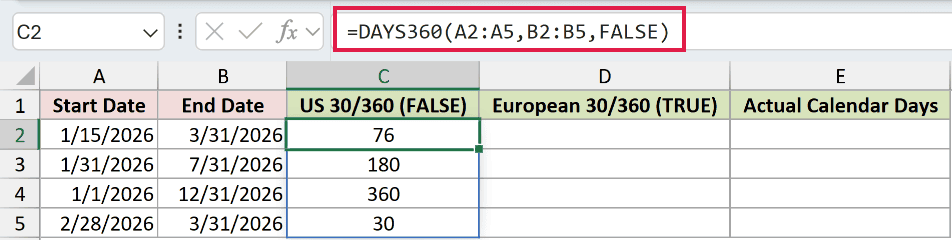
The U.S. method adjusts certain dates that fall on the last day of a month. It returns 76 days for the first date pair.
Here is the European method formula:
=DAYS360(A2:A5,B2:B5,TRUE)
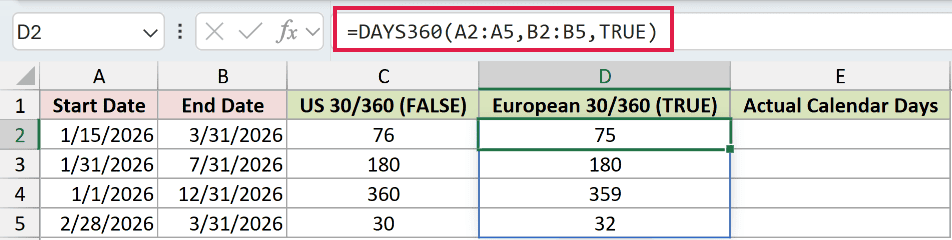
The European method changes start and end dates on the 31st to the 30th of that month. It returns 75 days for the first pair.
Here is the actual calendar-day formula:
=B2:B5-A2:A5
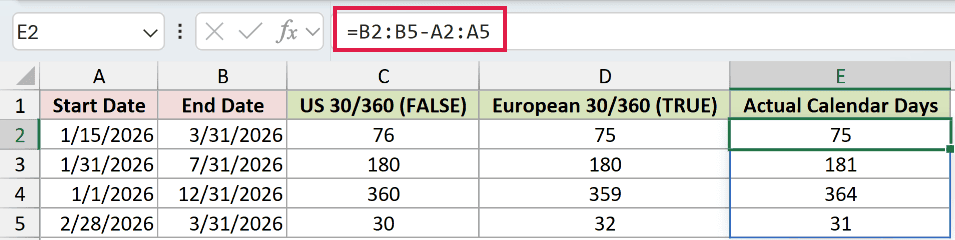
Subtracting the dates returns the actual elapsed days. The February 28 to March 31 row shows the difference clearly: U.S. 30/360 returns 30, European returns 32, and subtraction returns 31.
Pro Tip: The correct method comes from the contract or accounting policy. Do not choose between FALSE and TRUE by comparing which result looks closer to actual days.
Example 4: Prorate Monthly Lease Charges
Let’s use DAYS360 for partial-month lease charges.
Below is the dataset with monthly charges, period dates, 30/360 days, and prorated charges for five lease units.
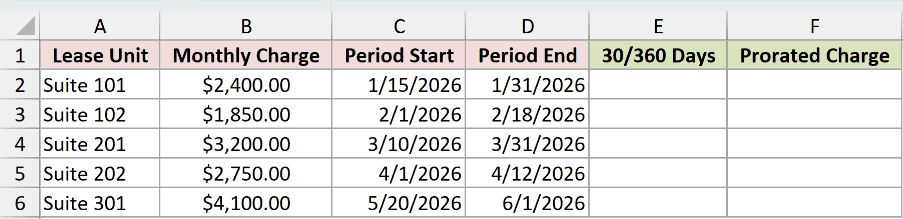
I first want to calculate the 30/360 days in each partial billing period.
Here is the day-count formula:
=DAYS360(C2:C6,D2:D6)
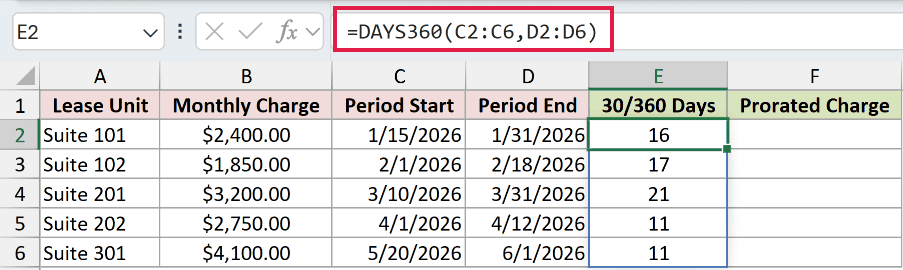
The formula returns one U.S. 30/360 count for each lease unit. Suite 101 has 16 chargeable days for January 15 through January 31.
I can now multiply each monthly charge by its 30/360 days and divide by 30.
Here is the prorated-charge formula:
=B2:B6*E2:E6/30
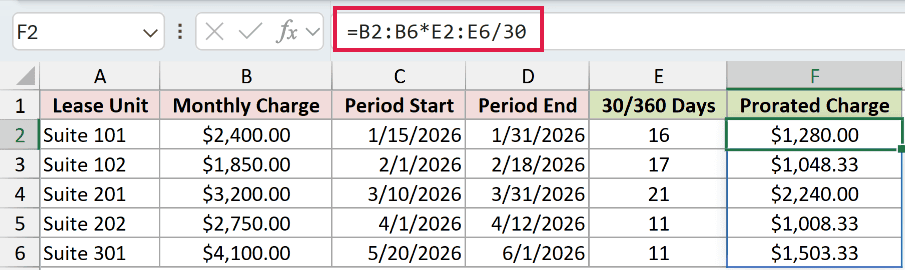
For Suite 101, the formula calculates $2,400 × 16 ÷ 30, which returns $1,280.00. The remaining charges spill down through F6.
Pro Tip: Divide by 30 only when the agreement defines a 30-day billing month. Use the billing terms stated in the lease.
Tips & Common Mistakes
- Enter real Excel dates or create them with the
DATEfunction. Dates stored as text can produce incorrect results or errors. - DAYS360 returns a negative number when
start_dateis later thanend_date. That can help you spot reversed inputs. - Omitted
methodandFALSEboth select the U.S. method.TRUEselects the European method. - Use the
DAYSfunction or subtract the dates when you need actual calendar days. UseNETWORKDAYSwhen weekends and holidays should be excluded. - For a 30/360 fraction instead of a day count,
YEARFRACwith basis0uses the U.S. method and basis4uses the European method. - Do not add
@before DAYS360 in a spilling formula. It applies implicit intersection and reduces a range calculation to one result.
I covered spilled day counts, accrued interest, method comparisons, and monthly proration with DAYS360.
I hope you found this article helpful.
Related Excel Functions / Articles:
