
The PERMUTATIONA function in Excel counts ordered arrangements when items can repeat. Use it to count possible codes without listing each one.
Moving a symbol to a different position can create a different code, so order matters. With repetition allowed, every symbol remains available for later positions.
In this article, I’ll show you how to count lock codes, compare character pools and lengths, and find the shortest promo code that meets a target.
PERMUTATIONA Function Syntax in Excel
PERMUTATIONA takes the available choices and the number of positions to fill:
=PERMUTATIONA(number, number_chosen)
- number (required): The number of different items or symbols available for each position.
- number_chosen (required): The number of positions to fill. Since repetition is allowed, this can exceed the number of available items.
For whole-number inputs, the calculation raises the pool size to the power of the position count. Every position has the same choices available.
PERMUTATIONA is available in Excel 2013 and later.
When to Use PERMUTATIONA Function
- Count possible lock codes when each wheel allows repeated symbols.
- Compare how password length and the allowed character pool affect the number of possibilities.
- Count identifiers with separate letter and digit sections.
- Count possible answer keys for a quiz with the same choices per question.
- Work out which code length provides enough possible promo codes.
Example 1: Count Possible Lock Codes
Let’s start with locks that have different wheel counts and symbol pools.
Below is the dataset. Column A names each lock, B contains symbols per wheel, and C contains wheel counts. Column D will show possible codes.
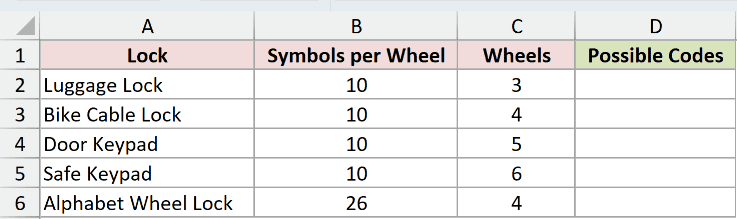
We want to count the codes for every lock, allowing the same symbol on multiple wheels.
Enter this formula in D2:
=PERMUTATIONA(B2:B6,C2:C6)
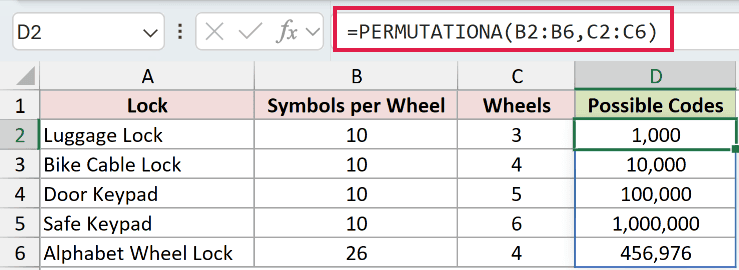
The formula pairs each pool size in B2:B6 with the wheel count on the same row in C2:C6. Its results spill into D2:D6.
The luggage lock has 10 symbols per wheel and 3 wheels, producing 1,000 possible codes. The bike cable lock’s 4 wheels produce 10,000.
The alphabet wheel lock uses 26 symbols across 4 wheels, so its result is 456,976. A repeated letter is allowed at every position.
These range formulas spill in Excel 2021, Excel 2024, and Microsoft 365. In Excel 2019 and earlier, use individual row references and copy the formula down.
Pro Tip: Leave the cells beneath D2 empty before entering the formula. Excel needs that space for the results; an occupied cell can cause #SPILL!.
Example 2: Compare Password Pools and Lengths
Now let’s compare both inputs in a grid instead of pairing them row by row.
Below is the dataset. Columns A and B describe character pools, while C1:E1 contains the password lengths 4, 6, and 8.
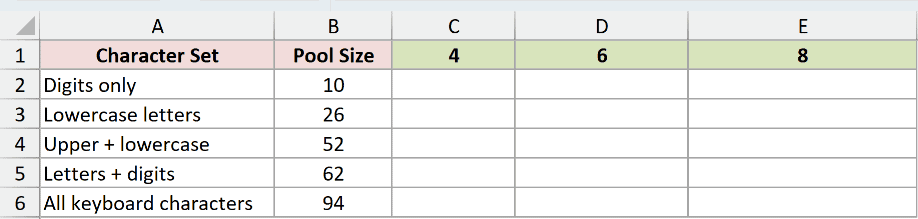
We want a count for every combination of character pool and password length.
Enter this formula in C2:
=PERMUTATIONA(B2:B6,C1:E1)
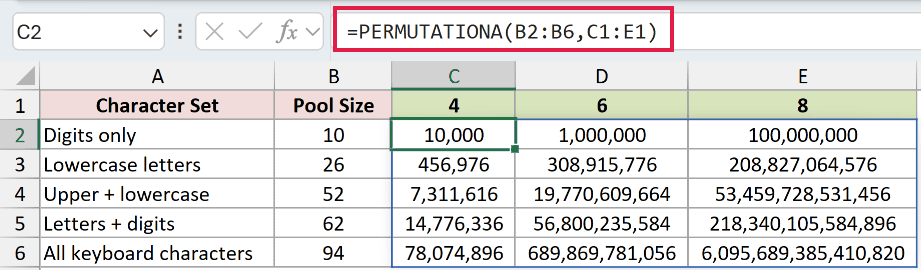
The pool sizes run down a column, while lengths run across a row. Excel combines each pool with every length and spills the answers across C2:E6.
With digits only, the counts are 10,000, 1,000,000, and 100,000,000. For lowercase letters, those same lengths return 456,976, 308,915,776, and 208,827,064,576.
Notice that 8 digits offer more possibilities than 4 characters from the 94-character pool, which returns 78,074,896.
The grid assumes every position can use every character in its pool. It doesn’t enforce rules such as requiring a digit or excluding particular sequences.
Pro Tip: Use the number format #,##0 to make large counts easier to read. Excel displays only 15 significant digits, so the longest count in this grid isn’t an exact printed integer.
Example 3: Count Plates With Mixed Character Types
A plate format needs separate counts when letter positions and digit positions have different choices.
Below is the dataset. Column A shows each plate pattern, B contains its letter count, and C contains its digit count. Column D will hold possible plates.
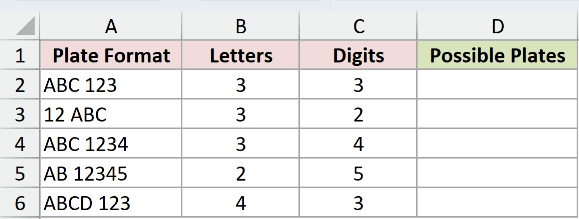
We want to count each fixed pattern with repetition allowed within both character types.
Enter this formula in D2:
=PERMUTATIONA(26,B2:B6)*PERMUTATIONA(10,C2:C6)
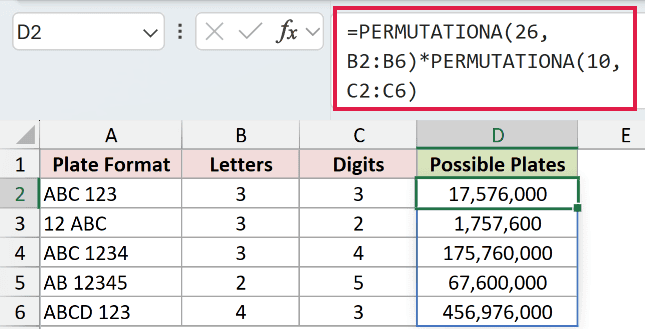
The first PERMUTATIONA counts arrangements for letter positions using 26 letters. The second counts arrangements for digit positions using 10 digits.
Multiplying the counts pairs every possible letter arrangement with every possible digit arrangement. The combined results spill into D2:D6.
The ABC 123 pattern returns 17,576,000, while ABC 1234 returns 175,760,000. The AB 12345 pattern returns 67,600,000.
These are illustrative patterns with fixed letter and digit positions. Spaces are fixed separators, and the digit section allows leading zeros.
Example 4: Count Possible Quiz Answer Keys
You can have more positions than choices because each choice remains available throughout the sequence.
Below is the dataset. Column A names each quiz, B lists answer choices per question, and C lists question counts. Column D will show possible answer keys.
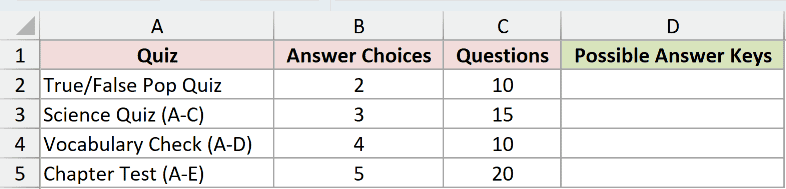
We want to count all possible answer sequences for each quiz.
Enter this formula in D2:
=PERMUTATIONA(B2:B5,C2:C5)
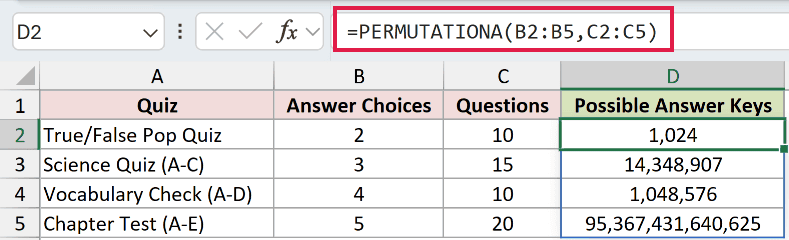
The results spill into D2:D5. The true/false quiz has 2 choices across 10 questions and returns 1,024 possible answer keys.
That works even though the question count exceeds the choice count. Choosing True for a question doesn’t prevent True from appearing again.
The science quiz returns 14,348,907, the vocabulary check returns 1,048,576, and the chapter test returns 95,367,431,640,625.
Pro Tip: To interpret these counts as guessing odds, each answer must be chosen independently and with equal probability.
Example 5: Find the Shortest Promo Code Length
Let’s reverse the question and find a code length that offers enough possibilities.
Below is the dataset. A2:A6 lists candidate lengths, D2 holds allowed characters, and F2 contains the typed target. The remaining labeled cells will hold calculations.

We want the shortest listed length that can provide at least 50,000,000 different codes.
First, LEN counts the characters in D2 to supply PERMUTATIONA’s pool size. Enter this formula in E2:
=LEN(D2)
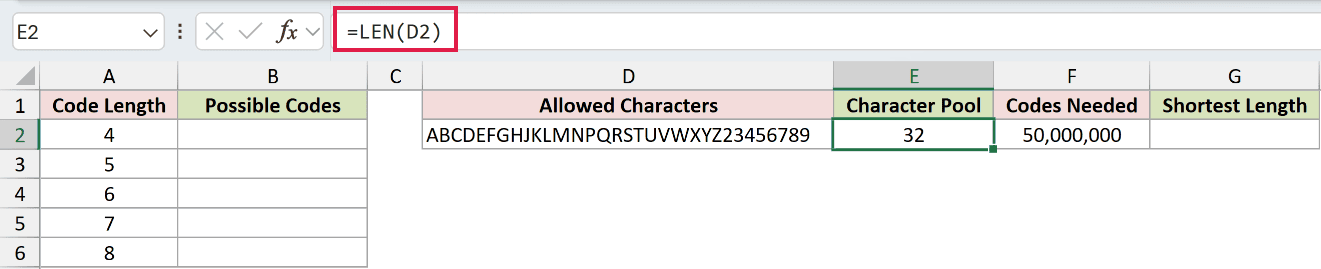
The result is 32. Keep each allowed character in D2 only once, because LEN counts characters rather than checking whether they’re unique.
Next, calculate the possibilities for each candidate length. Enter this formula in B2:
=PERMUTATIONA(E2,A2:A6)
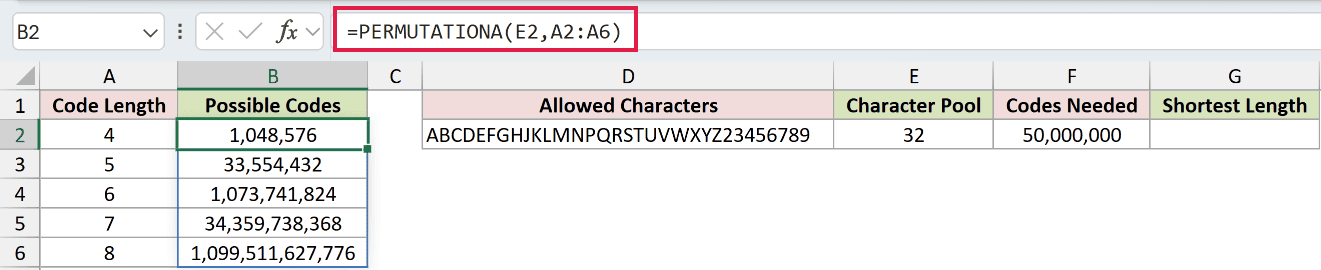
The formula uses the pool size in E2 for every length in A2:A6, spilling counts into B2:B6.
A length of 5 offers 33,554,432 codes, below the target. A length of 6 offers 1,073,741,824, which clears it.
Finally, XLOOKUP finds a sufficient count in the PERMUTATIONA results and returns its corresponding code length. Enter this formula in G2:
=XLOOKUP(F2,B2:B6,A2:A6,,1)
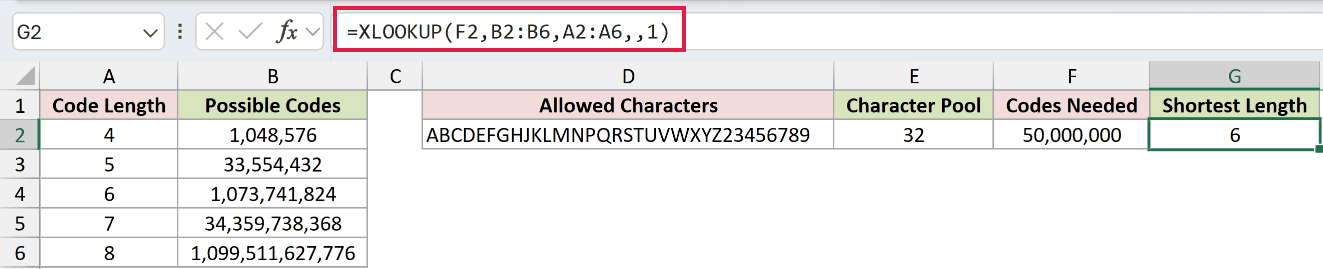
XLOOKUP searches B2:B6 for the target in F2. The final argument requests an exact match or the next larger count, then returns the length from A2:A6.
The double comma leaves the optional missing-match argument unused. The result in G2 is 6, the shortest listed length that meets the target.
This lookup step requires Excel 2021 or later. In older versions, compare the calculated counts with the target and read the corresponding length from column A.
Tips & Common Mistakes
- Enter whole-number counts. PERMUTATIONA truncates decimal arguments rather than rounding them. A fractional pool or length can therefore produce a plausible answer to a different question.
- Check blank inputs. A blank cell supplied as the position count is treated like choosing no positions. Don’t let a missing length pass unnoticed.
- Check for an empty pool. A zero pool with a positive position count returns 0, rather than the
#NUM!error Microsoft documents. Check the pool size before using the count. - Check invalid inputs before calculating. Negative pool sizes return
#NUM!, and text that cannot be interpreted as a number returns#VALUE!. Numeric text can be converted automatically. - Large counts have limits. Very large inputs or results can return
#NUM!.
You can now use PERMUTATIONA to count arrangements with repetition and compare pools and lengths in a grid.
For more specific formats, combine segment counts or look up the shortest code length that meets your target.
Related Excel Functions / Articles:
