
The COTH function in Excel returns the hyperbolic cotangent of a number. Its output is always greater than or equal to 1, or less than or equal to -1.
COTH works with plain numbers, not circular angles.
It appears in models involving saturation, thermal energy, and length-dependent correction factors.
In this article, I’ll show you how COTH behaves across a range, compare equivalent calculations, and use it in three practical scientific models.
COTH Function Syntax in Excel
The COTH function has one required argument.
=COTH(number)
- number (required) is the real number whose hyperbolic cotangent you want to calculate.
When to Use COTH Function
- Calculate hyperbolic cotangents without building the result from other hyperbolic functions.
- Model a response that rises from zero and approaches a saturation limit.
- Calculate mean oscillator energy across a range of temperatures.
- Apply a finite-length correction to cable or dendrite resistance.
- Check identities involving TANH, COSH, and SINH.
Example 1: Calculate COTH for Several Numbers
Let’s start by seeing how COTH behaves for negative, positive, small, and large inputs.
Below is the dataset. Column A contains the input numbers, and column B is ready to hold the COTH results.
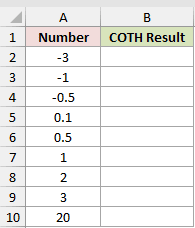
We want one formula to calculate the hyperbolic cotangent for every number in column A.
Here is the formula:
=COTH(A2:A10)
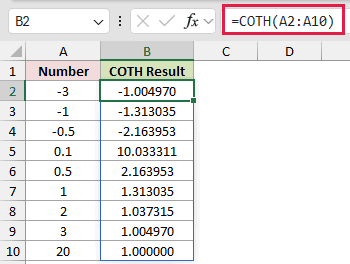
The formula spills down column B. At -3, COTH returns -1.004970, while 3 returns 1.004970, showing the function’s odd symmetry.
The COTH result gets large as the input approaches zero. An input of 0.1 returns 10.033311, while an input of 20 returns 1.000000.
Pro Tip: Range-based COTH formulas spill in Excel 2021, Excel 2024, and Microsoft 365. In Excel 2019 and earlier, enter a single-cell version and fill it down.
Example 2: Compare Equivalent COTH Calculations
Now let’s compare COTH with two mathematically equivalent calculations.
Below is the dataset. Column A holds the numbers, while columns B, C, and D are prepared for COTH and its two comparison results.
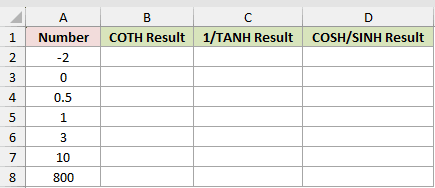
We want to check where the three methods agree and where one comparison breaks down.
Here is the direct COTH formula:
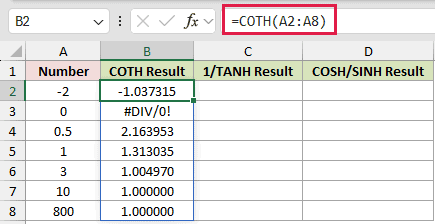
=COTH(A2:A8)
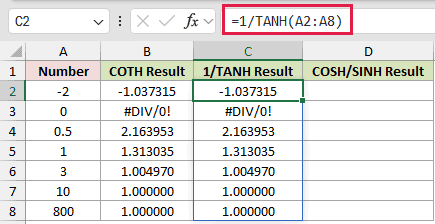
Here is the reciprocal-of-TANH comparison:
=1/TANH(A2:A8)
And here is the COSH-divided-by-SINH comparison:
=COSH(A2:A8)/SINH(A2:A8)
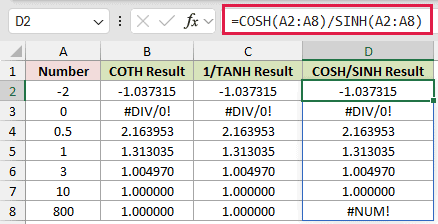
All three methods return 2.163953 for 0.5. They also return #DIV/0! for zero because the hyperbolic cotangent is undefined there.
The comparisons matter at the largest input. COTH and the reciprocal-of-TANH comparison return 1.000000, but the COSH/SINH comparison in D8 returns #NUM! because its components overflow.
COTH is therefore safer than reconstructing the result from COSH and SINH. Before Excel 2013, the reciprocal of TANH is the practical fallback.
Example 3: Model Relative Magnetization
Here’s a model where the zero input needs a meaningful physical limit.
Below is the dataset. Applied fields are in column A, while columns B and C are ready for the Langevin argument and relative magnetization.
The settings are Particle Moment (J/T) 9.274E-20 in F2, Temperature (K) 300 in F3, and Boltzmann Constant (J/K) 1.380649E-23 in F4.
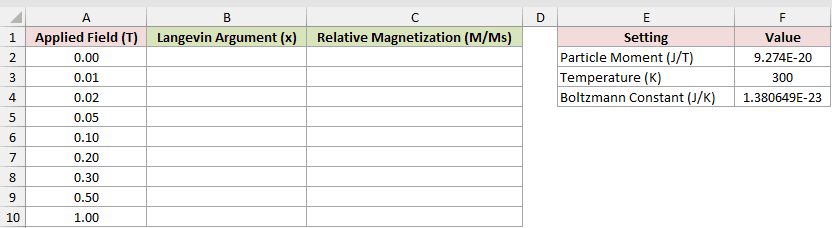
We first want to calculate the dimensionless Langevin argument for every applied field.
Here is the argument formula:
=$F$2*A2:A10/($F$4*$F$3)
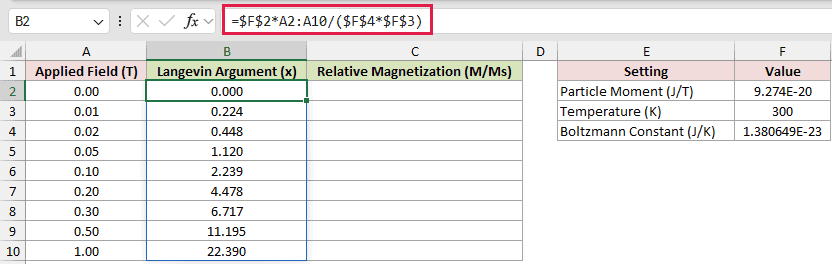
The formula multiplies the Particle Moment in F2 by the field, then divides that product by the Boltzmann Constant in F4 multiplied by the Temperature in F3.
Next, we want to turn each argument into relative magnetization.
Here is the magnetization formula:
=IF(B2:B10=0,0,COTH(B2:B10)-1/B2:B10)
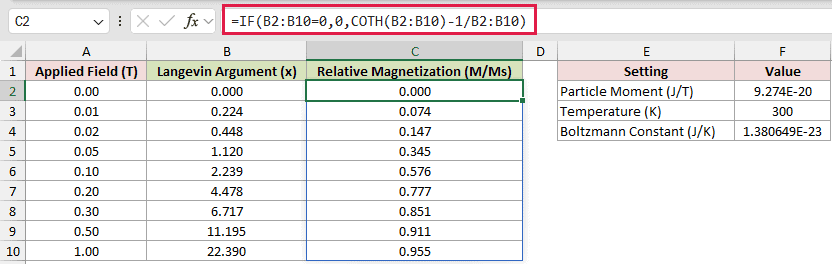
At an applied field of 0.01 T, the argument is 0.224 and relative magnetization is 0.074. At 1.00 T, relative magnetization reaches 0.955.
How this formula works:
B2:B10=0checks whether an argument is zero.- The IF returns 0 for a zero argument. This is the physical limit at zero field, not a hidden error.
- Otherwise,
COTH(B2:B10)-1/B2:B10calculates COTH of the argument minus 1 divided by the argument. This is the Langevin function. - As the field rises, M/Ms approaches 1, the full-magnetization saturation limit.
At low field, relative magnetization is close to one-third of the argument.
Example 4: Calculate Quantum Oscillator Energy
Next, let’s use COTH to connect low-temperature and high-temperature energy behavior.
Below is the dataset. Column A contains temperatures, while columns B and C await quantum and classical energy results.
The settings card contains Mode Energy (meV) 25 in F2 and Boltzmann Constant (meV/K) 0.08617 in F3.
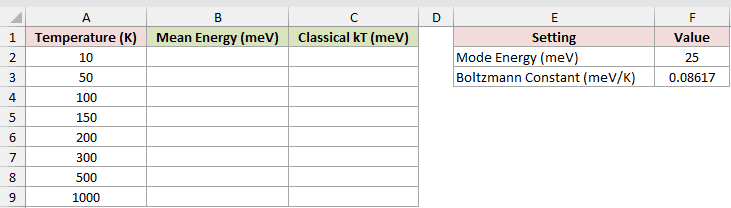
We want to calculate the oscillator’s mean energy at every temperature.
Here is the mean-energy formula:
=$F$2/2*COTH($F$2/(2*$F$3*A2:A9))
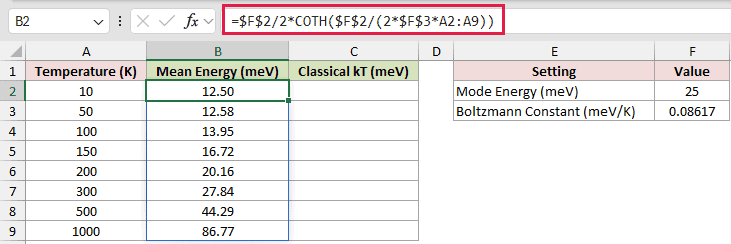
The formula takes half the mode energy in F2, then multiplies it by COTH of F2 divided by the product of 2, F3, and the temperature.
For comparison, we also want the classical energy at each temperature.
Here is the classical comparison formula:
=$F$3*A2:A9
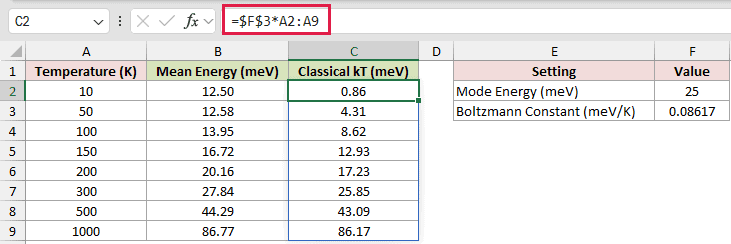
At 10 K, mean energy is 12.50 meV while classical energy is 0.86 meV.
The 12.50 meV floor is the zero-point energy, half of F2’s 25 meV.
At 1000 K, the two results are close: 86.77 meV for mean energy and 86.17 meV for classical energy.
Example 5: Correct Finite Dendrite Resistance
Finally, let’s apply COTH as a finite-length correction factor.
Below is the dataset. It lists each dendrite’s length, length constant, and infinite-cable resistance, with column E prepared for input resistance.
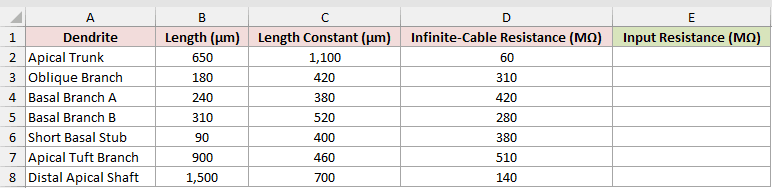
We want to calculate the input resistance after accounting for each dendrite’s finite length.
Here is the formula:
=D2:D8*COTH(B2:B8/C2:C8)
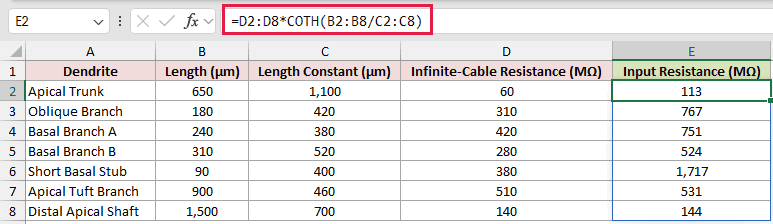
The length divided by the length constant becomes COTH’s input. COTH returns the finite-length correction factor.
The formula then multiplies the infinite-cable resistance in column D by that factor to return the input resistance.
The Short Basal Stub has an infinite-cable resistance of 380 MΩ and an input resistance of 1,717 MΩ. Its short length creates a large correction.
The Distal Apical Shaft returns 144 MΩ from an infinite-cable value of 140 MΩ. Beyond about 2 length constants, the correction moves close to 1.
Tips & Common Mistakes
- Don’t wrap COTH inputs in RADIANS. COTH takes a plain number, while COT is the circular cotangent and equals 1/TAN.
- A zero argument or truly blank cell returns
#DIV/0!. Empty text returns#VALUE!instead. - Numeric text typed directly into the formula, such as
"2", is converted. Other text, such as"abc", returns#VALUE!. A typed TRUE is also accepted. - COTH doesn’t return
#NUM!for large inputs. Large positive values return exactly 1, and large negative values return exactly -1. - ACOTH reverses COTH, but its input must be above 1 or below -1. Values from -1 to 1, including 0.5 and 1, return
#NUM!. - If a cell blocks the spill range, the formula cell shows
#SPILL!and no results appear until you clear the blocking cells.
Near zero, check whether the model has a meaningful limiting value before adding an error guard.
For large inputs, use COTH directly to avoid intermediate overflow.
Other Excel articles you may also like:
