
The COUPDAYSNC function in Excel returns the number of days from a bond’s settlement date to its next coupon date.
That makes it useful for checking how soon interest will be paid and prioritizing holdings by their next coupon.
In this article, I’ll show you how to compare 30/360 with actual days, flag coupons inside a date window, and sort by the soonest coupon.
COUPDAYSNC Function Syntax in Excel
The function needs the bond’s settlement terms and coupon schedule.
=COUPDAYSNC(settlement, maturity, frequency, [basis])
- settlement (required) is the date when the bond is settled.
- maturity (required) is the date when the bond matures.
- frequency (required) is 1 for annual, 2 for semiannual, or 4 for quarterly coupon payments.
- basis (optional) sets the day-count convention. When omitted, Excel uses 0 for US 30/360. Use 1 for actual/actual, 2 for actual/360, 3 for actual/365, or 4 for European 30/360.
When to Use COUPDAYSNC Function
- Find how many days remain before a bond’s next coupon payment.
- Compare upcoming coupon dates across a portfolio.
- Flag bonds whose next coupon falls inside a monitoring window.
- Sort a watch list by the soonest coupon payment.
- Calculate the share of the current coupon period still remaining.
Example 1: Find Days Until the Next Coupon
Let’s start with one bond and a straightforward day count.
Below is a parameter card with settlement, maturity, frequency, and basis inputs, plus a labeled cell where the days to next coupon will appear.
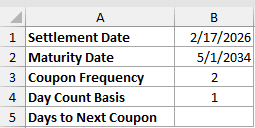
We want to find how many days remain after settlement before the next coupon.
Here is the formula:
=COUPDAYSNC(B1,B2,B3,B4)
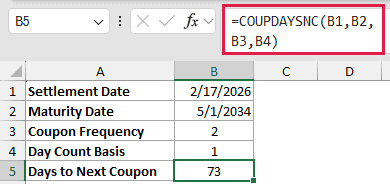
The formula reads the four inputs from B1:B4. Excel returns 73 in B5 for this semiannual bond using actual calendar days.
COUPDAYSNC is available in every current version of Excel.
Example 2: Calculate Days Across a Bond Portfolio
Here’s the same calculation across several holdings.
Below is a table of seven fictional bonds with maturity, frequency, and basis columns. H2 stores the settlement date, and column E is ready for the day counts.
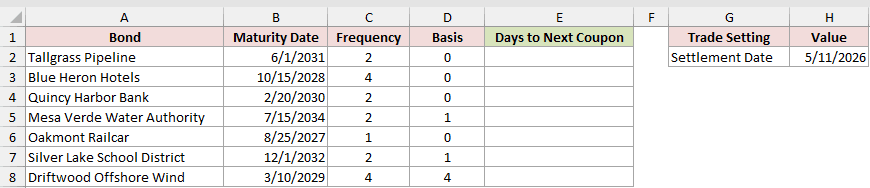
We want each row to use the shared settlement date and that bond’s own coupon settings.
Enter this formula in E2:
=COUPDAYSNC($H$2,B2,C2,D2)
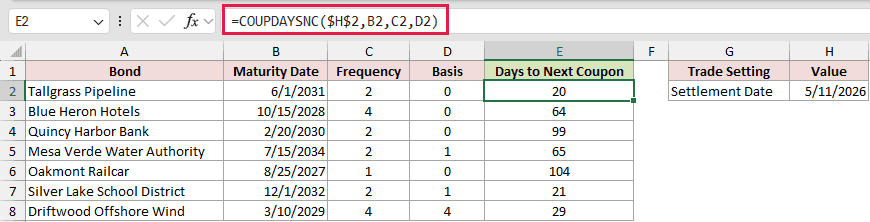
Copy the formula down through E8. The locked reference $H$2 keeps the settlement date fixed while the other references move with each row.
Excel returns 20 for Tallgrass Pipeline and 104 for Oakmont Railcar. Tallgrass is semiannual, while Oakmont is annual, and their maturity dates place the next coupons on different dates.
A plain range in a COUPDAYSNC argument returns one #VALUE! instead of spilling, so copied-down formulas are the default approach.
Example 3: Compare 30/360 and Actual Days
Day-count basis can change the answer even when every date stays the same.
Below is a set of settlement dates for one semiannual bond, with maturity and frequency inputs. Columns B and C will hold two valid convention results.
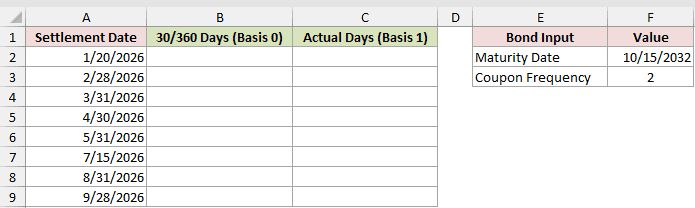
We want to compare the US 30/360 count with the actual calendar-day count.
First, enter the US 30/360 formula in B2:
=COUPDAYSNC(A2,$F$2,$F$3,0)
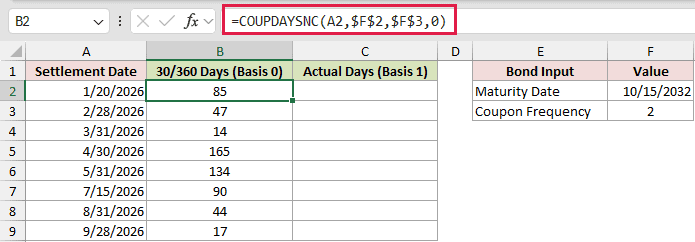
Here is the actual/actual comparison in C2:
=COUPDAYSNC(A2,$F$2,$F$3,1)
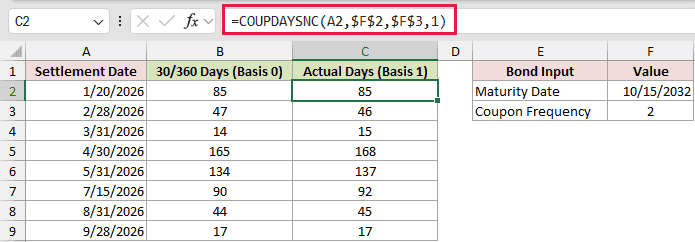
Copy both formulas down their columns. The two conventions agree at 85 days for the first settlement date.
For the 5/31/2026 settlement, basis 0 returns 134 and basis 1 returns 137. Neither is wrong because each follows a valid convention.
US 30/360 treats months as having 30 days. Actual/actual counts the calendar days between settlement and the next coupon.
Example 4: Flag Coupons Inside a Date Window
Now let’s turn the day count into a simple monitoring flag.
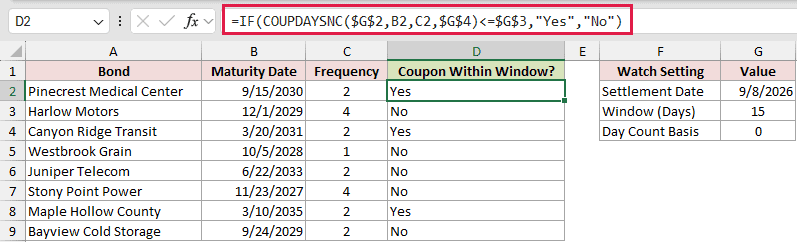
Below is a bond list with maturity and frequency inputs, plus a settlement date, window, basis, and an empty result column for the flags.
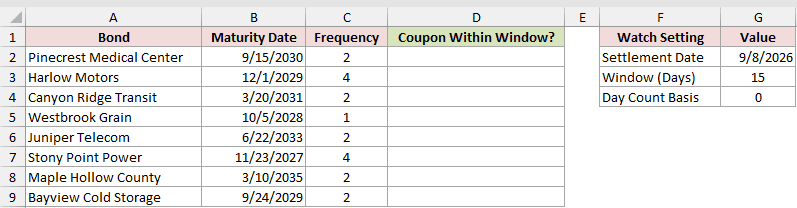
We want column D to show whether each coupon falls inside the 15-day window.
Enter this formula in D2:
=IF(COUPDAYSNC($G$2,B2,C2,$G$4)<=$G$3,"Yes","No")
Copy the formula down column D.
- COUPDAYSNC calculates the remaining days for each bond.
- The
<=test compares that count with the window in G3. - IF returns Yes when the coupon is inside the window and No when it is outside.
Pinecrest Medical Center, Canyon Ridge Transit, and Maple Hollow County return Yes. Bayview Cold Storage returns No because its coupon falls outside the window.
Example 5: Sort Bonds by the Soonest Coupon
Here’s a one-formula watch list that puts the nearest coupon first.
Below is a watch list with bond names, maturity dates, settlement, frequency, and basis inputs. Columns G and H are reserved for the sorted spill.
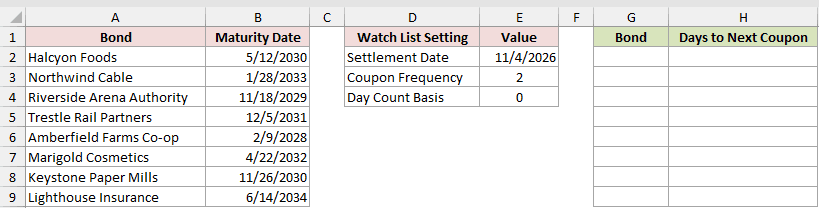
We want to return each bond and its remaining days, ordered from the smallest count upward.
Here is the formula:
=SORT(HSTACK(A2:A9,COUPDAYSNC($E$2,B2:B9+0,$E$3,$E$4)),2)
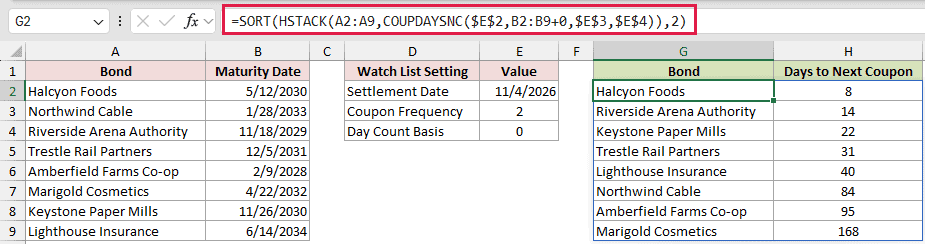
HSTACK joins each bond name to its day count. SORT then orders the combined array by its second column.
The +0 converts B2:B9 into a computed array. Without that coercion, the plain maturity range returns one #VALUE! instead of the day counts.
Halcyon Foods appears first with 8 days. Marigold Cosmetics appears last with 168 days.
Pro Tip: A range formula that spills needs Excel 2021, Excel 2024, or Microsoft 365. In Excel 2019 and earlier, copy the per-row formula down. This exact HSTACK version requires Microsoft 365 or Excel 2024. In earlier versions, calculate the days in a helper column and sort the table.
Example 6: Handle Settlement on a Coupon Date
The count behaves differently when settlement reaches a coupon date.
Below are settlement dates around one coupon, plus the bond’s maturity, frequency, and basis. Columns B and C will hold day counts and coupon dates.
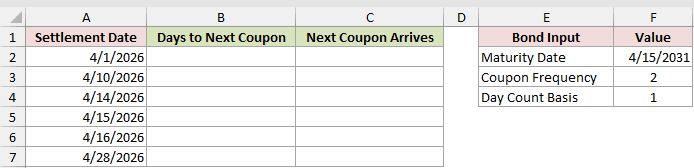
We want to see the countdown before the coupon and what happens on the coupon date itself.
Enter this formula in B2:
=COUPDAYSNC(A2,$F$2,$F$3,$F$4)
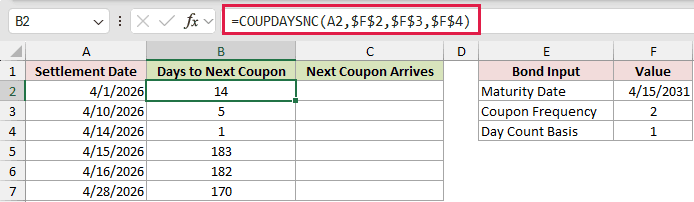
Copy it down column B. The count falls from 14 to 1 as settlement approaches 4/15/2026.
On 4/15/2026, the result jumps to 183 because Excel moves to the following coupon. COUPDAYSNC never returns 0 before maturity.
To reveal the coupon date represented by each count, add the settlement date to the result:
=A2+B2
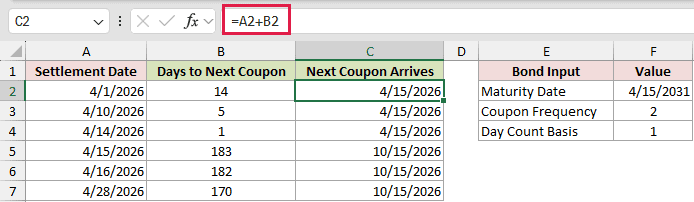
Copy this formula down column C. The first three rows return 4/15/2026, while the coupon-date row returns 10/15/2026.
This addition is a valid cross-check under basis 1, 2, or 3 because those conventions count actual days.
Example 7: Calculate the Coupon Period Fraction
Finally, let’s express the remaining days as a share of the full coupon period.
Below is a bond parameter card with settlement, maturity, frequency, and basis inputs. Three labeled result cells will hold the remaining days, period length, and fraction.
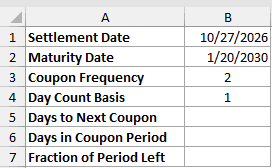
We want to divide the days still ahead by the total days in the current coupon period.
First, calculate the days to the next coupon:
=COUPDAYSNC(B1,B2,B3,B4)
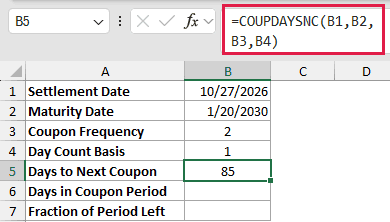
Excel returns 85 in B5.
Next, calculate the length of the full coupon period:
=COUPDAYS(B1,B2,B3,B4)
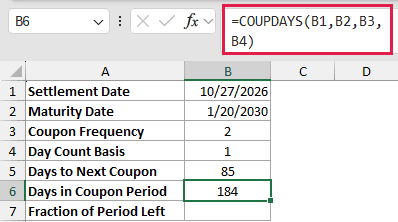
COUPDAYS returns 184 in B6.
Finally, divide the remaining days by the full period:
=B5/B6
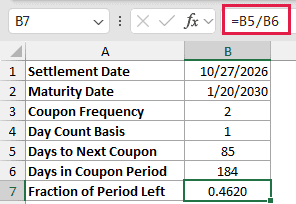
The result is 0.4620. It is the share of the coupon period still to run, sometimes described as the DSC/E fraction in bond pricing.
Tips & Common Mistakes
- Frequency must be 1, 2, or 4. A monthly value of 12 returns #NUM!.
- Basis defaults to 0 when omitted or supplied through a blank cell. Values outside 0 through 4 return #NUM!.
- Settlement on or after maturity returns #NUM!. Text that is not a date returns #VALUE!.
- A plain range in any COUPDAYSNC argument returns one #VALUE!. For the spill route shown above, add
+0to every range argument, or use MAP in Microsoft 365 or Excel 2024. - Frequency and basis are truncated. Frequency 2.9 behaves like 2, while basis 1.9 behaves like 1.
- Don’t assume COUPDAYBS plus COUPDAYSNC always equals COUPDAYS. End-of-month bonds can break that relationship under actual/actual.
- Subtracting one date from another, such as COUPNCD minus settlement, may display the result as a date. Apply General or Number. That difference counts actual days, so it matches COUPDAYSNC only under basis 1, 2, or 3.
- Use the TODAY function as the settlement input when you want a watch list that updates as Excel recalculates.
Choose the day-count basis that matches the bond’s convention before relying on the result.
With that basis set, COUPDAYSNC gives a dependable countdown to the next coupon.
Related Excel Functions / Articles:
