
Excel’s COUPDAYS function returns the number of days in the coupon period containing a bond’s settlement date.
It measures the entire coupon period, not the days already accrued or the days remaining before the next payment. The selected day count basis controls the result.
In this article, I’ll show you how day count bases and payment frequencies change coupon-period lengths, then use COUPDAYS in an accrued-interest calculation.
COUPDAYS Function Syntax in Excel
The COUPDAYS function uses settlement and maturity dates, payment frequency, and an optional day count basis.
=COUPDAYS(settlement, maturity, frequency, [basis])
- settlement (required) is the bond’s settlement date.
- maturity (required) is the bond’s maturity date.
- frequency (required) is the number of coupon payments per year: 1 for annual, 2 for semiannual, or 4 for quarterly.
- basis (optional) selects the day count convention: 0 for US (NASD) 30/360, 1 for actual/actual, 2 for actual/360, 3 for actual/365, or 4 for European 30/360.
When to Use COUPDAYS Function
- Find the length of the coupon period containing a bond’s settlement date.
- Compare how day count conventions change the period length.
- Check period lengths for annual, semiannual, and quarterly bonds.
- Supply the coupon-period denominator in an accrued-interest calculation.
- Review period changes caused by short months and leap years.
Example 1: Find a Coupon Period’s Length
Let’s start with one bond and an actual/actual day count basis.
Below is an input card with settlement, maturity, coupon frequency, and basis, plus a labelled cell that will hold the coupon-period length.
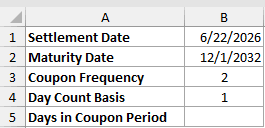
We want to find the length of the coupon period containing the settlement date.
Here is the formula:
=COUPDAYS(B1,B2,B3,B4)
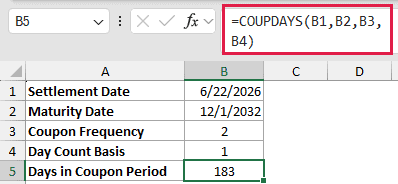
B1 and B2 hold the dates, while B3 selects semiannual payments and B4 selects actual/actual. Excel returns 183 days.
That result covers the whole coupon period containing the settlement date. It is not the number of days from settlement to the next coupon.
Example 2: Compare All Day Count Bases
Now let’s see how the basis argument changes the result for the same bond.
Below is a table of basis codes and conventions beside the bond inputs. Column C will hold the period length for each basis.
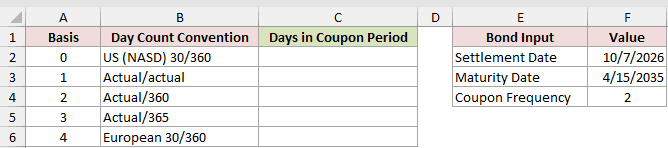
We want to calculate the coupon-period length under every supported day count basis.
Enter this formula in C2 and copy it down through C6:
=COUPDAYS($F$2,$F$3,$F$4,A2)
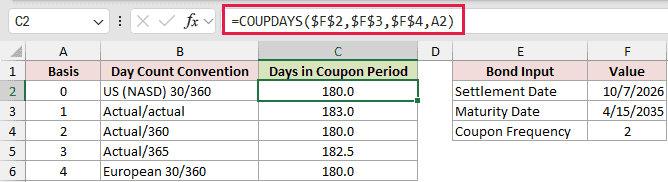
The locked references keep the bond inputs fixed, while A2 changes with each copied row.
Basis 0, basis 2, and basis 4 each return 180.0. Actual/actual returns 183.0, while actual/365 returns 182.5.
The decimal matters. A whole-number format would display the actual/365 result as 183 and hide the half day.
Pro Tip: If you omit the basis argument, COUPDAYS uses basis 0, the US (NASD) 30/360 convention.
Example 3: Compare Coupon Payment Frequencies
Here’s how payment frequency changes the length of a coupon period.
Below is a frequency table beside the bond dates. Columns C and D will compare 30/360 with actual/actual for each payment schedule.

We want to calculate both day count conventions for annual, semiannual, and quarterly payments.
Enter this formula in C2 and copy it down through C4:
=COUPDAYS($G$2,$G$3,B2,0)

For the actual/actual comparison, enter this formula in D2 and copy it down through D4:
=COUPDAYS($G$2,$G$3,B2,1)

Under 30/360, the annual, semiannual, and quarterly rows return 360, 180, and 90.
Actual/actual counts the real coupon dates. The same rows return 365, 184, and 92.
Both columns show valid day count conventions, and the YIELD function uses the same frequency and basis arguments.
Use the basis specified for the security you are analyzing.
Example 4: Track Actual Coupon Period Lengths
Actual/actual periods can change length as the calendar changes.
Below is a list of trade dates beside a fixed maturity, frequency, and basis. Column B will show the containing period’s length for each trade.
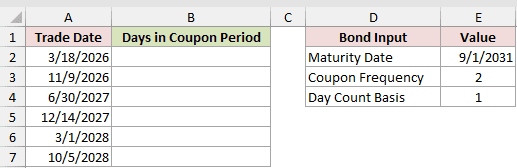
We want to compare coupon-period lengths across short months and a leap year.
Enter this formula in B2 and copy it down through B7:
=COUPDAYS(A2,$E$2,$E$3,$E$4)
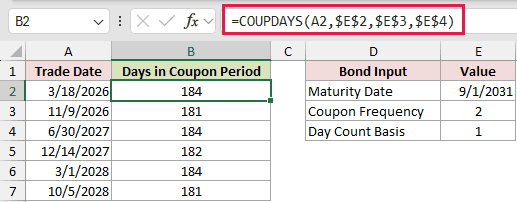
The results are 184, 181, 184, 182, 184, and 181 days. Actual/actual follows the bond’s real coupon dates.
The periods running through February return 181 days in B3 and B7.
The 12/14/2027 trade returns 182 days in B5 because its period includes February 29, 2028.
The 3/1/2028 trade settles on a coupon date and returns 184. Excel treats that date as the start of the new coupon period.
Pro Tip: A maturity on the last day of a month creates an edge case under basis 1. With 8/31/2030 maturity and 3/10/2026 settlement, COUPDAYS returned 181 for a real 184-day period.
Example 5: Calculate Accrued Bond Interest
COUPDAYS becomes especially useful when a report needs accrued interest for several holdings.
Below is a holdings table with maturity, rate, and face amount, plus report settings. Columns E and F will hold period days and accrued interest.

We want to calculate each full coupon period before using it as the accrued-interest denominator.
Enter this formula in E2 and copy it down through E7:
=COUPDAYS($I$2,B2,$I$3,$I$4)

The formula returns the full coupon-period length for each holding. Tidewater Grain Co. returns 181 days, while Redstone Medical Group returns 184.
Now enter the accrued-interest formula in F2 and copy it down through F7:
=D2*C2/$I$3*COUPDAYBS($I$2,B2,$I$3,$I$4)/E2

D2 multiplied by C2 and divided by frequency gives the coupon payment. COUPDAYBS returns the days since the previous coupon date, while E2 remains the full-period denominator.
The accrued interest is $792.47 for Tidewater Grain Co. and $32.38 for Blue Heron Hospitality.
When using the PRICE function, add accrued interest to its clean-price result to get the dirty price.
Example 6: Spill COUPDAYS Across Trades
A plain range does not work directly inside COUPDAYS, but a coerced array can spill.
Below is a trade list with settlement and maturity dates, plus shared frequency and basis settings. Column D will hold the period length for every bond.
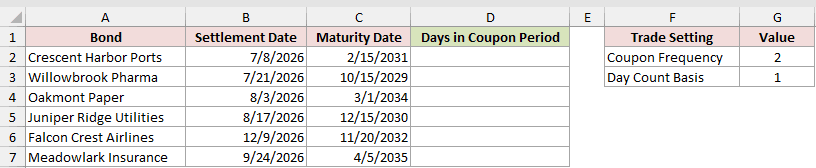
We want one formula to calculate all six coupon-period lengths.
Here is the formula:
=COUPDAYS(B2:B7+0,C2:C7+0,G2,G3)
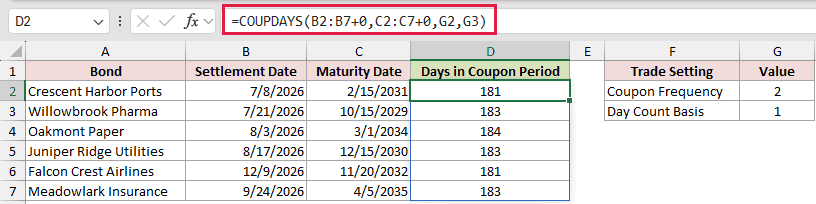
The +0 operation converts both date ranges into computed arrays. COUPDAYS then spills 181, 183, 184, 183, 181, and 183 down column D.
This spilling form works in Excel 2021, Excel 2024, and Microsoft 365. In Excel 2019 and earlier, use a per-row formula and copy it down.
Pro Tip: Coerce every ranged argument. Coercing only one date range returns #VALUE! in every output cell, while an uncoerced plain range returns one #VALUE!.
Tips & Common Mistakes
- Frequency must be 1, 2, or 4. Using 12 for monthly payments returns #NUM!.
- Settlement must be earlier than maturity. A settlement date on or after maturity returns #NUM!.
- Text that Excel recognizes as a date can work, but invalid date text returns #VALUE!.
- COUPDAYS truncates a settlement time and uses the date portion.
- COUPDAYBS plus COUPDAYSNC can equal COUPDAYS for ordinary bonds, but this is not guaranteed around end-of-month and February boundaries.
- COUPDAYS measures a coupon period. YEARFRAC measures the span between two dates, so it is not a direct substitute.
- The function is available in every current Excel version. It originated as an Analysis ToolPak function before Excel 2007.
COUPDAYS is most useful when you need the full coupon period rather than a simple difference between two dates.
Choose the day count basis deliberately, and keep the period length as the denominator when you calculate accrued interest.
Other Excel articles you may also like:
