
The ISEVEN function in Excel checks a number and returns TRUE when it is even or FALSE when it is odd.
It can test IDs, assign alternating groups, and supply a Boolean condition to other functions. Excel truncates decimals before testing their parity.
In this article, I’ll show you how to identify even numbers, assign routes, and filter or count even-numbered records.
ISEVEN Function Syntax in Excel
The ISEVEN function needs one argument:
=ISEVEN(number)
numberis the value, cell reference, or numeric range you want to test. Excel truncates nonintegers before checking whether they are even.
When to Use ISEVEN Function
- Flag even-numbered IDs, shipments, or records.
- Assign records to alternating groups or routes.
- Return only rows whose numeric identifier is even.
- Count even values in a list.
Example 1: Check Even Numbers in a List
A spilled formula can test a complete numeric list at once.
Below are eight shipment numbers and an empty Even? result column.
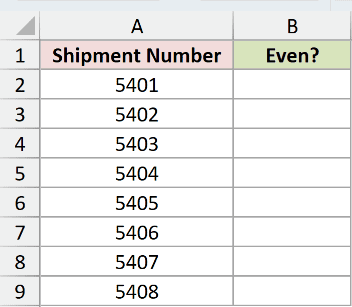
I want Excel to identify every even-numbered shipment.
Here is the formula:
=ISEVEN(+A2:A9)
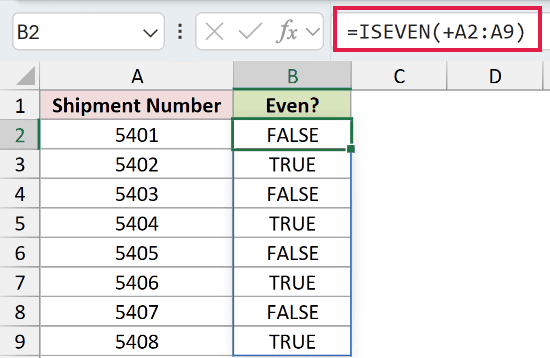
The unary plus passes A2:A9 to ISEVEN as numeric values. ISEVEN returns TRUE for shipments 5402, 5404, 5406, and 5408.
The formula spills eight results in Excel 2021, Excel 2024, Microsoft 365, and Excel for the web.
Pro Tip: Keep the unary plus in range formulas. In this workbook, =ISEVEN(A2:A9) returns #VALUE!, while =ISEVEN(+A2:A9) spills correctly.
Example 2: Assign Routes With ISEVEN
ISEVEN can turn a number pattern into an operational label.
Below are receiving slips, suppliers, and an empty Receiving Route column.
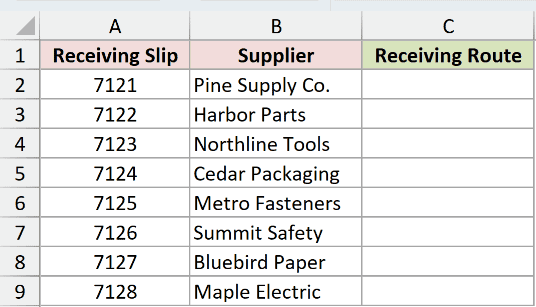
I want even-numbered slips sent east and odd-numbered slips sent west.
Here is the formula:
=IF(ISEVEN(+A2:A9),"Route East","Route West")
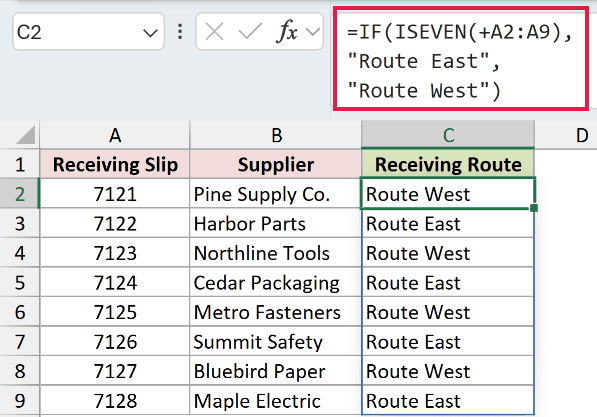
ISEVEN creates the TRUE and FALSE tests. The IF function returns Route East for TRUE and Route West for FALSE.
Slip 7121 goes west, while 7122 goes east. The remaining rows follow the same alternating pattern.
Pro Tip: A MOD comparison can produce the same test, but ISEVEN states the intent more clearly when you only need TRUE or FALSE.
Example 3: Filter Even-Numbered Records
An ISEVEN result can act as the include condition for FILTER.
Below is a storage list and an empty output area with matching headers on the right.
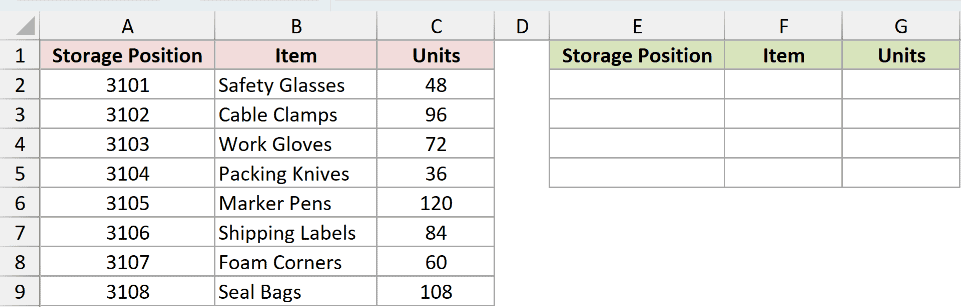
I want a separate list containing only the even-numbered storage positions.
Here is the formula:
=FILTER(A2:C9,ISEVEN(+A2:A9))
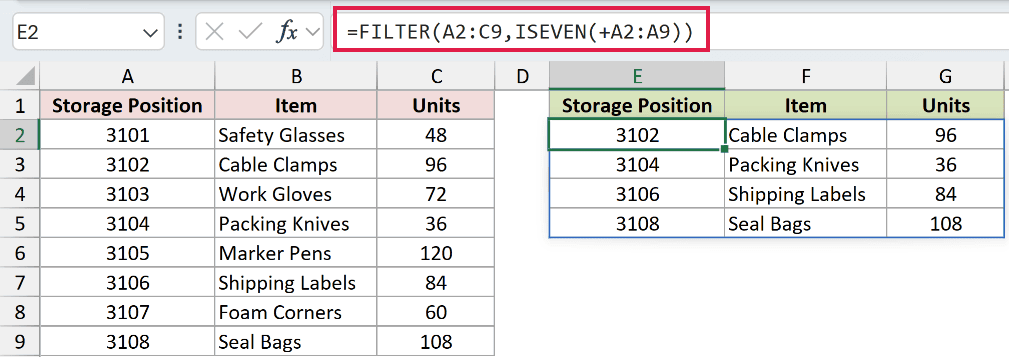
ISEVEN returns TRUE for positions 3102, 3104, 3106, and 3108. The FILTER function returns those complete rows.
The item names and unit counts stay aligned with their storage positions.
Pro Tip: FILTER is available in Excel 2021, Excel 2024, Microsoft 365, and Excel for the web. Older versions can filter an ISEVEN helper column.
Example 4: Count Even Values With ISEVEN
You can reduce a list of TRUE and FALSE results to one count.
Below are 11 inspection IDs with an empty count card beneath the list.
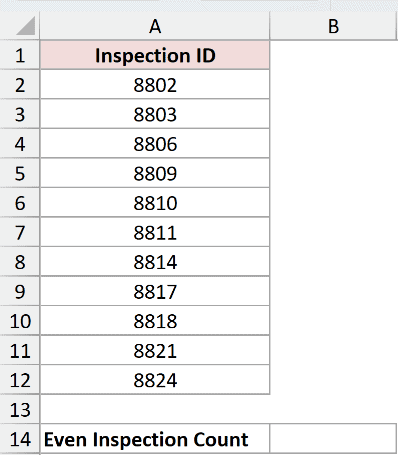
I want to count the inspections with even IDs.
Here is the formula:
=SUMPRODUCT(--ISEVEN(+A2:A12))
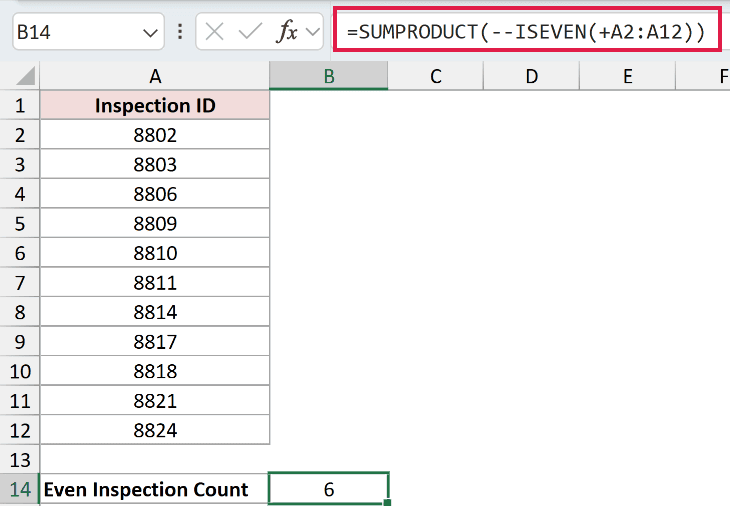
ISEVEN returns TRUE for six inspection IDs. The double unary changes TRUE to 1 and FALSE to 0.
SUMPRODUCT adds those values and returns 6 in cell B14.
Example 5: Test Decimals, Negatives, and Text
The input type changes what ISEVEN returns.
Below are negative decimals, zero, a positive decimal, and text, with an empty result column.
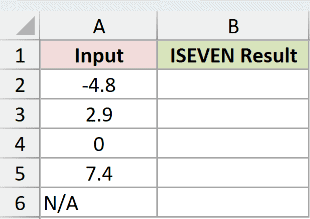
I want to check each input after applying ISEVEN’s normal rules.
Here is the formula:
=ISEVEN(+A2:A6)
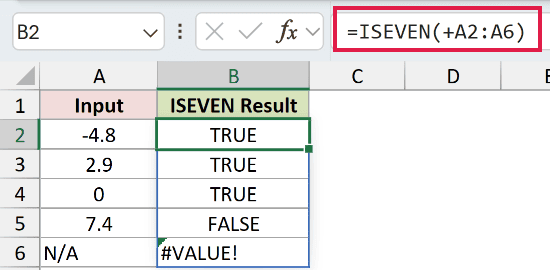
Excel truncates -4.8 to -4 and 2.9 to 2, so both return TRUE. Zero also returns TRUE because it is even.
The value 7.4 is tested as 7 and returns FALSE. The text value N/A returns #VALUE!.
Pro Tip: ISEVEN truncates decimals rather than rounding them. A value of 7.9 is tested as 7, not 8.
Tips & Common Mistakes
- Keep the unary plus when a modern range formula needs to spill ISEVEN results.
- Excel 2019 and earlier need
=ISEVEN(A2)copied down instead of a spilling range formula. - Nonnumeric input returns
#VALUE!. Clean or validate mixed data before testing it. - Use MOD when you need the remainder itself rather than a TRUE or FALSE test.
- The rule
=ISEVEN(ROW())can highlight every other row with conditional formatting.
I covered direct tests, routing labels, filtered records, counts, and the decimal and text behaviors that often cause confusion.
I hope you found this article helpful.
Related Excel Functions / Articles:
Other Excel articles you may also like:
