
The TBILLYIELD function in Excel returns the annual yield of a Treasury bill from its purchase price, settlement date, and maturity date.
A bill bought below face value earns its return through the difference between what you pay and what you receive at maturity.
TBILLYIELD measures the holding-period return against the purchase price and converts it to an annual yield using a 360-day year.
I’ll show you how to compare bill yields, convert a dollar purchase into the required price, and check the calculation’s day-count convention.
TBILLYIELD Function Syntax in Excel
TBILLYIELD requires the following arguments:
=TBILLYIELD(settlement, maturity, pr)
- settlement (required): The date you settle the purchase of the Treasury bill.
- maturity (required): The date the bill repays its face value. It must follow settlement and be no more than one calendar year later.
- pr (required): The purchase price per $100 of face value. Enter the quoted price, not the total dollars paid or a discount rate.
Format the result as a percentage. TBILLYIELD has no argument for changing its day-count basis.
When to Use TBILLYIELD Function
- Calculate a Treasury bill’s annual yield from a quoted purchase price.
- Compare bills with different prices and maturity dates on the same yield basis.
- Calculate yield from the total amount paid after converting it to a price per $100.
- See how changing a bid price changes the yield for the same bill.
Example 1: Calculate Yield From a Bill Price
Let’s start with a single purchase and its quoted price.
Below is the dataset. B1:B3 contain the settlement date, maturity date, and price per $100 face value. The labeled B4 cell will hold the yield.
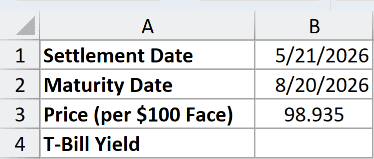
We want the annual yield for the bill purchased at 98.935 and held until maturity.
Enter this formula in B4:
=TBILLYIELD(B1,B2,B3)
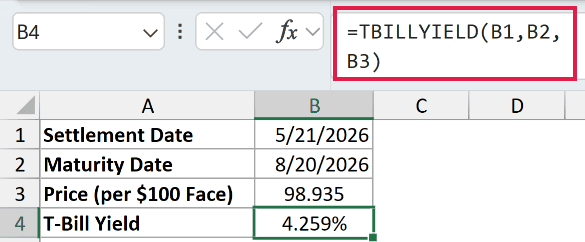
The result is 4.259% for settlement on 5/21/2026 and maturity on 8/20/2026.
The price means you pay 98.935 for each $100 repaid at maturity. TBILLYIELD converts the gain relative to that purchase price into an annual rate.
Example 2: Compare Bills With Different Maturities
A lower quoted price doesn’t automatically mean a higher annual yield, because the time until repayment also matters.
Below is the dataset. Columns A:C list bills, maturities, and prices. Column D will hold yields, while G2 contains the shared settlement date.
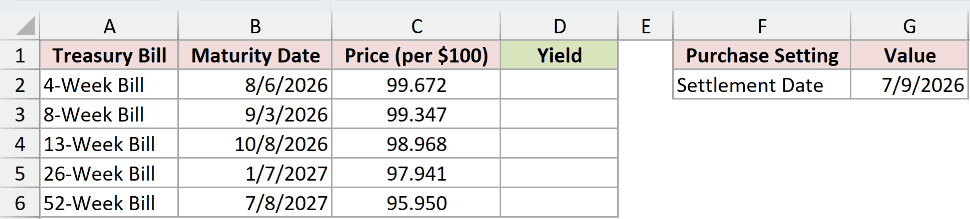
We want to compare the yields of bills settling on 7/9/2026.
Enter this formula in D2, then copy it down through D6:
=TBILLYIELD($G$2,B2,C2)
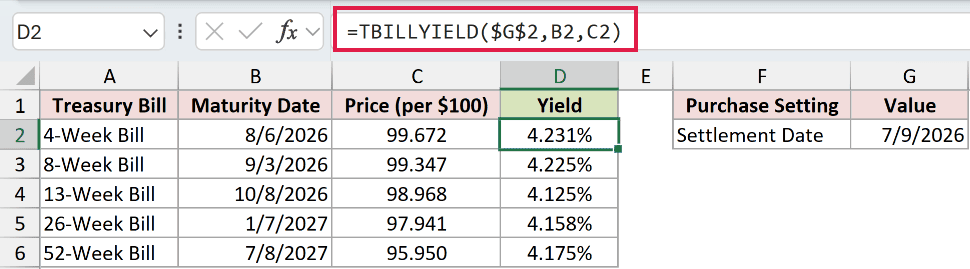
The absolute reference $G$2 keeps settlement fixed. The maturity and price references change for each row.
The 4-Week Bill returns 4.231%, while the 52-Week Bill returns 4.175% despite its lower purchase price.
The other yields are 4.225%, 4.125%, and 4.158%. Comparing the annual rates avoids confusing a larger price discount with a better annual return.
This example uses a separate formula for each bill. We’ll use a single spilling formula for a price table later.
Example 3: Convert Dollar Cost Before Calculating Yield
Your purchase confirmation may show the total dollars paid instead of a quoted price per $100.
Below is the dataset. B1:B4 contain dates, face amount, and amount paid. The labeled cells B5 and B6 will hold the converted price and yield.
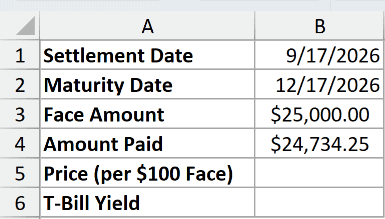
We want the yield on a $25,000.00 face amount purchased for $24,734.25.
First, convert the amount paid into a price per $100 in B5:
=B4/B3*100
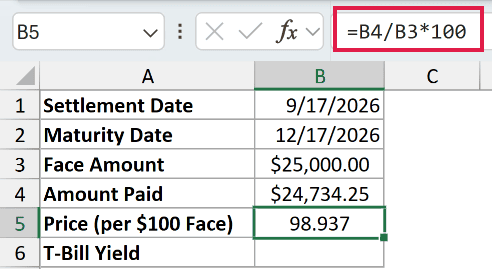
The result is 98.937. Dividing the amount paid by the face amount expresses the cost proportionally, and multiplying by 100 puts it on the required scale.
B5 is a supporting calculation, shown in white. It supplies the price for the green yield cell below.
Now enter the yield formula in B6:
=TBILLYIELD(B1,B2,B5)
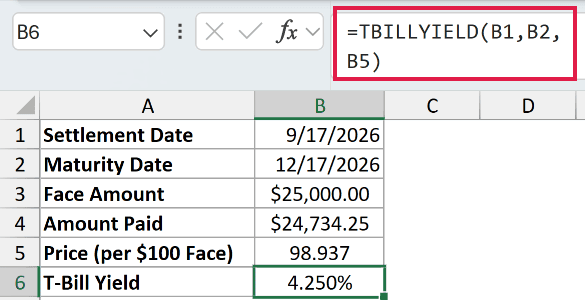
The result is 4.250% for the purchase settling on 9/17/2026 and maturing on 12/17/2026.
Passing the total amount paid directly into TBILLYIELD would use the wrong price scale. Convert it first.
Example 4: Compare Yield With the Discount Rate
A quoted discount rate and the yield on your purchase use different amounts as their starting point.
Below is the dataset. B1:B3 contain the dates and quoted discount rate. The labeled cells beneath them will hold the price, yield, and comparison gap.
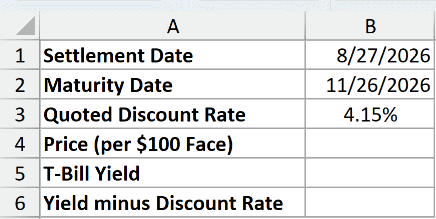
We want to find the purchase yield implied by the quoted 4.15% discount rate.
TBILLPRICE calculates a bill’s price from its discount rate and dates. Here, it prepares the price that TBILLYIELD needs.
Enter this supporting formula in B4:
=TBILLPRICE(B1,B2,B3)
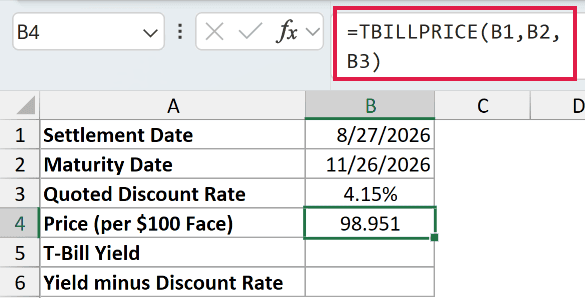
B4 displays 98.951. Keep its formula in place so the yield uses the underlying price rather than a retyped, rounded display.
Calculate the yield in B5:
=TBILLYIELD(B1,B2,B4)
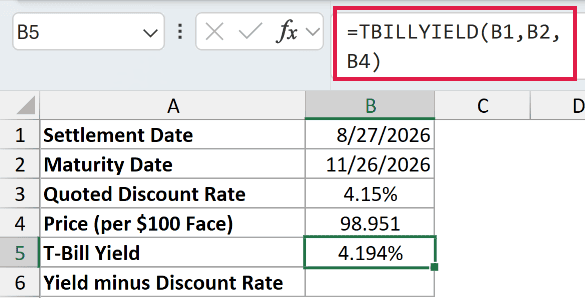
The yield is 4.194%, above the quoted discount rate.
For the comparison gap, enter this formula in B6:
=B5-B3
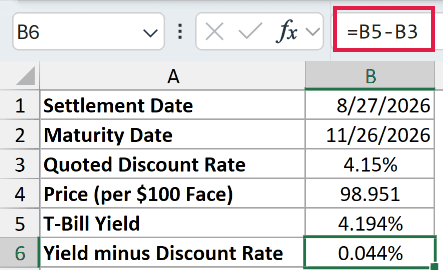
The comparison cell displays 0.044%. Because it subtracts rates, read this as a percentage-point gap, not a relative percentage increase.
The discount rate measures the discount against face value. TBILLYIELD measures the same gain against the smaller amount paid, so the yield is higher.
Converting the discount rate to a price and then calculating yield produces a higher rate because the yield uses the smaller purchase price as its base.
Example 5: Check the 360-Day Yield Calculation
Let’s check the calculation behind the function using the same bill throughout.
Below is the dataset. B1:B3 contain dates and price. The labeled cells below will hold the day count, TBILLYIELD result, and comparison calculations.
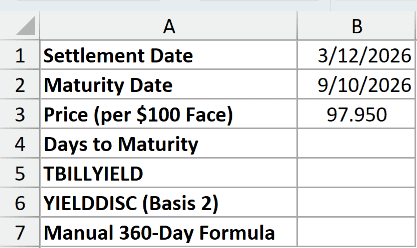
We want to verify that TBILLYIELD uses actual days to maturity and a 360-day year.
First, calculate the day count in B4:
=B2-B1
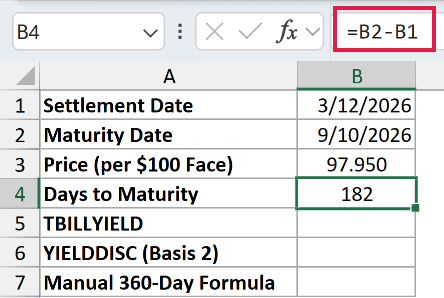
Subtracting settlement from maturity returns 182 days.
Enter TBILLYIELD in B5:
=TBILLYIELD(B1,B2,B3)
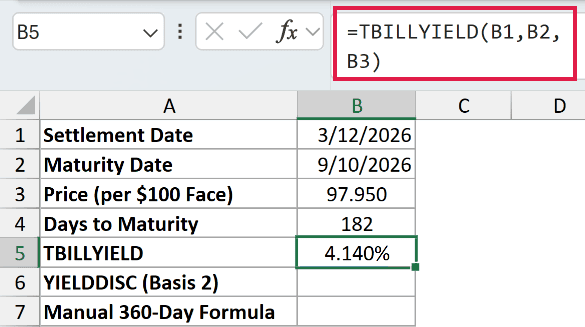
The yield is 4.140% at the purchase price of 97.950.
For comparison, YIELDDISC calculates a discounted security’s yield with a selectable day-count basis. Its basis 2 uses actual days and a 360-day year, matching TBILLYIELD.
Enter the comparison formula in B6:
=YIELDDISC(B1,B2,B3,100,2)
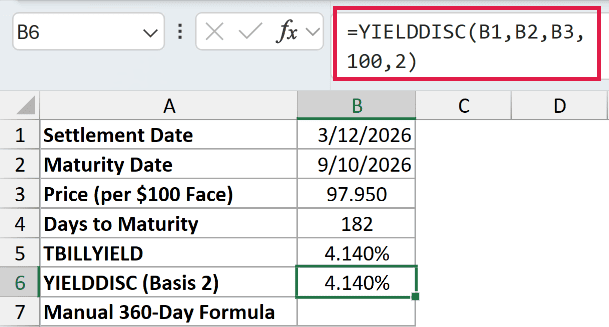
This comparison also returns 4.140%. The literal 100 is the redemption amount per $100 face value, and 2 selects the matching day-count basis.
Finally, enter the manual comparison in B7:
=(100-B3)/B3*360/B4
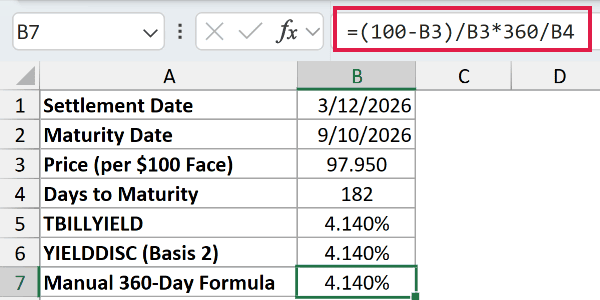
The manual comparison returns 4.140% too.
Here’s how it works:
100-B3finds the gain per $100 of face value.- Dividing by
B3measures that gain against the purchase price. - Multiplying by
360/B4annualizes the holding-period return using the actual day count.
When checking TBILLYIELD manually, use its 360-day convention rather than substituting a 365-day annualization.
Example 6: Spill Yields for Different Bid Prices
Now let’s hold the dates fixed and change only the purchase price.
Below is the dataset. A2:A7 list bid prices, B2:B7 will hold yields, and E2:E3 contain the settlement and maturity dates.
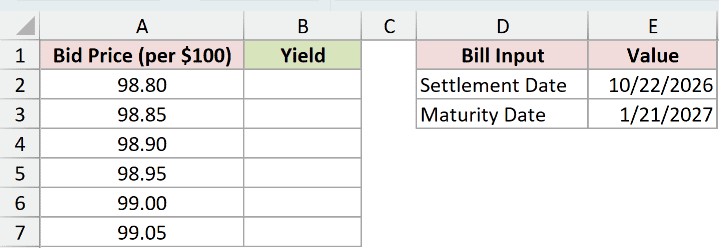
We want one formula to calculate the yield for every bid price.
Enter this formula in B2:
=TBILLYIELD(E2,E3,+A2:A7)
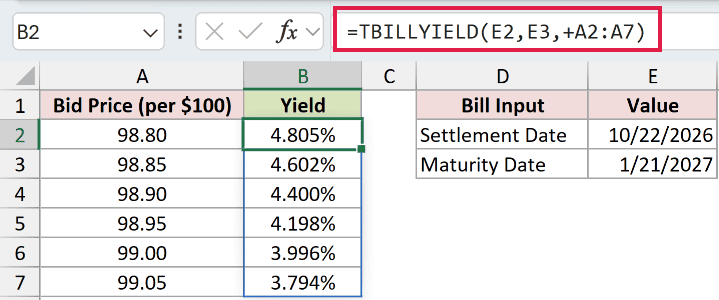
The formula spills into B2:B7. The plus sign turns the price range into a numeric array that TBILLYIELD can process.
A bare range returns a single #VALUE! error. Keep the + before A2:A7.
This spilling formula works in Excel 2021, Excel 2024, and Microsoft 365. In Excel 2019 and earlier, use the per-row approach from Example 2.
The bid of 98.80 returns 4.805%, while 99.05 returns 3.794%. Paying less for the same repayment on the same date increases the yield.
Pro Tip: Enter the formula only in B2 and leave the remaining output cells empty so Excel can place the spilled results.
Example 7: Check Errors and Negative Yields
Some unusual inputs produce errors, while others return a valid but unexpected yield.
Below is the dataset. Columns A:D contain the case label, settlement date, maturity date, and price. Column E will show each yield or expected error.
The rows cover valid purchases, face-value comparisons, and intentional input mistakes.
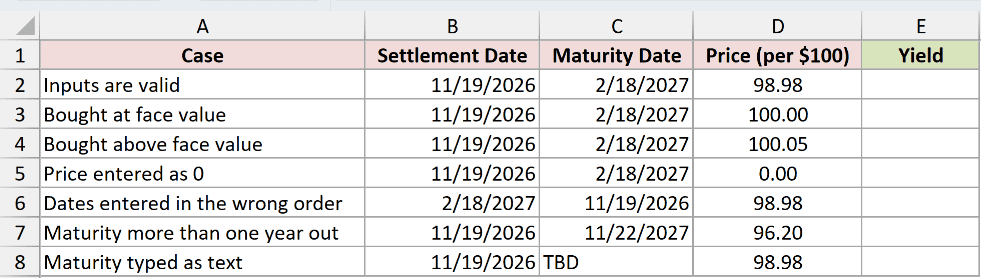
We want to distinguish invalid inputs from purchases that legitimately produce zero or negative yields.
Enter this formula in E2 and copy it through E8:
=TBILLYIELD(B2,C2,D2)
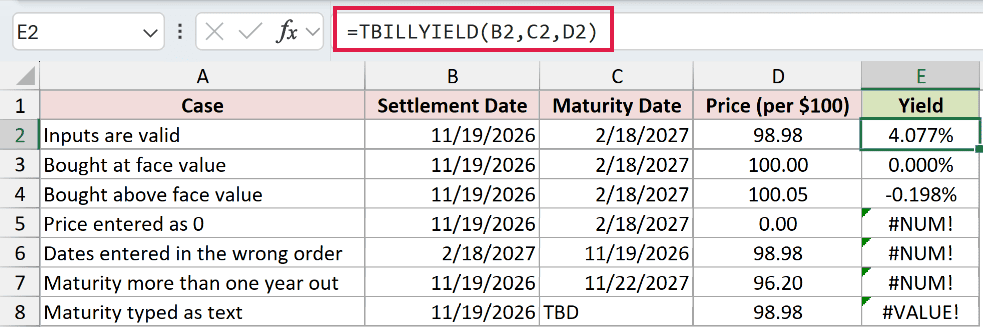
Each row tests its own inputs. The errors in E5:E8 come from intentional mistakes and share the Yield column with valid results.
- Valid purchase, E2: A price of 98.98 returns 4.077%.
- Face-value comparison, E3: A price of 100.00 returns 0.000% because the amount repaid equals the price paid.
- Above-face-value comparison, E4: A price of 100.05 returns -0.198%. Paying more than the repayment amount produces a negative yield, not an error.
- Zero-price mistake, E5: A price of 0.00 returns #NUM!. Supply a positive purchase price.
- Reversed-date mistake, E6: Settlement follows maturity, so the result is #NUM!. Correct the order of the dates.
- Maturity-limit mistake, E7: Settlement on 11/19/2026 and maturity on 11/22/2027 exceed the one-calendar-year limit, returning #NUM!.
- Unusable-date mistake, E8: The maturity entry
TBDreturns #VALUE!. Replace the placeholder with the actual maturity date.
Tips & Common Mistakes
- Check the price scale first. TBILLYIELD expects a price per $100 face value. A total purchase cost needs the conversion shown in Example 3.
- Keep the day-count convention consistent. TBILLYIELD uses actual days and a 360-day year. There is no optional basis setting to change it.
- Use usable dates. Recognizable text dates can work, but a placeholder such as
TBDcan’t. Real Excel date cells make the inputs easier to check. - Check settlement and maturity together. Equal dates, reversed dates, or maturity beyond one calendar year return
#NUM!. - Don’t round intermediate prices by retyping them. Reference the calculated price cell so the yield uses its full value.
Before comparing your result with a quoted rate, check whether that rate uses purchase price or face value and which year-length convention it follows.
Other Excel articles you may also like:
