
The DEC2BIN function in Excel converts a decimal integer into binary text.
It handles values from -512 through 511. Positive numbers use the shortest binary form unless you request padding, while negative numbers use a 10-bit two’s-complement form.
In this article, I’ll show you how to convert decimal values to binary, add leading zeros, and handle negative numbers and common DEC2BIN errors.
DEC2BIN Function Syntax in Excel
DEC2BIN has one required argument and one optional argument.
=DEC2BIN(number, [places])
numberis the decimal integer you want to convert. It must be from -512 through 511.placesis the optional number of characters in the result. DEC2BIN adds leading zeros when the result needs fewer characters.
When to Use DEC2BIN Function
- Convert decimal codes into binary text.
- Pad positive values to a fixed width, such as eight-bit network octets.
- Encode negative integers in a 10-bit two’s-complement form.
- Check whether a value fits DEC2BIN’s signed range.
- Diagnose number, width, and data-type errors in imported values.
Example 1: Convert Decimal Codes to Binary
Let’s begin with a simple list of decimal codes.
Below is the dataset with eight decimal values in column A.
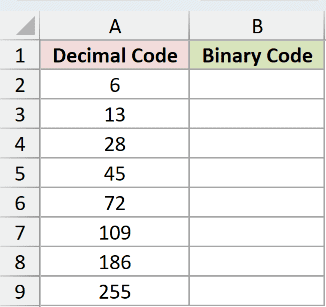
We want one formula in B2 to convert every value into binary text.
Here is the formula:
=DEC2BIN(+A2:A9)
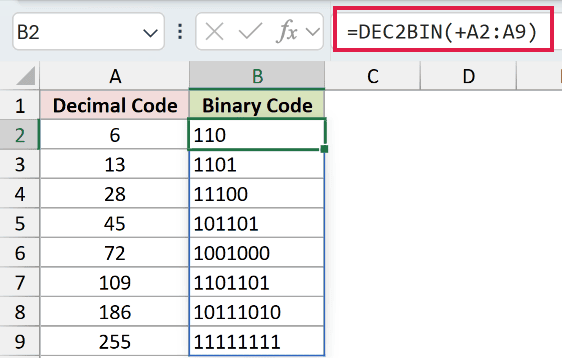
The formula returns 110, 1101, 11100, 101101, 1001000, 1101101, 10111010, and 11111111.
The leading + is necessary here. A bare range reference returns #VALUE!, while unary plus passes the range to DEC2BIN as a value array.
In Excel 2021, Excel 2024, Microsoft 365, and Excel for the web, those results spill from B2 through B9.
Pro Tip: DEC2BIN is the shortest route for decimal-to-binary conversion within its signed range. Keep the unary plus when the input is a range.
Example 2: Add Leading Zeros to Binary
Fixed-width codes often need their leading zeros kept.
Below is the dataset with decimal network octets in column A.
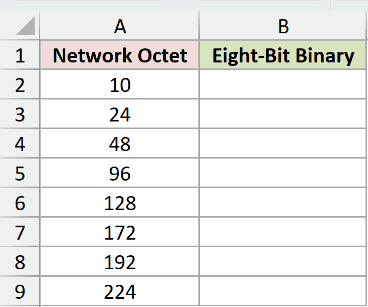
We want every result in B2:B9 to contain eight binary characters.
Here is the formula:
=DEC2BIN(+A2:A9,8)
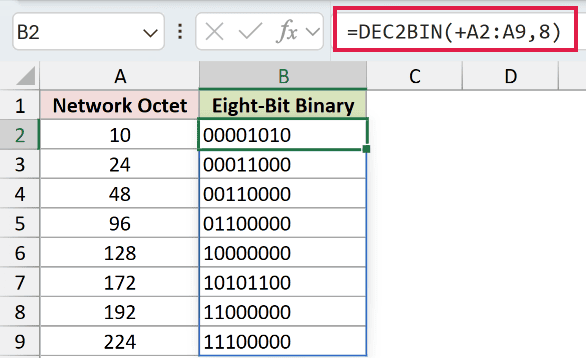
The places argument is 8, so DEC2BIN pads shorter results with zeros on the left.
The values become 00001010, 00011000, 00110000, 01100000, 10000000, 10101100, 11000000, and 11100000.
DEC2BIN adds padding only when the requested width can hold the result. It returns #NUM! when the width is too small.
Example 3: Convert Negative Numbers to Binary
Negative values use a fixed signed representation.
Below is the dataset with six negative integers in column A, binary text in column B, and a round-trip check in column C.
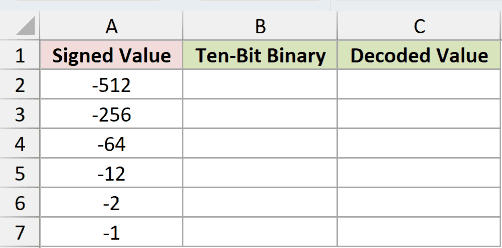
We first want DEC2BIN to encode all six signed values in B2:B7.
Here is the conversion formula:
=DEC2BIN(+A2:A7,4)
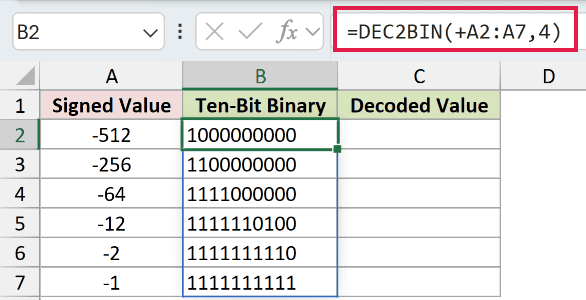
The formula returns 1000000000, 1100000000, 1111000000, 1111110100, 1111111110, and 1111111111.
DEC2BIN ignores a valid places argument for negative numbers. Each result always contains 10 bits and uses two’s-complement notation.
We also want to decode those binary strings and confirm the original values.
Here is the check formula:
=BIN2DEC(+B2:B7)
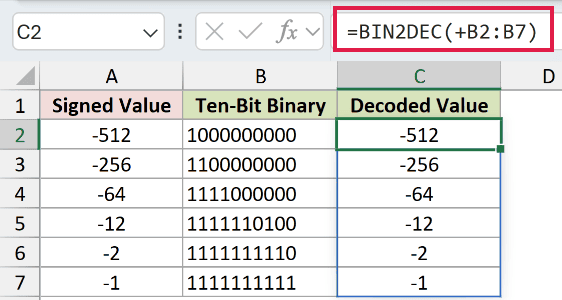
BIN2DEC returns -512, -256, -64, -12, -2, and -1 in C2:C7. These results match the source values.
Pro Tip: Do not read the final nine bits as an ordinary positive magnitude. The complete 10-bit pattern represents the negative value in two’s-complement notation.
Example 4: Handle Values Above 511
DEC2BIN has a narrow signed range, while BASE accepts much larger nonnegative integers.
Below is the dataset comparing both functions across values from 255 through 2,047.
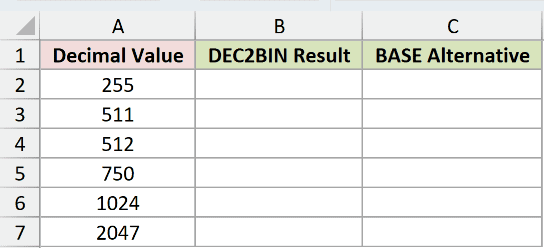
We first want to see where DEC2BIN reaches its upper limit.
Here is the DEC2BIN formula:
=DEC2BIN(+A2:A7)
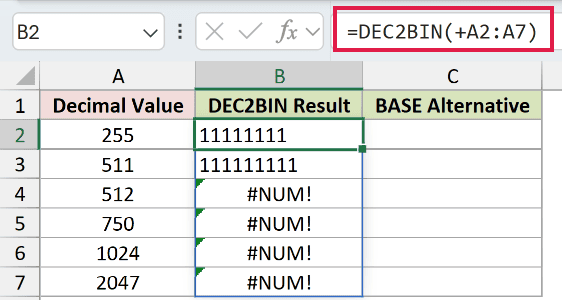
DEC2BIN converts 255 and 511 to 11111111 and 111111111. It returns #NUM! for 512, 750, 1,024, and 2,047.
We also want binary text for every nonnegative value in the table.
Here is the BASE formula:
=BASE(A2:A7,2)
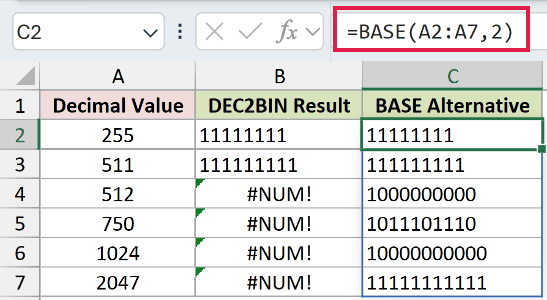
BASE returns 11111111, 111111111, 1000000000, 1011101110, 10000000000, and 11111111111.
BASE works well for larger nonnegative integers. It does not create DEC2BIN’s signed two’s-complement result for negative numbers.
Example 5: Diagnose DEC2BIN Errors
The places argument can fail for several different reasons.
Below is the dataset with six input and width combinations.
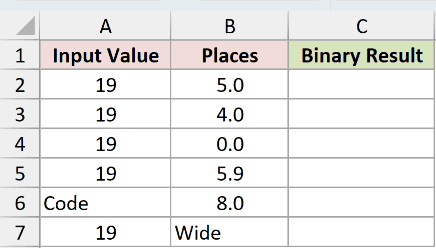
We want to evaluate each row separately so the cause of every result stays visible.
The first row uses five places for the decimal value 19.
=DEC2BIN(A2,B2)
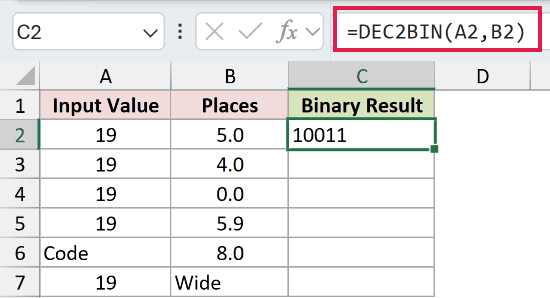
The result is 10011, which fits exactly into five characters.
The second row allows only four places.
=DEC2BIN(A3,B3)
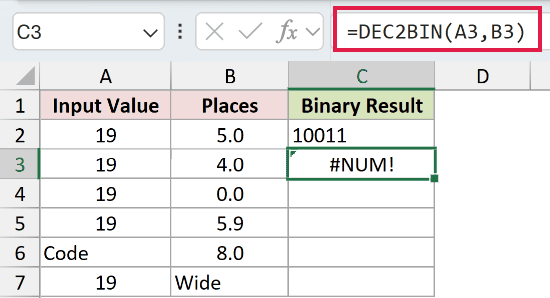
DEC2BIN returns #NUM! because 10011 needs five characters.
The third row sets places to zero.
=DEC2BIN(A4,B4)
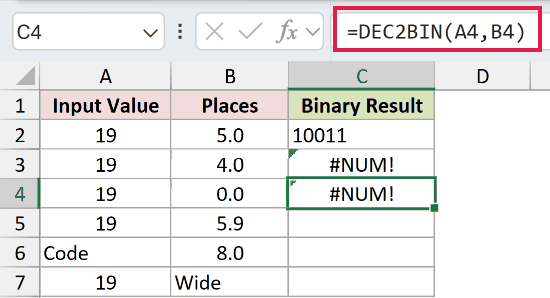
Zero and negative width values return #NUM!.
The fourth row supplies 5.9 as the width.
=DEC2BIN(A5,B5)
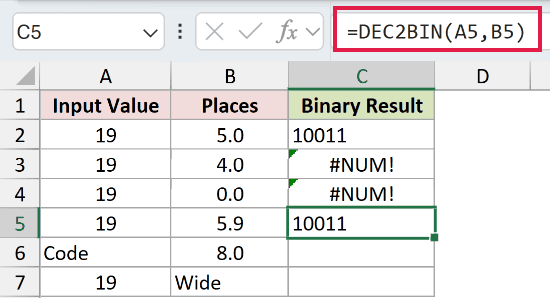
DEC2BIN truncates the fractional argument to 5 and returns 10011.
The fifth row supplies Code instead of a number.
=DEC2BIN(A6,B6)
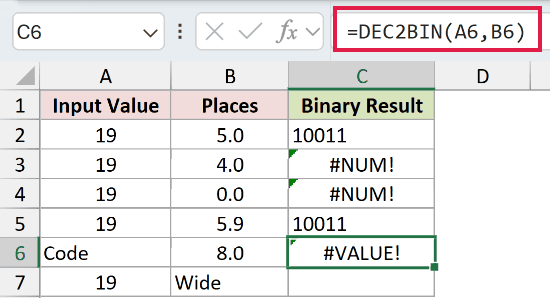
A nonnumeric number argument returns a #VALUE! error.
The final row supplies Wide instead of a numeric width.
=DEC2BIN(A7,B7)
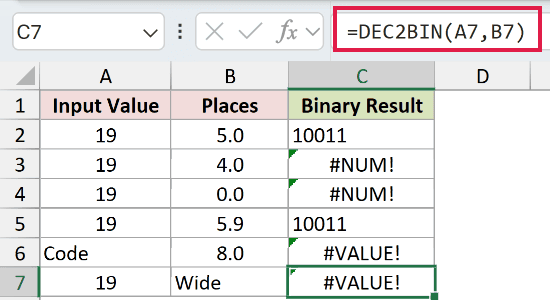
A nonnumeric places argument also returns #VALUE!.
Tips & Common Mistakes
- Keep DEC2BIN inputs from -512 through 511. Values outside that range return
#NUM!. - Preserve the unary plus in range formulas. It changes the range reference into the value array DEC2BIN needs for spilling.
- Keep the output range blank in dynamic-array Excel. Any blocked cell causes a
#SPILL!error. - Remember that DEC2BIN returns text. Excel can display leading zeros because the result is not a decimal number.
- Use enough places for a positive result. Excel truncates fractional places, while zero, negative, or insufficient places return
#NUM!. - Use BASE for larger nonnegative integers. Use DEC2BIN when you need its signed 10-bit behavior.
I covered ordinary conversion, fixed-width padding, negative values, range limits, and common DEC2BIN errors.
I also compared DEC2BIN with BIN2DEC and BASE. I hope you found this article helpful.
Related Excel Functions / Articles:
Other Excel articles you may also like:
