
Calculating credit card interest in Excel helps you estimate a billing cycle’s charge and see how purchases and payments affect it.
Multiplying a balance by the annual percentage rate (APR) divided by 12 gives you a rough monthly figure. But when your balance changes during the cycle, the dates of those changes matter too.
A payment halfway through the month reduces the balance on fewer days than a payment at the start.
In this article, I’ll show you a quick estimate using a daily rate, then build a daily balance tracker that accounts for purchases, payments, and optional daily compounding.
Both examples assume interest applies throughout the billing cycle. They use one APR and exclude fees. Check your statement and card agreement for the balance calculation, day basis, and grace-period rules that apply to your account.
Method #1: Using the Daily Rate Formula
Use this approach when you want a quick estimate and expect the balance to stay unchanged during the cycle. It doesn’t include daily compounding or transactions made during that period.
Below I have the inputs on the Quick Estimate sheet. The opening balance is $2,400, the APR is 21.99%, and the billing cycle runs from September 1 to September 30, 2026.
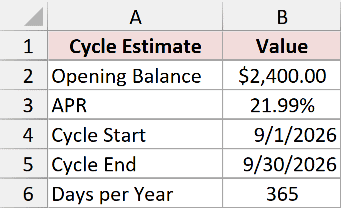
Enter the opening balance in B2, the APR in B3, and the cycle’s start and end dates in B4 and B5. Enter 365 in B6 for this example. Use your issuer’s day basis when working with your own account.
Type the APR as 21.99%, including the percent sign. Excel stores that percentage as 0.2199. Entering 21.99 as an ordinary number would make the calculation 100 times too large.
1. Count the billing-cycle days.
In B8, enter this formula:
=B5-B4+1
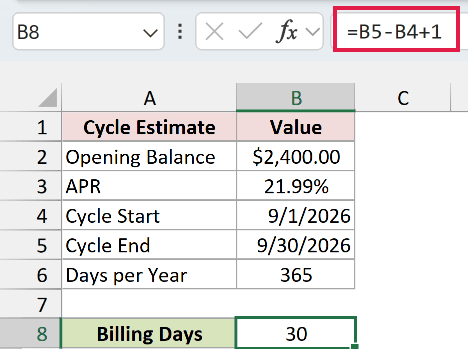
Subtracting the start date from the end date returns 29. Adding 1 includes both dates, so the result is 30 days. Make sure the dates are real Excel dates rather than text. Their display format can differ with your regional settings.
2. Convert the APR to a daily rate.
In B9, enter:
=B3/B6
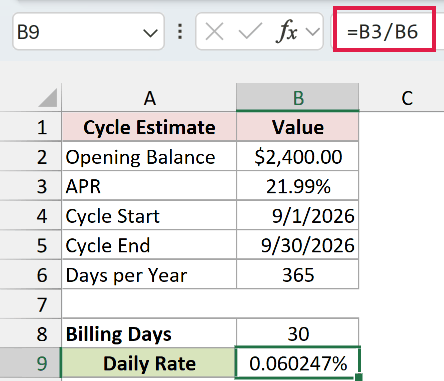
The formula divides 21.99% by 365. Formatted as a percentage with six decimal places, the daily rate displays as 0.060247%. Keep the underlying value at full precision instead of typing that rounded display value into another cell.
3. Calculate the cycle’s interest.
In B10, enter:
=B2*B9*B8
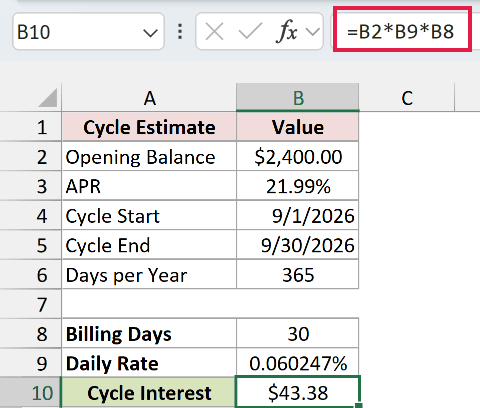
This multiplies the $2,400 balance by the daily rate and 30 days. The estimated interest displays as $43.38 when the cell is formatted as currency.
It’s a simple interest estimate for an unchanged balance. If purchases or payments change the balance during the cycle, use the daily tracker in the next method.
How does the APR/12 shortcut compare?
In B11, enter:
=B2*B3/12
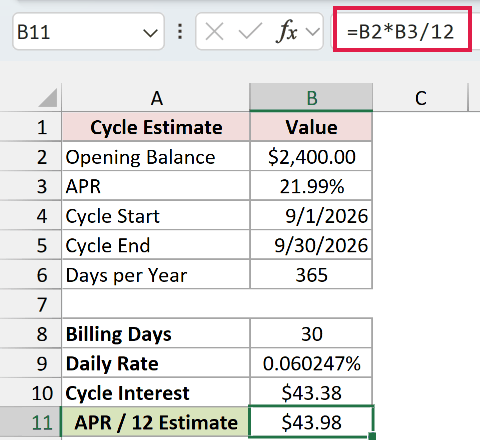
This returns $43.98. Dividing the APR by 12 treats the period as one-twelfth of a year. The daily-rate calculation uses the actual 30-day cycle, so the two estimates differ even though the balance and APR are identical.
Note: Neither estimate determines whether you qualify for a grace period. If your purchases qualify for interest-free treatment, applying either formula to the whole balance can overstate the charge.
Method #2: Building a Daily Balance Tracker
If you make purchases or payments during the cycle, I recommend tracking the balance day by day. This lets each transaction affect the calculation from its posting date.
Below I have a full September 1 to September 30, 2026 cycle on the Daily Tracker sheet. It starts with $2,400 at 21.99% APR and includes groceries, fuel, other purchases, and three card payments.
The screenshots hide some middle rows so the inputs and results fit together. The workbook keeps all 30 days, and the formulas include the hidden rows.
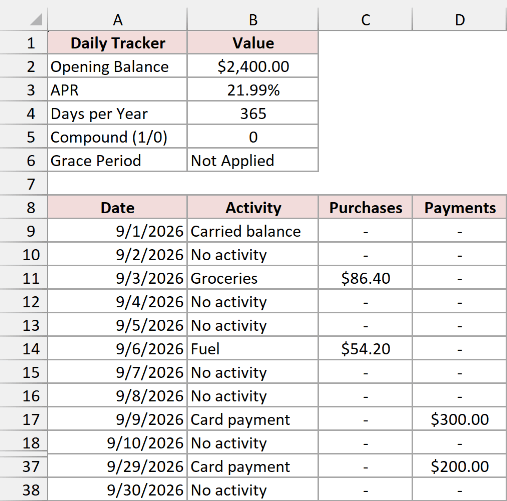
The input cells are B2 for the opening balance, B3 for the APR, B4 for the day basis, and B5 for daily compounding. Leave B5 at 0 while following the initial example. We’ll use 1 for the compounding variation later.
The daily records occupy rows 9 through 38. Column A contains dates, B describes the activity, C contains purchases, and D contains payments. Purchases and payments are entered as positive amounts in their respective columns.
Keep one row for every day, including days with no activity. Enter zero for purchases and payments on those days. Averaging only the transaction dates would give those dates the wrong weight.
1. Calculate the daily rate.
In B6, enter:
=B3/B4
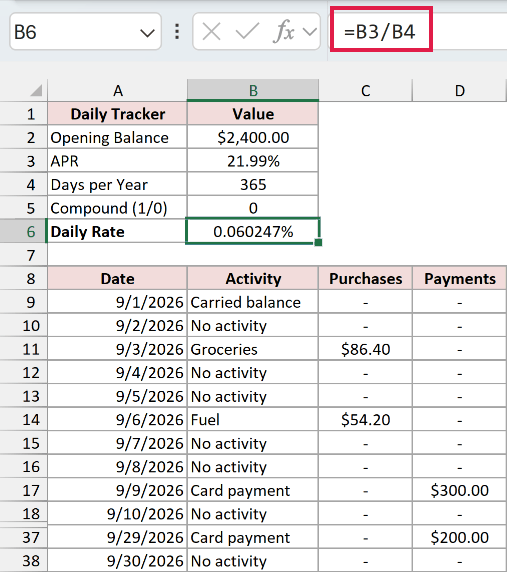
With a 21.99% APR and 365-day basis, the rate displays as 0.060247%. This is the rate we’ll apply to each day’s balance subject to interest.
2. Calculate the first day’s balance.
In E9, enter:
=$B$2+C9-D9
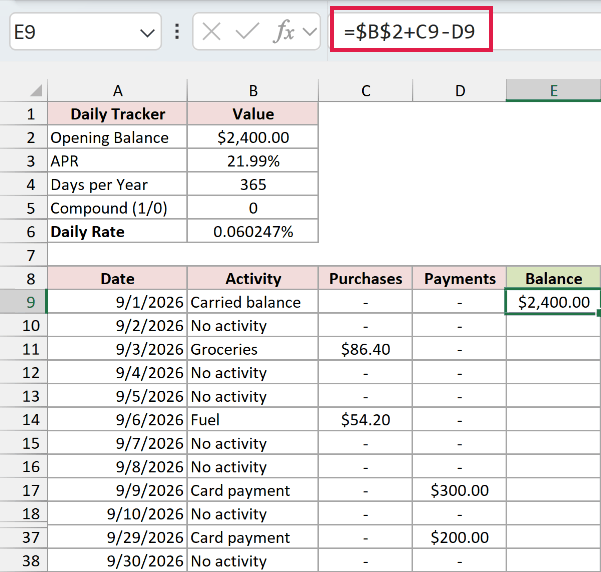
The formula adds the first day’s purchases to the opening balance and subtracts payments. There are no purchases or payments on September 1, so the balance is $2,400.
3. Carry the balance forward.
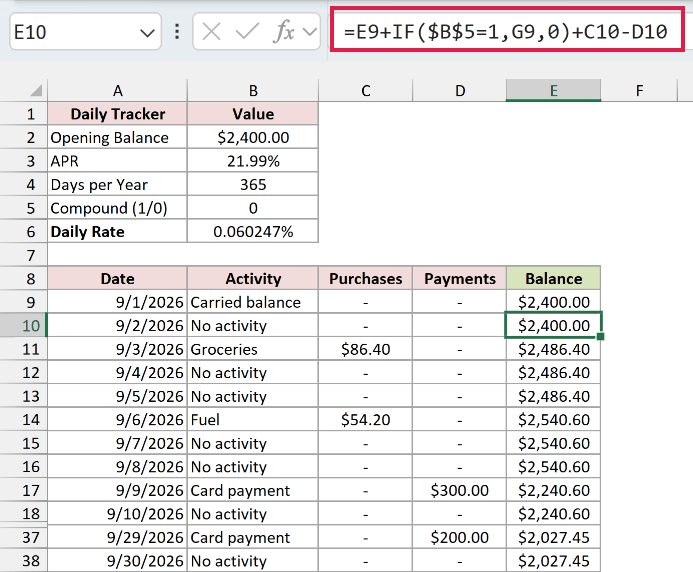
In E10, enter the following formula, then fill it down through E38:
=E9+IF($B$5=1,G9,0)+C10-D10
How does this formula work?
E9 carries forward yesterday’s balance. C10-D10 adds today’s purchases and subtracts today’s payments.
The IF function checks the compounding setting in B5. When it’s 1, the formula also adds yesterday’s interest from G9. When it’s 0, that part contributes zero. We’ll calculate column G below.
On September 9, the $300 payment reduces the balance from $2,540.60 to $2,240.60 with compounding switched off.
I use row-by-row formulas in this tracker because each day’s compounded balance can depend on the previous day’s interest.
4. Identify the balance subject to interest.
In F9, enter this formula and fill it down through F38:
=MAX(E9,0)
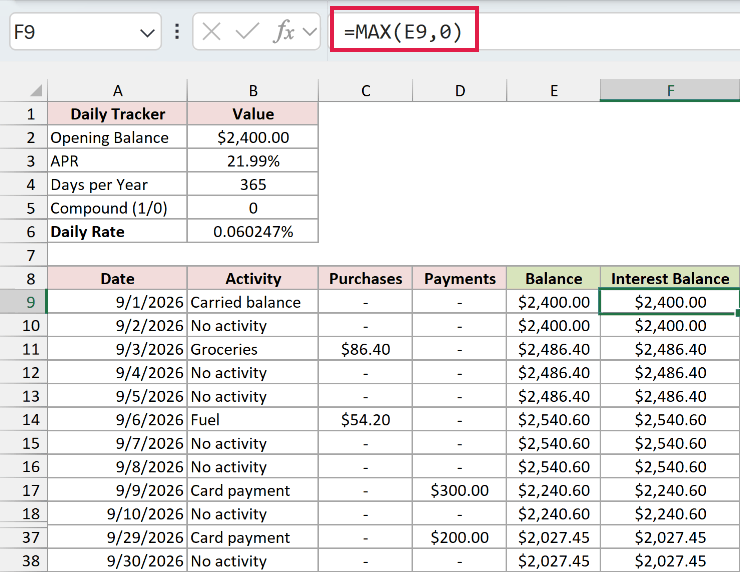
The MAX function returns the larger of the day’s balance and zero. A positive balance remains unchanged. A negative balance becomes zero in this interest calculation, so an overpayment doesn’t generate a negative interest charge.
Column E still keeps the negative credit balance, allowing it to offset later purchases. Column F is only the amount this model subjects to interest. In the example, all daily balances are positive, so the two columns match.
5. Calculate each day’s interest.
In G9, enter the following formula and fill it down through G38:
=F9*$B$6
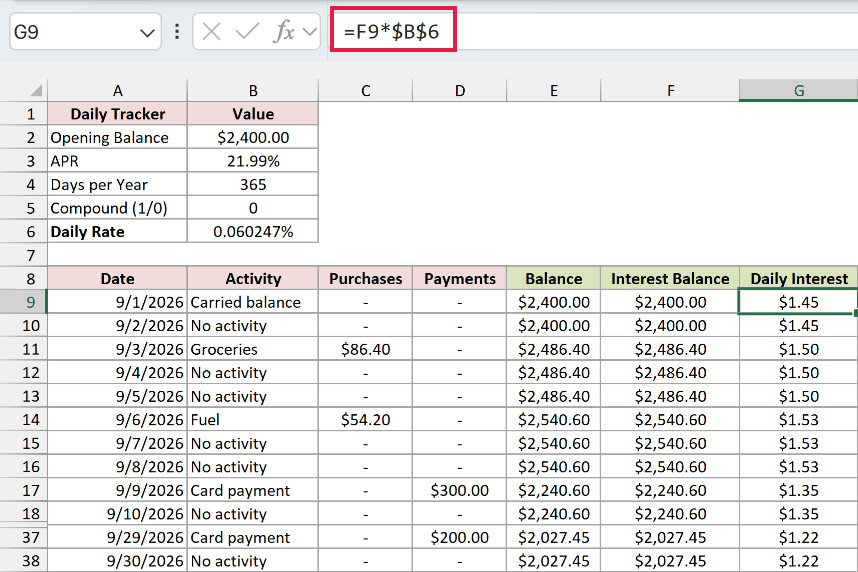
This multiplies the day’s interest balance by the daily rate. The dollar signs keep B6 fixed as the other reference moves down the column.
September 1’s interest displays as $1.45. The underlying value has more decimal places. Formatting it as currency changes what you see, while the calculations keep that extra precision.
6. Count the days and calculate the average balance.
In B41, enter:
=COUNT(A9:A38)
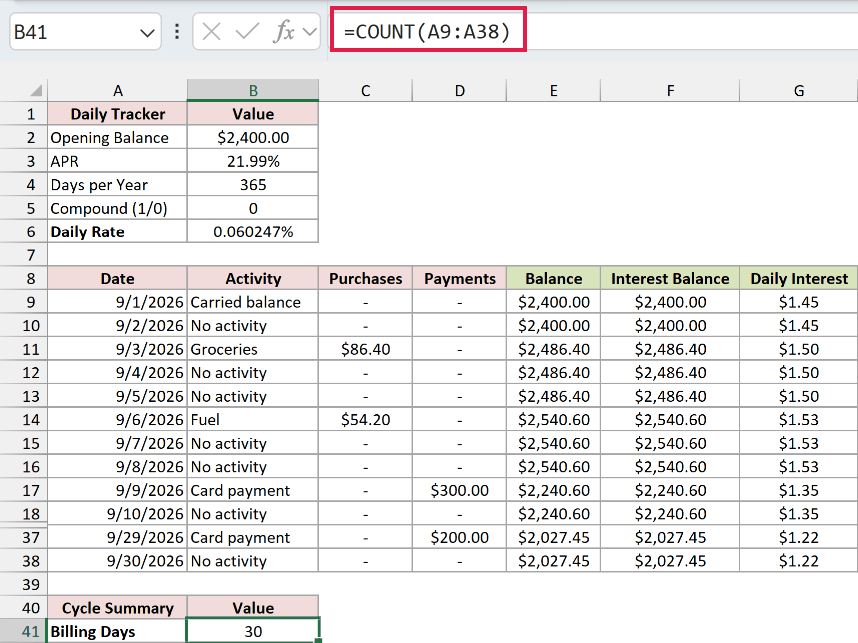
The COUNT function counts the numeric Excel dates in the daily records and returns 30. It doesn’t detect missing or duplicate calendar dates, so check that the rows run consecutively from the cycle’s start to its end.
In B42, enter:
=AVERAGE(F9:F38)
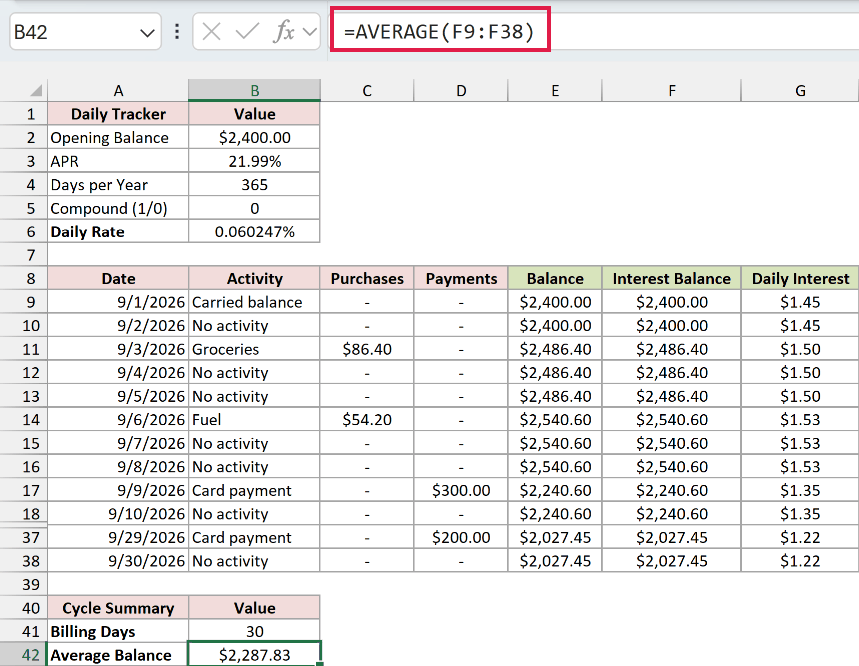
The AVERAGE function returns the mean of the daily interest balances. Here, it displays as $2,287.83. Days with a zero interest balance must remain in the calculation. An empty cell would be ignored instead.
7. Total the cycle’s interest.
In B43, enter:
=ROUND(SUM(G9:G38),2)
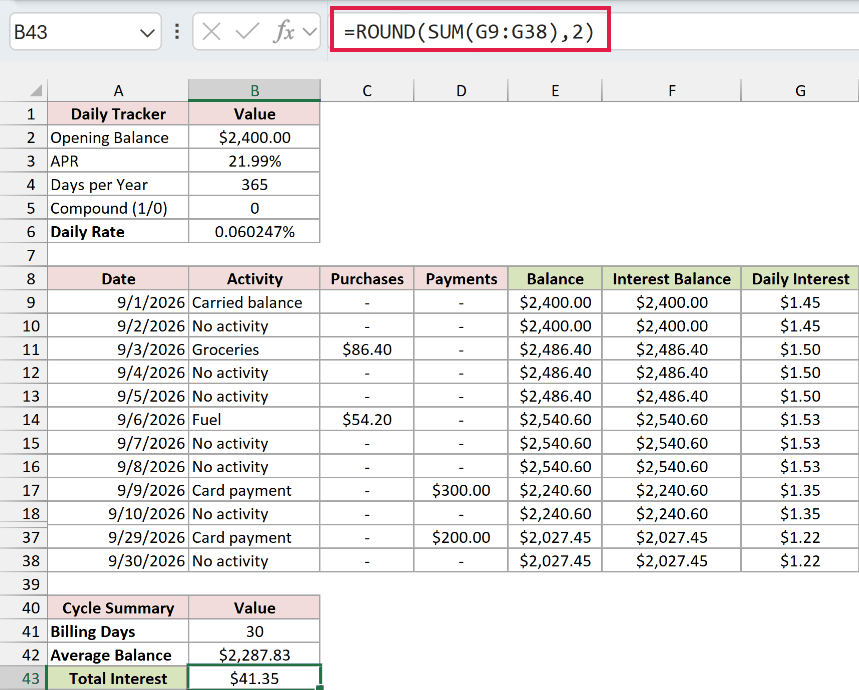
The SUM function adds the daily interest amounts. ROUND rounds that total to two decimal places. The result is $41.35.
This model rounds the cycle total rather than each daily accrual. Adding up the two-decimal figures you can see in column G may therefore differ slightly from the calculated total.
8. Check the total using the average daily balance.
In B44, enter:
=ROUND(B42*$B$6*B41,2)
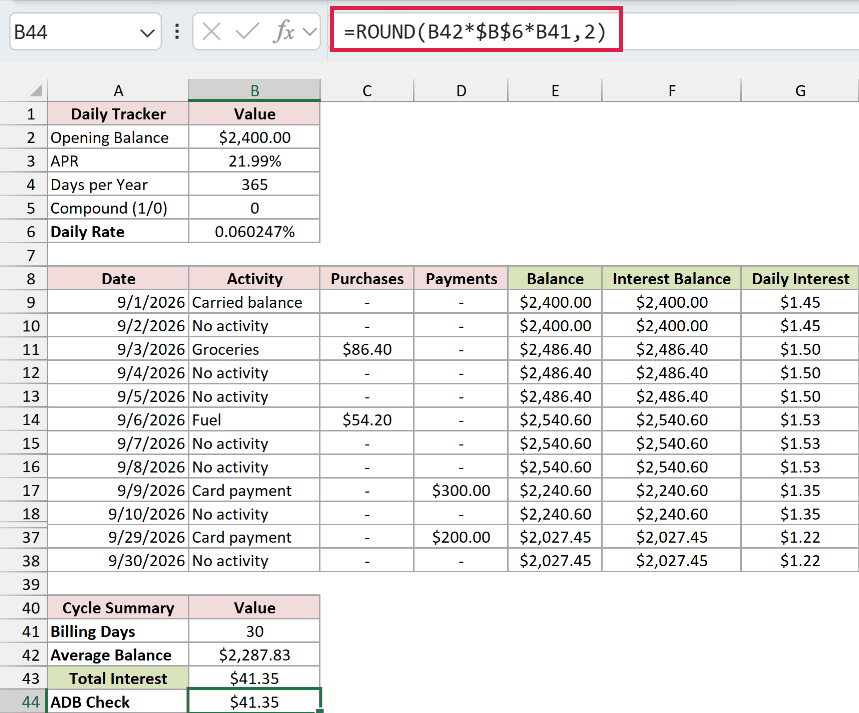
This multiplies the average interest balance by the daily rate and the number of days. It also returns $41.35. With one constant daily rate, averaging the daily balances first is mathematically equivalent to adding their individual interest charges.
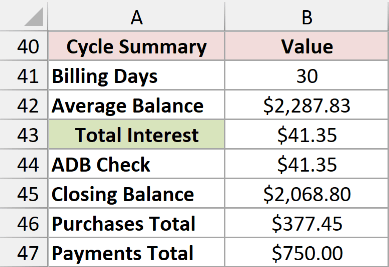
The completed summary also shows $377.45 in purchases, $750 in payments, and a $2,068.80 closing balance, including the cycle’s interest.
When the card compounds interest daily
Some issuers add accrued interest to the balance used for the next day’s calculation. The CFPB’s explanation of daily periodic rates describes this treatment. Check your card agreement before selecting it in the tracker.
To model daily compounding, change B5 from 0 to 1. The existing balance formula then includes the previous day’s interest automatically.
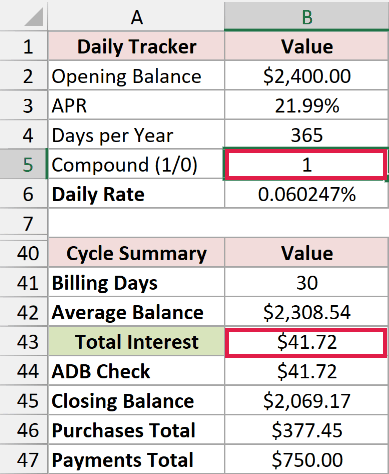
With the same purchases and payments, the cycle’s interest changes to $41.72, and the closing balance becomes $2,069.17. The average balance increases too, because it now includes interest added on earlier days.
Keep the setting at 0 when that daily capitalization doesn’t apply. A daily interest calculation and daily compounding are separate assumptions.
Here’s how the results compare for the examples above:
| Calculation | Interest | What it includes |
|---|---|---|
| Daily-rate estimate | $43.38 | Unchanged $2,400 balance for 30 days |
| APR/12 shortcut | $43.98 | Unchanged balance for one-twelfth of a year |
| Daily tracker, compounding off | $41.35 | Actual example purchases and payments |
| Daily tracker, compounding on | $41.72 | The same transactions plus daily capitalization |
Additional Notes About Calculating Credit Card Interest in Excel
Before using the examples for your own account, check these details:
- Use balances that actually accrue interest. A purchase grace period can change whether interest applies. The workbook doesn’t determine eligibility or remove qualifying purchases automatically. The CFPB explains how grace periods work.
- Use posting dates from your statement. These examples change the balance before calculating interest for that date. Follow your agreement if its timing rules differ.
- Keep full precision until the final charge. The workbook rounds the cycle total to cents. Your issuer may use different rounding rules or a minimum interest charge.
- Match the period and APR. Use the statement’s actual dates and the applicable rate. This workbook assumes one constant APR throughout the cycle, with fees excluded.
Frequently Asked Questions
Here are a few questions you may run into when adapting the tracker.
Why Does My Excel Result Differ From the Interest on My Statement?
Check the opening balance, posting dates, APR, day basis, and compounding setting first. Fees, grace-period treatment, rate changes, issuer rounding, and minimum interest charges can also affect the result. The workbook estimates a charge under its stated assumptions rather than reproducing every card agreement.
Does Making the Minimum Payment Stop Credit Card Interest?
Paying the minimum generally leaves part of the balance unpaid, and interest can continue on balances subject to interest. Paying enough to preserve a purchase grace period depends on your account’s terms. The CFPB describes how payments affect interest.
How Do I Handle Purchases and Cash Advances With Different APRs?
Calculate each APR category separately, then add its interest charge to the others. Use the payments allocated to each category, rather than subtracting the same payment from every balance. The single-APR tracker doesn’t allocate payments between categories, so use the allocations shown on your statement.
How Do I Adapt the Tracker to a Different Billing-Cycle Length?
Keep exactly one row per calendar day. Insert or delete daily rows to match the cycle, fill the balance and interest formulas through the last date, and check that every summary range covers those rows.
The closing-balance calculation must reference the final day’s balance and interest.
Conclusion
In this article, I showed you how to estimate credit card interest from a daily rate and how to track a full cycle with purchases, payments, and optional compounding. I hope you found this article helpful.
Other Excel articles you may also like:
