
Converting a Julian date in Excel turns a compact year and day code into a calendar date you can read, sort, and filter.
Before choosing a formula, count the digits and check the data source. A 5-digit YYDDD code, 7-digit YYYYDDD code, and 6-digit JDE code each store the year differently.
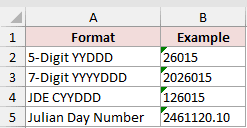
Astronomical Julian Day Numbers look different again, with values such as 2461120.10. Matching the formula to the format prevents a plausible but wrong date.
Method #1: Using DATE With LEFT and RIGHT (7-Digit YYYYDDD)
This is the method I recommend for seven-digit YYYYDDD codes because the four-digit year removes any uncertainty about the century.
On the 7-Digit sheet, A2:A11 contains product names and B2:B11 contains seven-digit Julian dates. I want calendar dates in C2:C11.
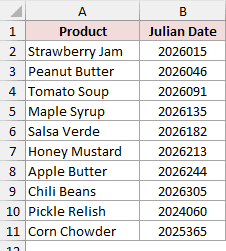
Enter this formula in cell C2:
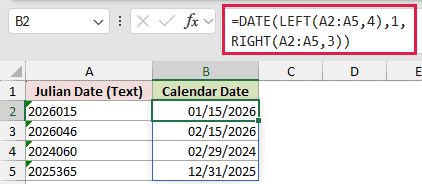
=DATE(LEFT(B2:B11,4),1,RIGHT(B2:B11,3))
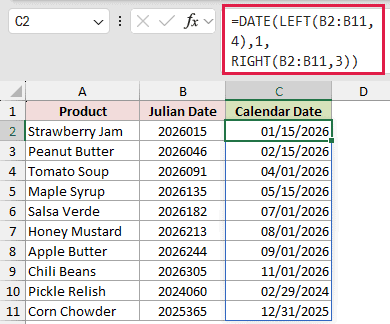
The formula spills through C11 automatically in Excel 365 and Excel 2021. Strawberry Jam returns 01/15/2026, while Corn Chowder returns 12/31/2025.
How does this formula work?
LEFT(B2:B11,4) extracts each four-digit year. For 2026015, it returns 2026.
RIGHT(B2:B11,3) extracts the day number within that year. For 2026015, it returns 015.
I pass 1 as the month and the extracted day number as the day. When that number exceeds 31, Excel rolls it into the correct later month for you.
That rollover also handles leap years. The code 2024060 becomes 02/29/2024, while 2025365 becomes 12/31/2025.
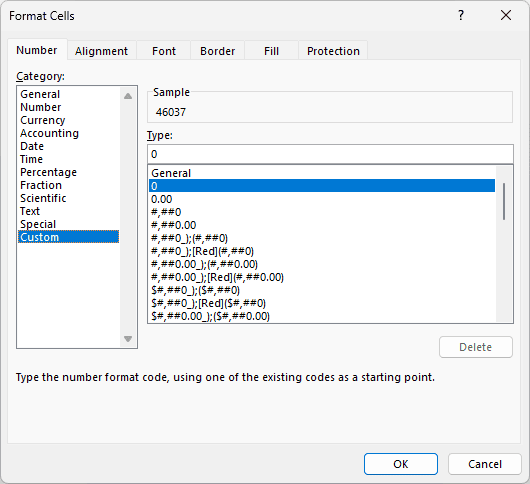
If the results appear as serial numbers, select C2:C11 and press Ctrl + 1. Choose Custom, enter mm/dd/yyyy in the Type box, and click OK.
Method #2: Using DATE With INT and MOD (5-Digit YYDDD)
For five-digit YYDDD codes, I recommend this formula because it still works when Excel hides a leading zero.
On the 5-Digit sheet, A2:A11 contains shipment IDs. B2:B11 contains the Julian dates, and C2:C11 is where I want the calendar dates.
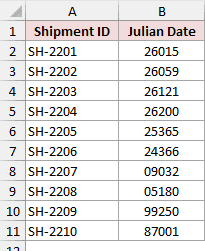
Enter this formula in cell C2:
=DATE(INT(B2:B11/1000)+IF(INT(B2:B11/1000)<30,2000,1900),1,MOD(B2:B11,1000))
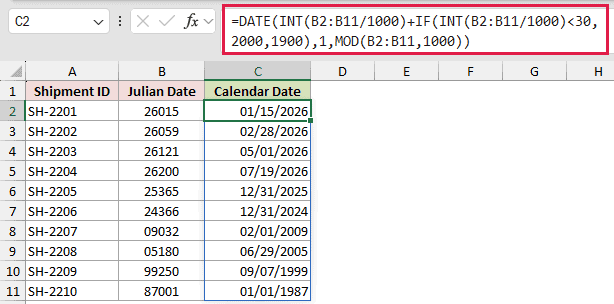
The formula spills through C11. SH-2201 returns 01/15/2026, SH-2207 returns 02/01/2009, and SH-2209 returns 09/07/1999.
How does this formula work?
INT(B2:B11/1000) removes the final three digits and returns the two-digit year. For 26015, it returns 26.
MOD(B2:B11,1000) returns the remaining day number. For 26015, it returns 15.
IF adds 2000 when the year is below 30. Otherwise, it adds 1900. DATE then converts the year and day number.
I use math instead of LEFT because Excel stores 09032 as 9032. The 00000 number format only makes the leading zero visible.
Note: This formula assumes years 00 through 29 belong to 2000 through 2029, while years 30 through 99 belong to 1930 through 1999. Change 30 if your data uses another cutoff.
Method #3: Using DATE With INT and MOD (JDE CYYDDD Format)
If your dates came from JD Edwards or another ERP export, check whether they use the six-digit CYYDDD structure.
On the JDE CYYDDD sheet, A2:A11 contains purchase order numbers. B2:B11 contains JDE dates, and C2:C11 is the result range.
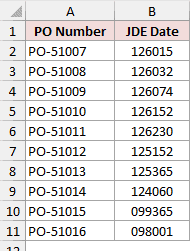
Enter this formula in cell C2:
=DATE(1900+INT(B2:B11/1000),1,MOD(B2:B11,1000))
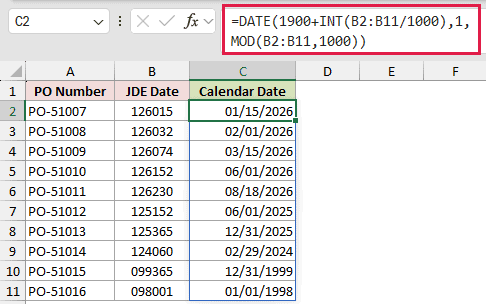
The formula spills through C11. PO-51007 returns 01/15/2026, PO-51014 returns 02/29/2024, and PO-51015 returns 12/31/1999.
How does this formula work?
INT(B2:B11/1000) removes the three-digit day number and leaves the first three digits of the code, 126.
The C is a century flag. It is 0 for the 1900s and 1 for the 2000s, so adding 1900 to 126 gives you 2026.
MOD(B2:B11,1000) returns the day number. For 126032, it returns 32, so DATE rolls forward to 02/01/2026.
The 000000 number format displays the leading zero, but the stored value remains 99365. INT and MOD read that stored number, so 099365 converts to 12/31/1999.
Method #4: Subtracting 2415018.5 (Astronomical Julian Day Numbers)
Scientific or astronomy data may contain values such as 2461120.10 rather than compact year and day codes.
On the Julian Day Number sheet, A2:A9 contains observation IDs. B2:B9 contains Julian Day Numbers, including decimal times.
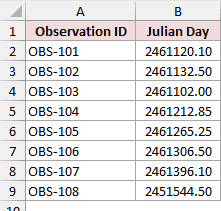
Enter this formula in cell C2:
=B2:B9-2415018.5
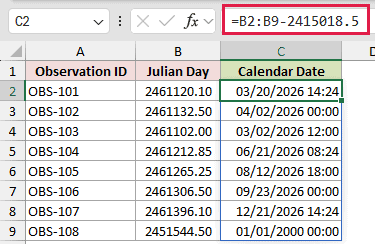
The formula spills through C9. Format C2:C9 as mm/dd/yyyy hh:mm to show both the date and time.
The first result is 03/20/2026 14:24. The final value, 2451544.50, becomes 01/01/2000 00:00.
How does this formula work?
Excel stores dates as serial numbers. Subtracting 2415018.5 converts each astronomical Julian Day Number to Excel’s 1900 date system.
The decimal part represents the time of day. Keeping it in the calculation preserves times such as 14:24 and 08:24.
Note: Use this conversion for dates from March 1, 1900 onward because Excel’s 1900 date system includes a false leap day. Astronomical Julian Day times are normally stated in UTC.
Method #5: Using TEXT and YEAR (Calendar Date to Julian Date)
You can also reverse the process when a system requires a seven-digit YYYYDDD code instead of a regular Excel date.
On the Calendar to Julian sheet, A2:A11 contains invoice numbers. B2:B11 contains invoice dates, and C2:C11 is the Julian code range.
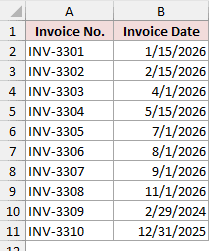
Enter this formula in cell C2:
=TEXT(B2:B11,"yyyy")&TEXT(B2:B11-DATE(YEAR(B2:B11),1,0),"000")
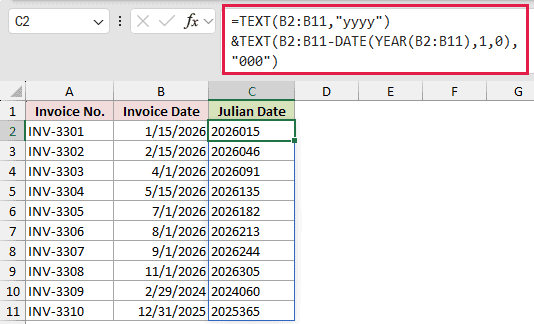
The formula spills through C11 and returns text. Excel left-aligns these codes by default because text values are left-aligned.
For example, INV-3301 returns 2026015, while the leap-day invoice INV-3309 returns 2024060.
How does this formula work?
TEXT(B2:B11,"yyyy") returns each four-digit year.
DATE(YEAR(B2:B11),1,0) returns the last day of the previous year. Subtracting it from each invoice date returns that date’s day number.
The second TEXT pads the day number to three digits. The ampersand joins the year and padded day into one code.
For a five-digit YYDDD result, change the first format code from "yyyy" to "yy".
Additional Notes About Converting Julian Date to Calendar Date in Excel
- Codes stored as text still work.
LEFTandRIGHTread text directly, whileINTandMODcoerce numeric text during calculation.
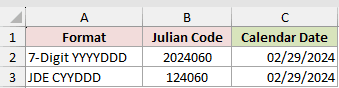
DATEhandles leap years automatically. Day 060 becomes 02/29/2024 for both 2024060 and JDE code 124060.
- The range formulas are for Excel 365 and Excel 2021 or later. In Excel 2019 and older, they may return one value through implicit intersection. Replace the range with B2, then fill down.
Frequently Asked Questions
What Is a Julian Date in Excel?
In Excel workbooks, a Julian date usually means a year plus its day number, such as 2026015 for January 15, 2026.
Some systems use YYDDD or JDE CYYDDD instead. Astronomy uses a continuous day count, so identify the format before selecting a formula.
What Happens If I Use the 7-Digit Formula on a 5-Digit Code?
You get a wrong date instead of an error. LEFT reads 26015 as the year 2601, so the formula returns 01/15/2601.
Count the digits before you pick a formula.
Why Does My Julian Date Formula Return #VALUE!?
One of the characters in the code is not a number. LEFT and RIGHT hand DATE something it cannot read.
Check the column for letters, hyphens, or stray symbols, then clean it up.
How Do I Get Today’s Julian Date in Excel?
Use this formula to return today’s date as a seven-digit YYYYDDD text code:
=TEXT(TODAY(),"yyyy")&TEXT(TODAY()-DATE(YEAR(TODAY()),1,0),"000")
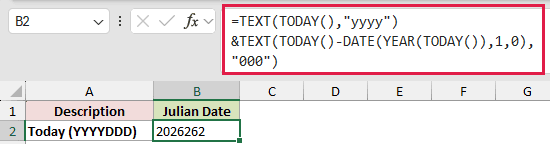
The result changes whenever Excel recalculates on a new day. Replace "yyyy" with "yy" if you need a five-digit code.
Does Day 366 Work in a Leap Year?
Yes. The code 24366 returns 12/31/2024 because 2024 has 366 days.
In a normal year, day 366 rolls into the next January. The code 25366 returns 01/01/2026.
Conclusion
In this article, I showed you how to turn 7-digit, 5-digit, JDE, and astronomical Julian values into real Excel dates, and how to reverse the process.
Count the digits first, then pick the matching formula. I reach for DATE with LEFT and RIGHT whenever the code carries a four-digit year.
I hope you found this article helpful.
Other Excel articles you may also like:
