
Excel’s WEEKDAY function returns a number representing a date’s day of the week.
The return type controls which day is numbered first. Use the result to flag weekends, group records by weekday, or choose a schedule.
In this article, I’ll show you how to return weekday numbers and names, flag weekends, and count weekend dates in a list.
WEEKDAY Function Syntax in Excel
Here is the syntax for the WEEKDAY function:
=WEEKDAY(serial_number, [return_type])
- serial_number – the date you want to evaluate. This can be a cell reference that contains a date, or a DATE() result.
- [return_type] – optional. Controls which day counts as 1. If you omit it, Sunday = 1 and Saturday = 7. Use return_type 2 to make Monday = 1 and Sunday = 7 (great for business use, because then weekends are > 5). Other codes (3, 11 to 17) let you shift the start day to Tuesday, Wednesday, and so on.
When to Use WEEKDAY Function
- Get the day-of-week number for a date so you can drive IF, CHOOSE, or conditional formatting logic.
- Flag or count weekend days in a list of dates.
- Group records by weekday (Mondays, Tuesdays, etc.) for analysis or scheduling.
- Spill weekday numbers for an entire date column in one formula in Excel 365.
- Build payroll or shift rules where weekends need different treatment than workdays.
Example 1: Get the Weekday Number of a Date
Let’s start with the most basic use case: getting a day-of-week number from a date.
Below is a dataset with dates in column A and an empty column B for the weekday numbers.
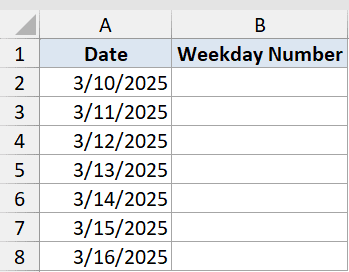
I want to find the weekday number for each date using the default return type (Sunday = 1).
Here is the formula:
=WEEKDAY(A2)
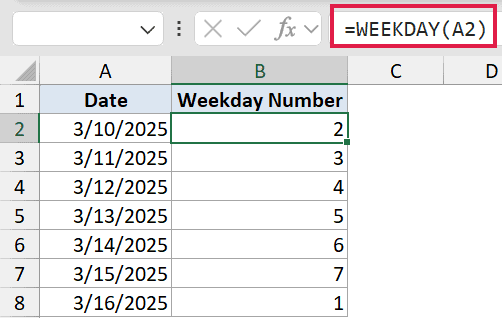
This formula is entered in B2 and filled down to B8. With the default return type, Sunday = 1, Monday = 2, and so on up to Saturday = 7.
For 3/10/2025 (a Monday), WEEKDAY returns 2. That’s the number you then pass into IF, CHOOSE, or any conditional logic downstream.
Pro Tip: Omitting the second argument defaults to Sunday = 1. If your week starts on Monday, always pass return_type 2. Otherwise your weekend check logic (like > 5) won’t work correctly.
Example 2: Spill Weekday Numbers for a Column
Here’s an easy way to get weekday numbers for a whole column at once in Excel 365.
Below is a dataset with event dates in column A. I want the weekday number for all of them in one step, using return_type 2 so Monday = 1.
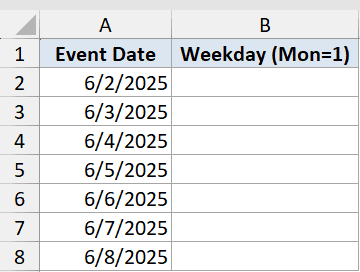
I want to spill weekday numbers for all seven dates with a single formula.
Here is the formula:
=WEEKDAY(A2:A8,2)
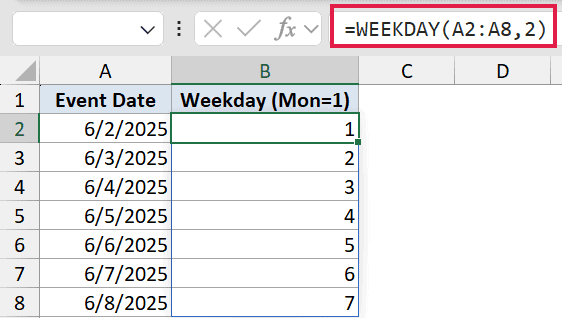
Instead of typing the formula in each row, you enter it once in B2 and it spills down to B8 automatically.
With return_type 2, the dates 6/2/2025 through 6/8/2025 give back 1, 2, 3, 4, 5, 6, 7. That’s Monday through Sunday in order.
Pro Tip: If a #SPILL! error appears, it means cells in B3:B8 aren’t empty. Clear them and the formula will spill correctly.
Example 3: Show the Day Name With CHOOSE
Sometimes a number isn’t enough. You want to see “Mon” or “Fri” directly in the cell. The CHOOSE function is a clean way to map that number to a label.
Below is a dataset of invoice dates in column A. I want column B to display a short day name for each date.
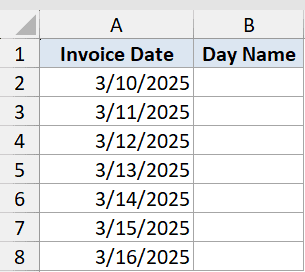
I want to convert each date into a short day name like “Mon” or “Wed”.
Here is the formula:
=CHOOSE(WEEKDAY(A2,2),"Mon","Tue","Wed","Thu","Fri","Sat","Sun")
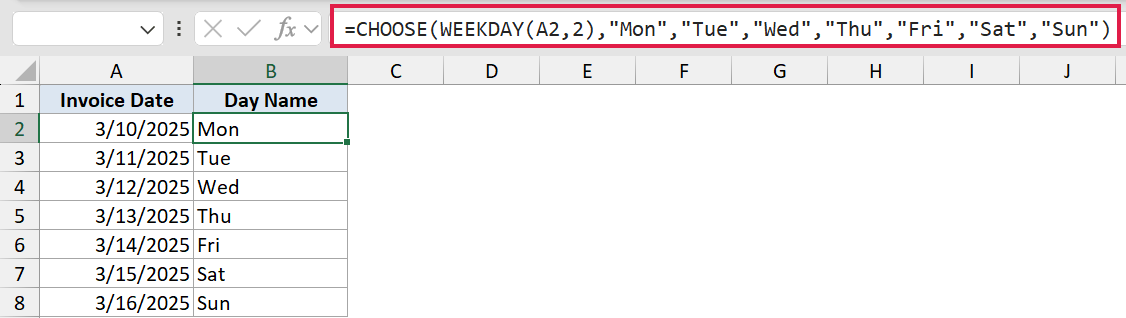
WEEKDAY(A2,2) returns a number from 1 (Monday) to 7 (Sunday). CHOOSE uses that number to pick the matching label from the list.
For 3/10/2025 (Monday), WEEKDAY returns 1, and CHOOSE picks “Mon”.
Modern alternative: If you just want the full day name and don’t need custom labels, the TEXT function is simpler:
=TEXT(A2,"dddd")
That returns “Monday”, “Tuesday”, etc. in one step, with no CHOOSE needed. The CHOOSE approach is worth knowing when you want abbreviated names, different languages, or custom labels (like “M”, “T”, “W”).
For a deeper look at all the ways to display day names from dates, see How to Convert Date to Day of Week in Excel.
Example 4: Flag Weekends vs Workdays
This is one of the most practical uses of WEEKDAY: identifying whether a date is a workday or a weekend.
Below is a list of shift dates in column A. I want column B to show “Workday” or “Weekend” for each one.
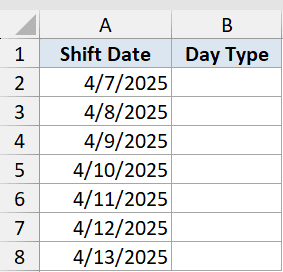
I want to label each date as either “Workday” or “Weekend” based on the day it falls on.
Here is the formula:
=IF(WEEKDAY(A2,2)>5,"Weekend","Workday")
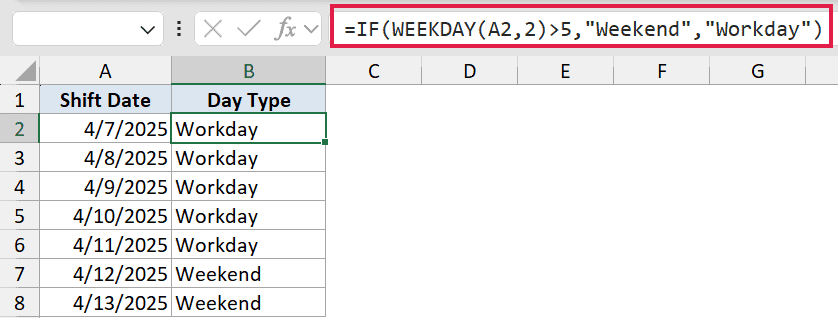
With return_type 2, Saturday = 6 and Sunday = 7. So any value greater than 5 is a weekend day.
For 4/7/2025 (a Monday), WEEKDAY returns 1, which is not > 5, so the formula returns “Workday”. For 4/12/2025 (a Saturday), WEEKDAY returns 6, which is > 5, so the formula returns “Weekend”.
This logic is also useful for conditional formatting. Apply =WEEKDAY($A2,2)>5 as a formula rule to highlight entire rows for weekend dates.
See How To Highlight Weekends In Excel for a step-by-step walkthrough.
Example 5: Count Weekend Days in a List
Sometimes you don’t need to label each row. You just want a total count of how many weekend dates are in a list.
Below is a list of 10 project dates in column A (rows 2 to 11). I want a single cell that counts how many of those dates fall on a weekend.
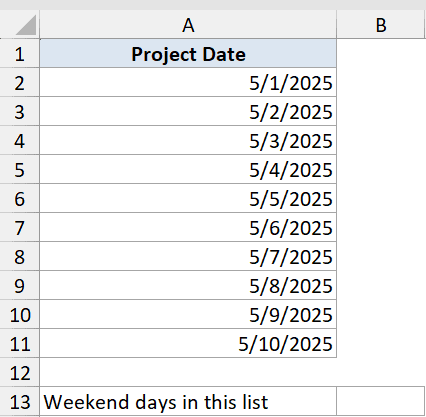
I want to count the total number of weekend dates in the list without adding a helper column.
Here is the formula:
=SUMPRODUCT(--(WEEKDAY(A2:A11,2)>5))
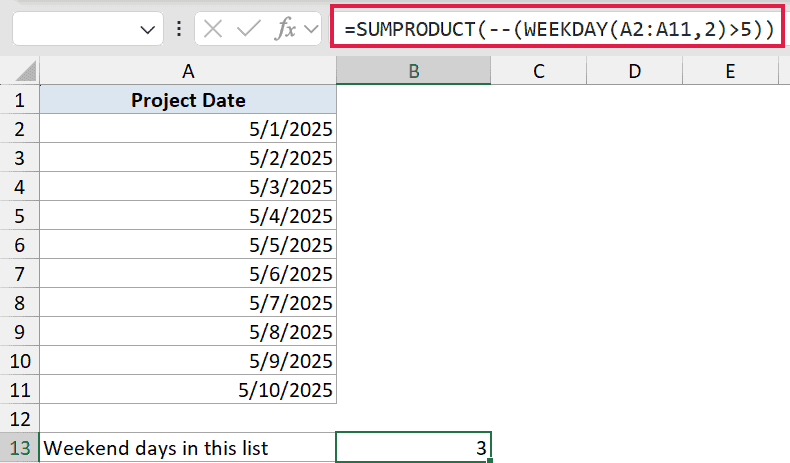
Here’s how this formula works:
WEEKDAY(A2:A11,2)runs WEEKDAY on all 10 dates at once and returns an array of day numbers.>5tests each number, returning TRUE for Saturday/Sunday and FALSE for weekdays.--converts TRUE/FALSE to 1/0.SUMPRODUCTadds them up, giving the total count of weekend days.
The result is 3, meaning three of the ten project dates fall on a weekend.
Pro Tip: You can flip this to count workdays instead: =SUMPRODUCT(–(WEEKDAY(A2:A11,2)<=5)). Same logic, just the opposite condition.
Tips & Common Mistakes
- Forgetting the return_type argument. The default (Sunday = 1) surprises users who expect a Monday-based week. If you’re checking weekends with
>5, always pass return_type 2 – otherwise Saturday comes back as 7 (fine) but Monday is 2, not 1, and your logic may be off. - Blank or zero cells return 7. If a date cell is empty or contains 0, WEEKDAY treats it as the Excel base date (January 0, 1900) and returns 7 (Saturday with return_type 1). Wrap the formula in an IF to guard against blanks:
=IF(A2="","",WEEKDAY(A2,2)). - Using TEXT instead of WEEKDAY for day names. When you just need the day name for display,
=TEXT(A2,"dddd")is simpler than WEEKDAY + CHOOSE. Use WEEKDAY when you need the number for logic; use TEXT when you only need the label. - Conditional formatting with WEEKDAY. Apply
=WEEKDAY($A2,2)>5as a formula rule (with the $ locking column A) to highlight full rows for weekends. The formula evaluates row by row so the row reference must be relative. - Public holidays are not weekends. WEEKDAY only knows about the day of the week – it has no concept of holidays. For full workday calculations, combine WEEKDAY with a holiday list and COUNTIF, or use the NETWORKDAYS function instead. To count business days between two dates, see Calculate Days Between Two Dates in Excel.
That covers the most common ways to use the WEEKDAY function in Excel. Whether you’re flagging weekends, displaying day names, or counting weekend days in a range, WEEKDAY gives you the building block you need.
Related Excel Functions / Articles:
- WEEKNUM Function in Excel
- Find Last Monday of the Month Date in Excel (Formula)
- TODAY Function in Excel
- ISNUMBER Function in Excel
- Count Days from a Date to Today in Excel (Formula)
- Days Between Dates Calculator
- Using IF Function with Dates in Excel (Easy Examples)
- Convert Number of Days to Weeks in Excel
- Week Start and End Dates in Excel
