
The ODDFPRICE function in Excel returns the price per $100 face value of a bond whose first coupon period is shorter or longer than normal.
A coupon is an interest payment. When a bond’s issue date falls between scheduled coupon dates, its first interest period doesn’t follow the usual payment spacing.
ODDFPRICE accounts for that uneven first period when calculating the price from an annual yield. Its result is a clean quote, which excludes accrued interest.
In this article, I’ll show you how to price new issues, compare first-period lengths, and turn the quoted price into settlement cash.
ODDFPRICE Function Syntax in Excel
ODDFPRICE uses the bond’s dates, rates, repayment amount, and coupon schedule:
=ODDFPRICE(settlement, maturity, issue, first_coupon, rate, yld, redemption, frequency, [basis])
- settlement (required): The date the buyer takes ownership of the bond.
- maturity (required): The date the bond’s principal is repaid.
- issue (required): The date the bond was issued.
- first_coupon (required): The date of its first interest payment.
- rate (required): The annual coupon interest rate.
- yld (required): The annual yield used to calculate the price.
- redemption (required): The amount repaid per $100 face value at maturity.
- frequency (required): The coupon payment schedule. Use
1for annual,2for semiannual, or4for quarterly payments. - basis (optional): The day-count convention.
0or omitted means US (NASD) 30/360;1means Actual/actual;2means Actual/360;3means Actual/365;4means European 30/360.
The dates must run in this order: issue, settlement, first coupon, then maturity. Use actual Excel dates in the input cells.
The first period must also be genuinely irregular. An exactly regular first period returns #NUM!, even when the dates are in the correct order.
When to Use ODDFPRICE Function
- Price a newly issued bond with a short first interest period.
- Calculate a quote when the first coupon covers a longer-than-normal period.
- Price a list of new issues with different yields and coupon schedules.
- Calculate the clean quote needed for a bond purchase’s settlement calculation.
Example 1: Price a Short First Period
Let’s start with a bond whose first interest payment arrives sooner than a normal semiannual payment would.
Below is the dataset. Column A labels the bond terms, B1:B9 holds the inputs, and B10 will show the price per $100.
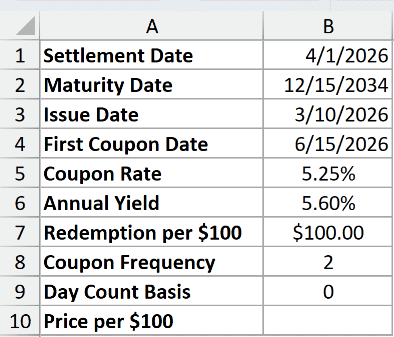
We want the bond’s price at settlement using its annual yield and short first coupon period.
Enter this formula in B10:
=ODDFPRICE(B1,B2,B3,B4,B5,B6,B7,B8,B9)
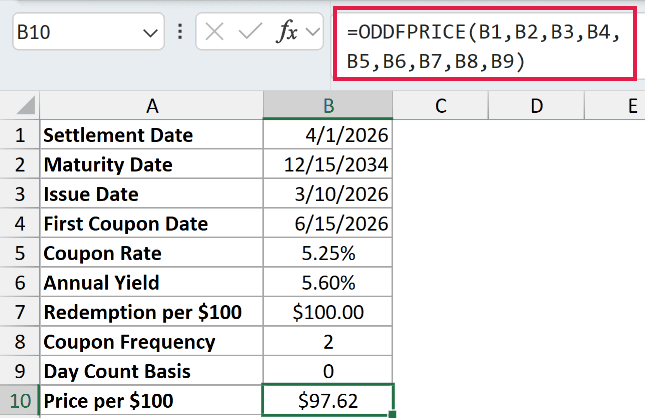
The result is $97.62 per $100 face value. The bond is priced below its redemption amount, so it’s trading at a discount.
The annual yield is 5.60%, above the 5.25% coupon rate. That higher yield is why the buyer pays less than the amount repaid at maturity.
The issue date is 3/10/2026, and the first coupon date is 6/15/2026. ODDFPRICE uses those dates to account for the shortened first period.
Pro Tip: Enter the coupon rate and yield as annual percentages. The frequency argument tells ODDFPRICE how often interest is paid; don’t divide those rates by the payment frequency yourself.
Example 2: Price a List of New Issues
Now let’s calculate quotes for several bonds together.
Below is the dataset. Column A names the bonds, B:J holds their dates and pricing inputs, and K will contain the price quotes.

We want each bond priced using the terms on its own row.
Enter this formula in K2:
=ODDFPRICE(+B2:B6,+C2:C6,+D2:D6,+E2:E6,+F2:F6,+G2:G6,+H2:H6,+I2:I6,+J2:J6)

The + before each range converts its cells into an array of values ODDFPRICE can process. Without that conversion, a bare range returns a single #VALUE!.
The formula spills into K2:K6, placing each quote beside its bond. You enter it only in K2.
This spilling form works in Excel 2021, Excel 2024, and Microsoft 365. In Excel 2019 and earlier, use individual cell references and copy the per-row formula down.
The calculated prices per $100 are:
- Granite Bay Water Revenue: $99.05.
- Lakeshore Transit Notes: $98.79.
- Maple Grove School District: $102.02.
- Copperfield Health System: $98.97.
- Ridgeline Power Bonds: $102.06.
Maple Grove and Ridgeline have coupon rates above their yields, and both quotes exceed the redemption amount. The other bonds have yields above their coupons and discounted quotes.
Example 3: Compare Short, Long, and Regular Periods
The issue date can change the price even when the remaining bond terms stay the same.
Below is the dataset. A:C lists the first-period scenarios and dates, H:I contains shared inputs, and D:F will hold prices and differences.

We want to see how ODDFPRICE handles short, long, and exactly regular first periods.
Enter this formula in D2:
=ODDFPRICE($I$2,$I$3,+B2:B4,+C2:C4,$I$4,$I$5,$I$6,$I$7,$I$8)
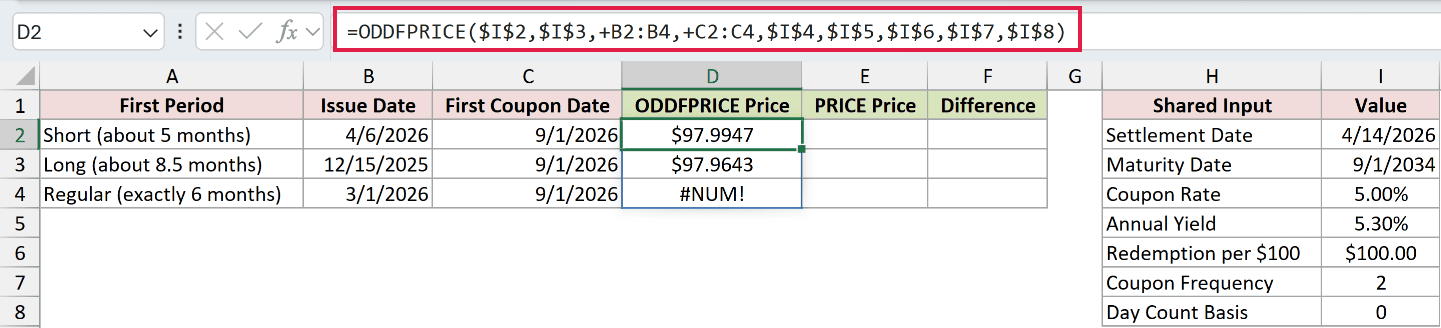
The formula keeps the shared inputs fixed while reading each row’s issue and first coupon dates. Its results spill into D2:D4.
The short first period returns $97.9947, and the long first period returns $97.9643. The exactly regular period deliberately returns #NUM!.
That regular row runs from 3/1/2026 to 9/1/2026. ODDFPRICE rejects it because the first period is exactly regular, rather than odd.
For comparison, PRICE calculates a bond’s quote using a regular coupon schedule. It doesn’t take issue or first coupon dates, so it can’t account for these irregular starts.
Enter this comparison formula in E2 and copy it down through E4:
=PRICE($I$2,$I$3,$I$4,$I$5,$I$6,$I$7,$I$8)
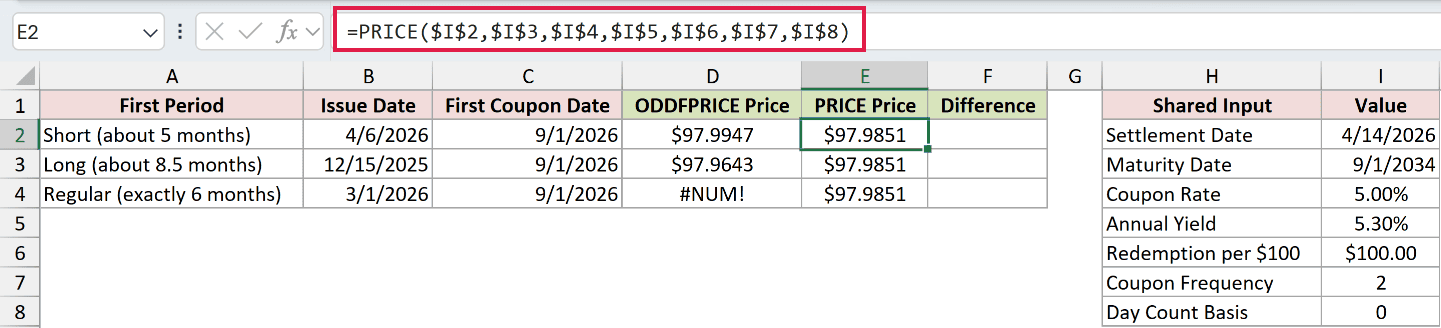
PRICE returns $97.9851 on every row because all its arguments are unchanged. That is the appropriate calculation for the regular row, but only a comparison for the odd periods.
To measure the difference between each ODDFPRICE quote and the regular-schedule comparison, enter this formula in F2:
=D2:D4-E2:E4
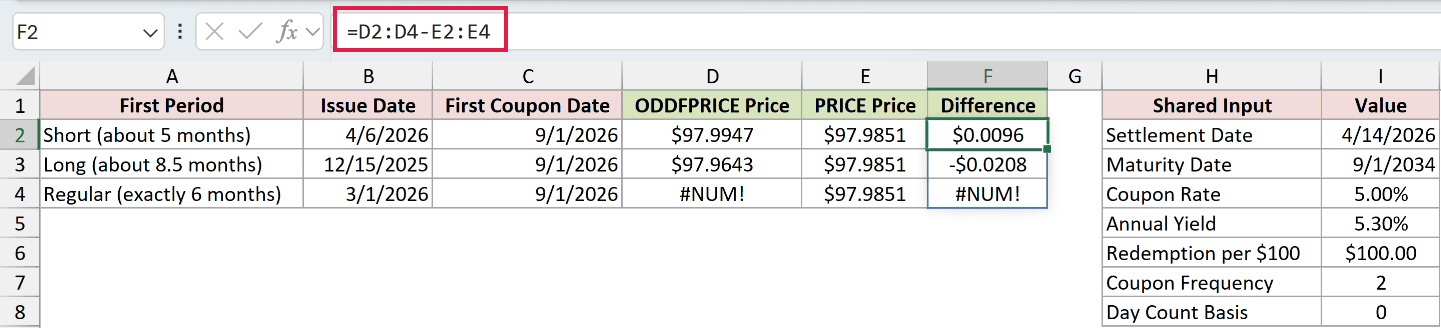
The differences spill into F2:F4. The short period’s difference is $0.0096, while the long period’s difference is -$0.0208 per $100 face value.
F4 deliberately shows #NUM! because the subtraction reads the error in D4.
Example 4: Compare Day-Count Conventions
The day-count basis tells Excel which convention to use when measuring interest periods.
Below is the dataset. A:B lists the basis codes and conventions, E:F contains the bond inputs, and C will hold the prices.
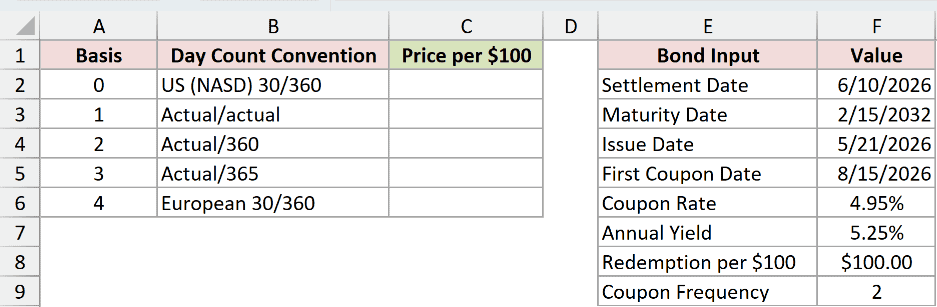
We want to change only the basis while keeping the bond’s other terms fixed.
Enter this formula in C2:
=ODDFPRICE($F$2,$F$3,$F$4,$F$5,$F$6,$F$7,$F$8,$F$9,+A2:A6)
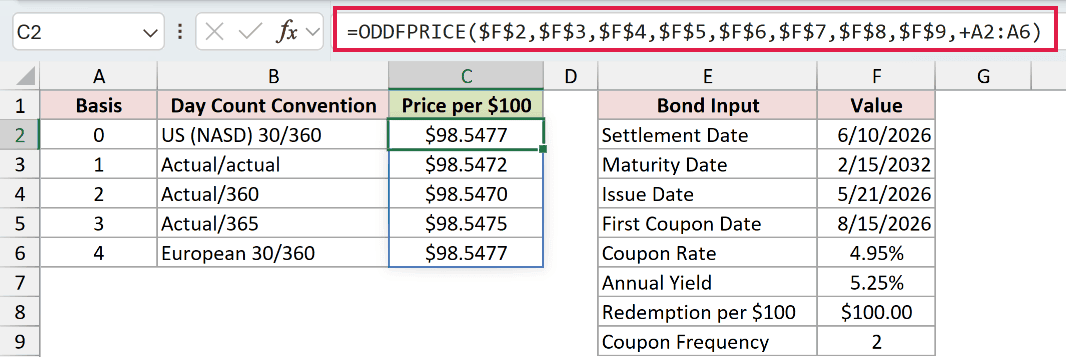
The locked references use the shared bond card. The final argument reads the basis codes, producing a spilled price beside each convention.
The prices per $100 are:
- US (NASD) 30/360: $98.5477.
- Actual/actual: $98.5472.
- Actual/360: $98.5470.
- Actual/365: $98.5475.
- European 30/360: $98.5477.
The differences are small for this bond. US and European 30/360 display the same price.
Use the convention specified for the bond.
Example 5: Calculate the Cash Paid at Settlement
A clean quote still needs to be converted into the amount paid for the purchase.
Below is the dataset. B1:B9 contains the bond terms, B10 holds the face value purchased, and B11:B14 will calculate the quote and settlement amounts.
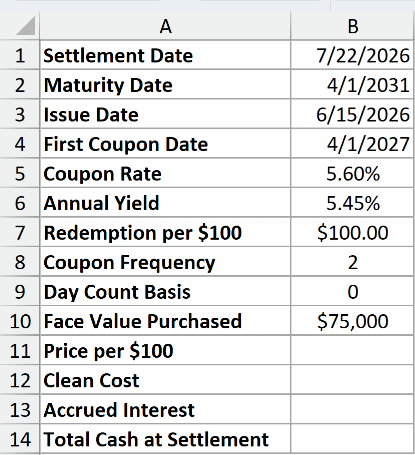
We want the settlement cash for a $75,000 face-value purchase, including the interest accrued since issue.
Start with the ODDFPRICE quote in B11:
=ODDFPRICE(B1,B2,B3,B4,B5,B6,B7,B8,B9)
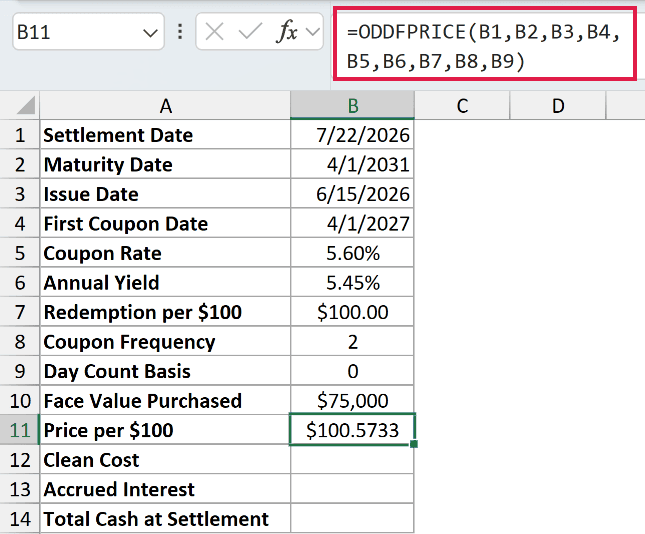
The result is $100.5733 per $100 face value. This bond has a long first period, running from 6/15/2026 to 4/1/2027.
Next, convert the quote into the clean cost of the purchased face value in B12:
=B11/100*B10
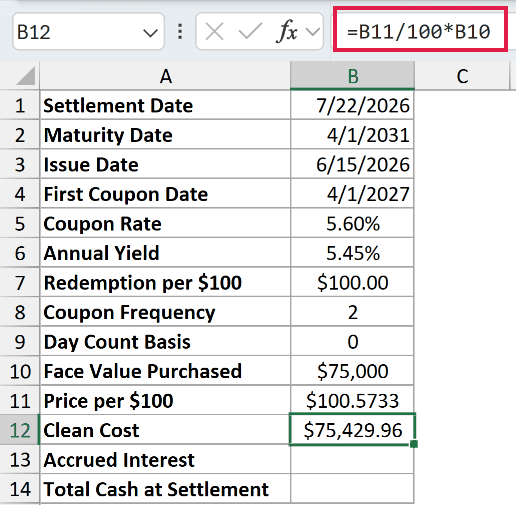
The clean cost is $75,429.96. The formula divides the quote by 100 and multiplies by the purchased face value.
ACCRINT calculates accrued coupon interest. Here it supplies the interest from issue to settlement that isn’t included in the ODDFPRICE clean quote.
Enter this formula in B13:
=ACCRINT(B3,B4,B1,B5,B10,B8,B9)
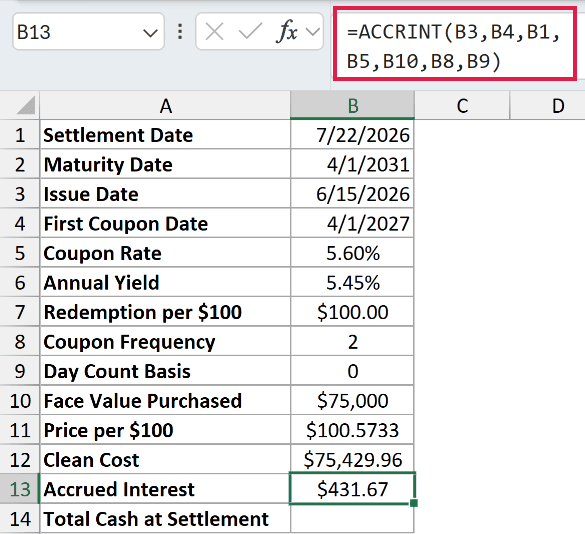
The accrued interest is $431.67. This formula uses the issue date, first coupon date, settlement date, coupon rate, purchased face value, frequency, and basis.
Finally, add the clean cost and accrued interest in B14:
=B12+B13
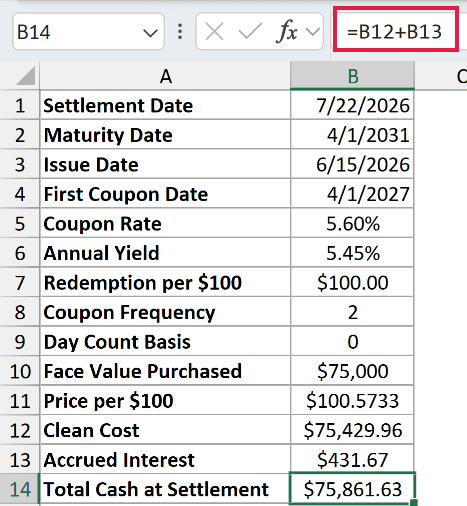
The total cash at settlement is $75,861.63. The ODDFPRICE quote is the starting point; the face value and accrued interest determine the amount paid here.
Example 6: Fix ODDFPRICE Input Errors
Let’s finish with input mistakes that stop ODDFPRICE from calculating a quote.
Below is the dataset. Column A names each scenario, B:J contains the pricing inputs, and K will show either a price or a deliberate error.

We want to identify which input causes each failed calculation.
Enter this formula in K2 and copy it down through K9:
=ODDFPRICE(B2,C2,D2,E2,F2,G2,H2,I2,J2)

This example uses individual row formulas so you can select each error cell and inspect its references. These results are copied down, rather than spilled.
The valid row returns $99.08. The remaining rows show these errors on purpose:
- K3, #NUM!: Settlement equals the issue date. Check the transaction dates; settlement must come after issue.
- K4, #NUM!: Settlement is after the first coupon. ODDFPRICE no longer fits this stage of the bond’s life.
- K5, #NUM!: The first coupon is after maturity. Correct the coupon or maturity date using the bond’s actual schedule.
- K6, #NUM!: The yield is -0.50%. ODDFPRICE doesn’t accept a negative yield.
- K7, #NUM!: The basis is 5. Replace it with the bond’s valid day-count basis.
- K8, #NUM!: The frequency is 3. Use the supported code matching the actual coupon schedule.
- K9, #VALUE!: Settlement contains not a date. Replace that text with an actual Excel date.
For the already-paid first coupon scenario, PRICE returns a price quote based on the remaining regular coupon payments. Use it once ODDFPRICE’s first-period calculation no longer applies.
Tips & Common Mistakes
- Check the coupon cycle as well as date order. A first coupon date that doesn’t align with the schedule leading to maturity also returns
#NUM!. - Keep rates annual. Coupon rate and yield describe different things, but both inputs must use annual rates.
- Check redemption and coupon rate. A redemption value of
0or a negative coupon rate returns#NUM!. - Keep basis codes whole. In testing,
1.9was treated as1. Enter the intended convention explicitly instead of relying on truncation. - Keep quote units separate from purchase size. Redemption is per $100 face value. The face value you buy belongs in the later cash calculation.
Other Excel articles you may also like:
