
Excel’s COUPNUM function returns the number of coupon dates remaining between a bond’s settlement date and maturity date.
It counts coupon dates after settlement through maturity. A partial first coupon period counts as a whole coupon, so the answer is always rounded up.
In this article, I’ll show you how to count remaining payments, see why partial periods round up, and build a remaining coupon-date list.
COUPNUM Function Syntax in Excel
The COUPNUM function uses two dates, a payment frequency, and an optional day count basis.
=COUPNUM(settlement, maturity, frequency, [basis])
- settlement (required) is the bond’s settlement date, when the buyer takes ownership.
- maturity (required) is the date when the bond expires and the issuer repays its face value.
- frequency (required) is the number of coupon payments per year: 1 for annual, 2 for semiannual, or 4 for quarterly.
- basis (optional) sets the day count convention. Use 0 for US (NASD) 30/360, 1 for actual/actual, 2 for actual/360, 3 for actual/365, or 4 for European 30/360.
When to Use COUPNUM Function
- Count how many coupon payments remain after a bond trade settles.
- Estimate the remaining interest cash for each holding in a portfolio.
- Size a schedule that lists every future coupon date.
- Keep matured bonds from producing errors in a rolling report.
Example 1: Count Coupons Left on One Bond
Let’s start with a single bond.
Below is the dataset. The card holds the settlement date, maturity date, payment frequency, day count basis, and a labelled cell for the coupon count.
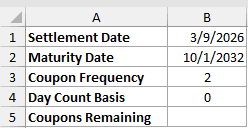
I’ll use the bond inputs to count the coupon dates still payable after settlement.
Here is the formula:
=COUPNUM(B1,B2,B3,B4)
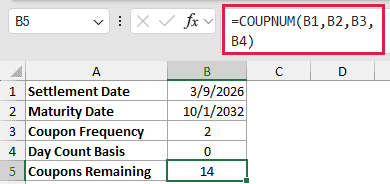
The settlement date is 3/9/2026, and the semiannual bond matures on 10/1/2032. COUPNUM returns 14 coupons remaining.
The basis is entered as 0, the default US (NASD) 30/360 convention. COUPNUM still counts coupon dates rather than elapsed days.
Example 2: Calculate Remaining Coupon Interest
Now let’s apply the count to a holdings report.
Below is the dataset. It lists holdings, face amounts, coupon rates, maturity dates, two result columns, and a card for the shared report settings.

Here, I’ll count each holding’s remaining coupons and calculate the interest still scheduled.
Here is the coupon-count formula entered in E2:
=COUPNUM($I$2,D2,$I$3,$I$4)
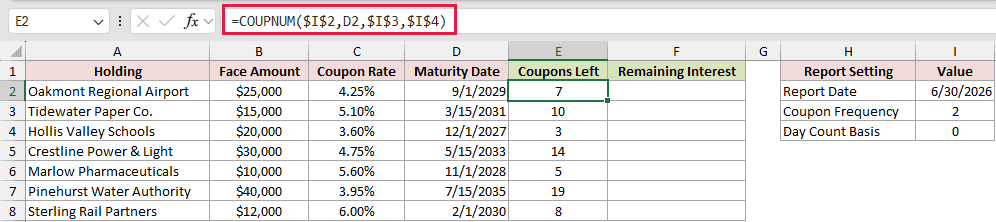
The locked references keep the report date, frequency, and basis fixed when the formula is copied down. Oakmont Regional Airport has 7 coupons left.
Next, this formula calculates the remaining interest in F2:
=B2*C2/$I$3*E2
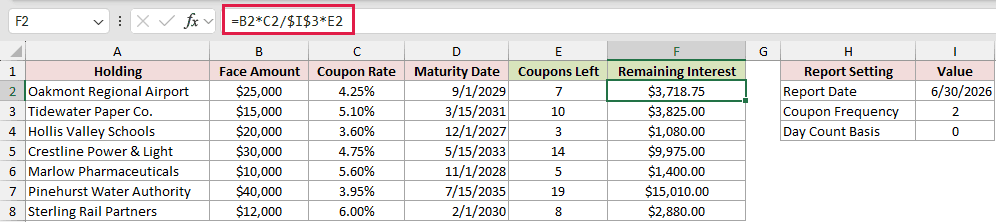
The formula finds one coupon payment from face amount, rate, and frequency. It then multiplies that payment by the count in column E.
Oakmont has $3,718.75 of interest remaining. Pinehurst Water Authority has 19 coupons left and $15,010.00 of remaining interest.
COUPNUM counts payments, while DURATION measures a bond’s sensitivity to interest-rate changes.
YIELD uses the bond’s price to estimate its annual return.
PRICE works in the other direction, calculating value per $100 of face amount from a required yield.
Both formulas are entered in row 2 and copied down. A plain range passed to COUPNUM returns one #VALUE! rather than a spilled column.
Example 3: See How Partial Periods Round Up
This example moves the settlement date through one coupon period.
Below is the dataset. It includes settlement-timing labels, settlement dates, a COUPNUM result column, a YEARFRAC comparison column, and fixed bond inputs.

I’ll compare settlement dates around one scheduled coupon date to see when the remaining count changes.
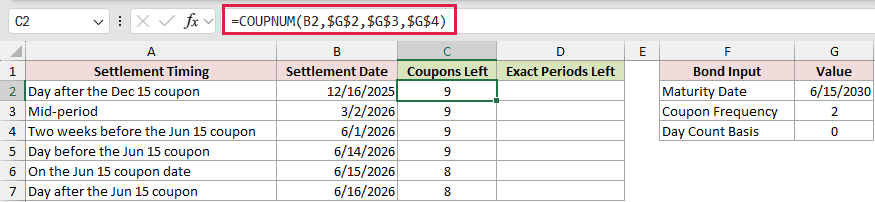
Here is the COUPNUM formula entered in C2 and copied down to C7:
=COUPNUM(B2,$G$2,$G$3,$G$4)
For comparison, this YEARFRAC formula is entered in D2 and copied down to D7:
=YEARFRAC(B2,$G$2,$G$4)*$G$3
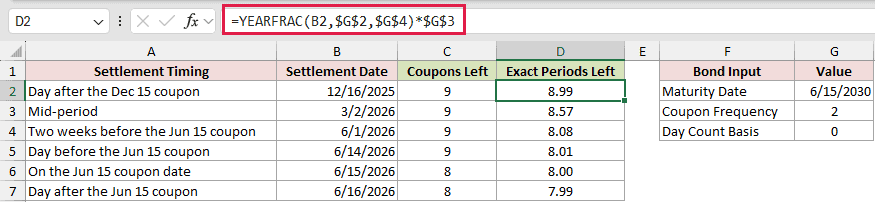
Column D is a comparison, not a replacement for the coupon count. Rows 2 through 5 show 8.99, 8.57, 8.08, and 8.01 exact periods.
COUPNUM returns 9 in each of those rows because any partial first period counts as a whole coupon.
On 6/15/2026, the comparison reaches 8.00 and COUPNUM returns 8. The coupon paid on the settlement date belongs to the seller, so it is excluded.
One day later, the comparison is 7.99 while COUPNUM still returns 8.
Example 4: Compare Annual and Quarterly Coupons
Payment frequency changes both the schedule and the number of coupon dates left.
Below is the dataset. It lists four payment schedules and their frequency codes, with a result column and fixed bond inputs beside the table.
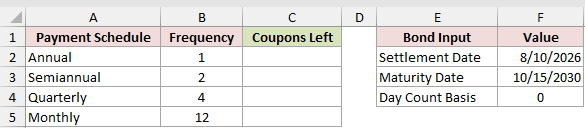
Next, I’ll compare the coupon counts for annual, semiannual, quarterly, and invalid monthly schedules.
Here is the formula entered in C2 and copied down:
=COUPNUM($F$2,$F$3,B2,$F$4)
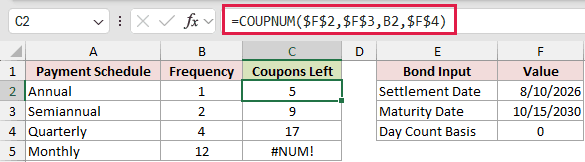
The annual schedule returns 5, the semiannual schedule returns 9, and the quarterly schedule returns 17.
Quarterly is not simply 2 times the semiannual count. The 7/15/2026 quarterly coupon falls before the 8/10/2026 settlement date, so it does not count.
The monthly row is a deliberate error demonstration. Frequency 12 returns #NUM! because COUPNUM accepts only annual, semiannual, or quarterly schedules.
Example 5: List Every Remaining Coupon Date
Sometimes the count is only the starting point.
Below is the dataset. A bond input card sits beside an empty Remaining Coupon Dates column that will hold the spilled schedule.
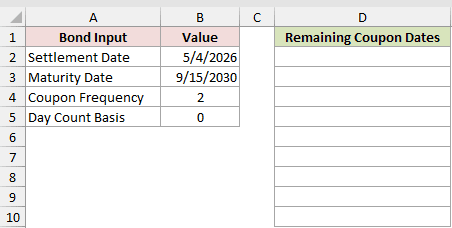
I’ll turn the coupon count into a chronological list of payment dates.
Here is the formula:
=SORT(EDATE(B3,-12/B4*SEQUENCE(COUPNUM(B2,B3,B4,B5),1,0)))
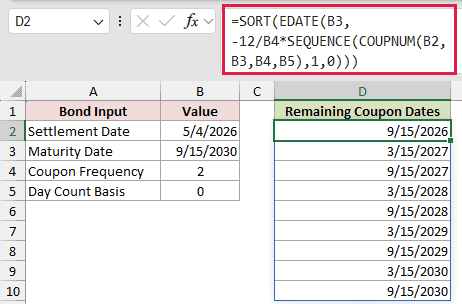
COUPNUM sets the number of rows for SEQUENCE. EDATE counts backward from maturity, and SORT puts the dates into ascending order.
The spill starts at 9/15/2026 and ends at the 9/15/2030 maturity date.
SEQUENCE and SORT, and therefore this spilled date list, need Excel 2021 or later: Excel 2021, Excel 2024, or Microsoft 365.
Pro Tip: Counting back with EDATE works for this schedule. For a bond maturing on 2/28, it can step back to 8/28 instead of month end. Use COUPPCD or COUPNCD logic for those schedules.
Example 6: Spill COUPNUM Across Trade Tickets
There is a spill option, but COUPNUM needs a small nudge.
Below is the dataset. Each ticket has a bond, settlement date, maturity date, and empty Coupons Left column, plus shared frequency and basis settings.
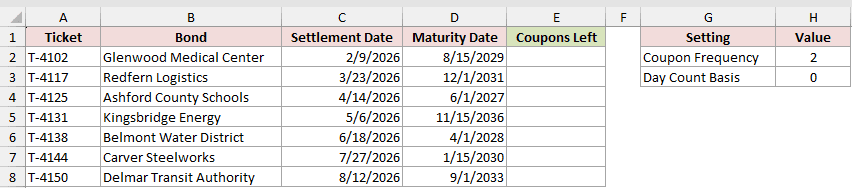
In this case, I’ll use one formula to return the coupon count for every trade ticket.
Here is the formula:
=COUPNUM(C2:C8+0,D2:D8+0,$H$2,$H$3)
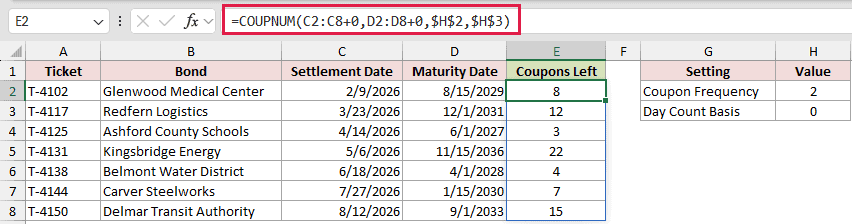
Adding +0 turns both date ranges into computed arrays that COUPNUM can process. The results spill from E2 through E8.
Glenwood Medical Center returns 8 coupons left, while Kingsbridge Energy returns 22.
Excel 2021, Excel 2024, and Microsoft 365 can spill this formula. In Excel 2019 and earlier, use the copied-down pattern from Example 2.
MAP and LAMBDA offer another spill route in Microsoft 365 and Excel 2024.
Pro Tip: Coerce every range argument. If only one date range has +0, every spilled cell returns #VALUE!.
Example 7: Handle Matured Bonds Without IFERROR
Rolling reports eventually meet bonds that have already matured.
Below is the dataset. It lists bonds and maturity dates, a raw COUPNUM problem column, a guarded result column, and shared review settings.
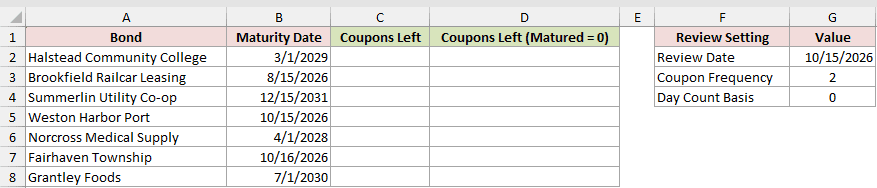
I’ll make matured bonds show zero while valid future bonds keep their coupon counts.
Here is the raw COUPNUM formula entered in C2 and copied down to C8. It causes the problem:
=COUPNUM($G$2,B2,$G$3,$G$4)
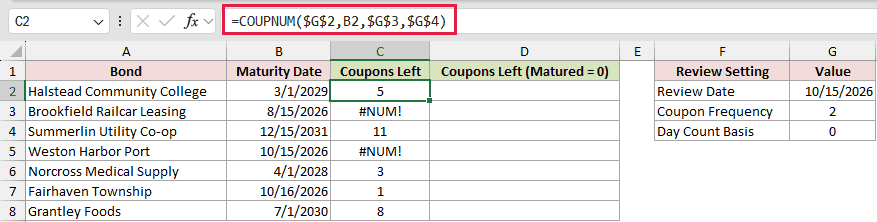
Column C is the problem column. It returns #NUM! for Brookfield Railcar Leasing and Weston Harbor Port because their maturity dates are not after the review date.
This IF formula is entered in D2 and copied down to D8 to fix that specific condition:
=IF(B2<=$G$2,0,COUPNUM($G$2,B2,$G$3,$G$4))
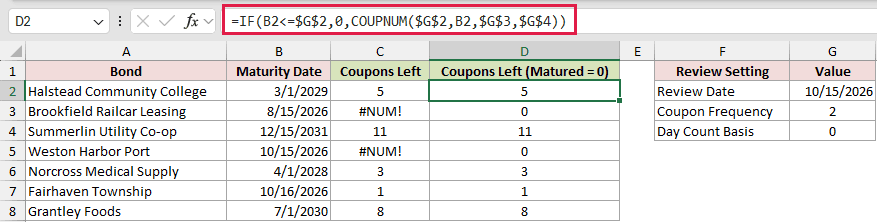
Column D checks the cause before calling COUPNUM. The two matured holdings return 0, while the valid rows keep their original counts.
Fairhaven Township matures one day after the review date, so it correctly returns 1.
This test is safer than wrapping everything in IFERROR. A blanket error handler could also hide a bad frequency or an invalid date.
Tips & Common Mistakes
- Frequency must be 1, 2, or 4. Monthly frequency 12 returns #NUM!, and decimal frequencies are truncated before Excel checks them.
- Basis 0 through 4 changes day-count calculations, but it does not change the coupon dates or the count returned by COUPNUM.
- A parseable text date such as “4/20/2026” works, but real Excel dates are safer. Unrecognized text returns #VALUE!, and any time portion is discarded.
- Settlement must be earlier than maturity. Equal dates and settlements after maturity return #NUM!.
- COUPNUM is available in every current version of Excel. Its
+0spill behavior depends on a version that supports dynamic arrays.
Use COUPNUM when you need Excel’s count of future coupon dates, including the partial first period.
For rolling reports, test whether a bond has matured instead of hiding every error with IFERROR.
Related Excel Functions / Articles:
