
The DISC function in Excel returns the annualized bank discount rate for a short-term security sold below face value and redeemed without periodic interest.
This rate uses face value as its base. It’s different from the return earned on the money you actually paid for the security.
In this article, I’ll show you how to compare Treasury bills, convert dollar costs, and diagnose input errors.
DISC Function Syntax in Excel
The DISC function needs the purchase and maturity dates, price, redemption value, and an optional day-count basis.
=DISC(settlement, maturity, pr, redemption, [basis])
- settlement (required) is the date you buy the security.
- maturity (required) is the date the security pays its redemption value.
- pr (required) is the price per $100 of face value.
- redemption (required) is the redemption value per $100 of face value.
- basis (optional) selects the day-count method. Use 0 for US 30/360, 1 for actual/actual, 2 for actual/360, 3 for actual/365, or 4 for European 30/360.
When to Use DISC Function
- Calculate the quoted bank discount rate for a Treasury bill or commercial paper.
- Compare discount securities with different prices and time to maturity.
- See how a different day-count basis changes an annualized discount rate.
- Test how proposed bid prices affect a short-term security’s quoted rate.
- Convert a dollar purchase cost into the per-$100 price DISC expects.
Example 1: Calculate a Treasury Bill Discount Rate
Let’s start with one six-month Treasury bill.
Below is the dataset. It contains the settlement date, maturity date, price, redemption value, basis, and an empty labelled cell for the discount rate.
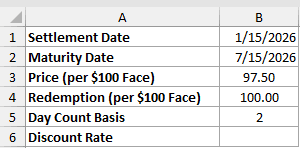
We want to calculate the bill’s annualized bank discount rate using the actual/360 basis.
Here is the formula:
=DISC(B1,B2,B3,B4,B5)
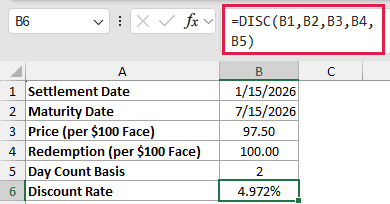
The formula returns 4.972%. Basis 2 tells DISC to use actual days and a 360-day year, which is the convention used for Treasury bills.
The price and redemption values are both quoted per $100 of face value. DISC is available in every current version of Excel.
Example 2: Compare Treasury Bill Discount Rates
Now let’s compare bills from one illustrative auction.
Below is the dataset. It lists six bills, their maturity dates and prices, an auction-settings card, and an empty Discount Rate column.
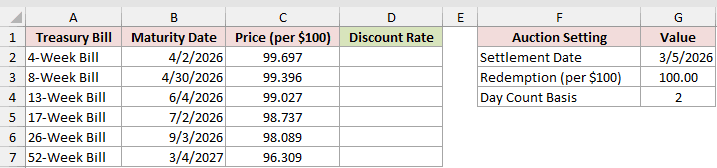
We want to calculate a comparable annualized discount rate for every bill.
Enter this formula in D2 and copy it down the column:
=DISC($G$2,B2,C2,$G$3,$G$4)
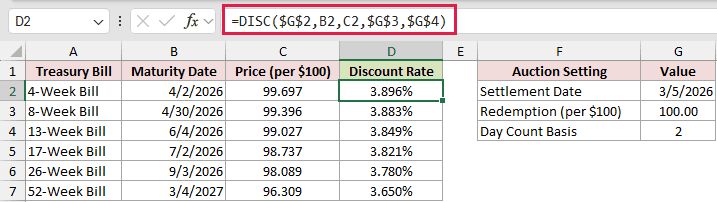
The locked references keep the settlement date, redemption value, and basis fixed. Each copied formula uses the maturity date and price from its own row.
The 4-week bill has a $0.303 discount per $100 and returns 3.896%. The 52-week bill has a $3.691 discount but returns only 3.650%.
DISC annualizes each discount over its time to maturity. A larger dollar discount does not automatically mean a higher annualized rate.
Example 3: Convert Dollar Cost to Price per $100
Here’s how to use DISC when a purchase confirmation shows dollar amounts.
Below is the dataset. It holds the dates, face amount, purchase cost, basis, and labelled cells for the converted price and discount rate.
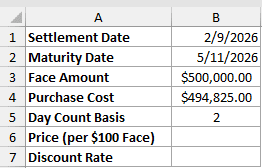
We first want to convert the purchase cost into a price per $100 of face value.
Here is the conversion formula:
=B4/B3*100
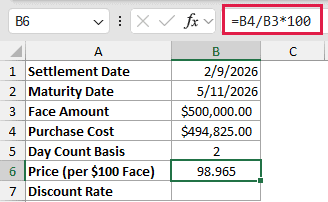
The $494,825.00 purchase cost divided by the $500,000.00 face amount returns a price of 98.965 per $100.
We can now use B6 in DISC. The redemption argument is 100 because B6 is a per-$100 price, so both inputs use the scale DISC expects.
Here is the DISC formula:
=DISC(B1,B2,B6,100,B5)
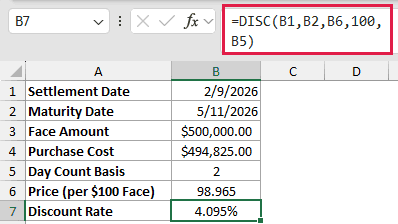
The formula returns 4.095%. Both DISC inputs are now on the per-$100 scale DISC expects.
Example 4: Compare DISC Day-Count Bases
Next, let’s hold one bill fixed and change only the basis.
Below is the dataset. It lists basis codes and day-count methods beside a bill-input card, with an empty Discount Rate column for the comparison.
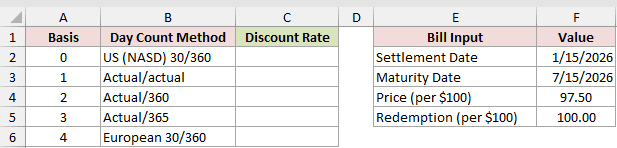
We want to see how each basis changes the annualized rate for the same bill.
Enter this formula in C2 and copy it down:
=DISC($F$2,$F$3,$F$4,$F$5,A2)
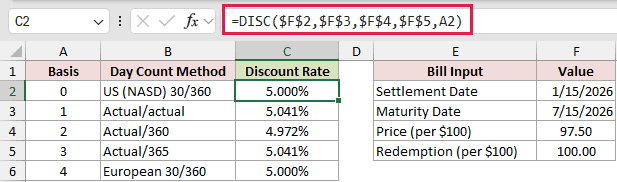
Basis 0 and basis 4 return 5.000%. Basis 1 and basis 3 return 5.041%, while basis 2 returns 4.972%.
Basis 0 is not wrong in general. It is also the default when basis is omitted, but a Treasury bill uses basis 2.
Omitting the basis here would therefore return 5.000% instead of the applicable 4.972%.
Example 5: Test a Range of Bid Prices
Here’s a compact way to test several proposed prices at once.
Below is the dataset. Column A contains six bid prices, the side card holds the two dates, and column B is ready for the discount rates.
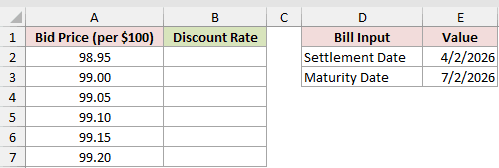
We want one formula to return a discount rate for every bid price.
Here is the spilling formula:
=DISC(E2,E3,A2:A7+0,100,2)
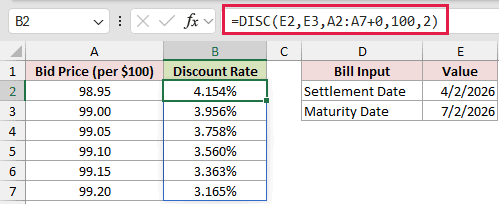
The +0 turns the price range into a computed array, allowing DISC to spill. A plain range returns one #VALUE! instead.
Because the card holds only the two dates, the formula types redemption as 100 per $100 of face value and basis as 2 for actual/360.
If a DISC formula contains several range arguments, each range needs +0. Coercing only some of them leaves #VALUE! in the spilled cells.
This spill works in Excel 2021, Excel 2024, and Microsoft 365. In Excel 2019 and earlier, use a single-price formula and fill it down.
A bid price of 98.95 returns 4.154%, while 99.20 returns 3.165%. The rate falls as the price rises.
Example 6: Compare DISC With YIELDDISC
Now let’s compare the quoted discount rate with the yield on the price paid.
Below is the dataset. It contains the bill’s dates, price, redemption value, basis, and two labelled answer cells for the rate comparison.
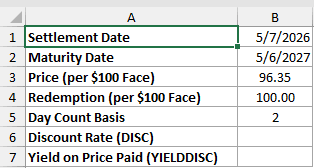
We first want the bank discount rate based on face value.
Here is the DISC formula:
=DISC(B1,B2,B3,B4,B5)
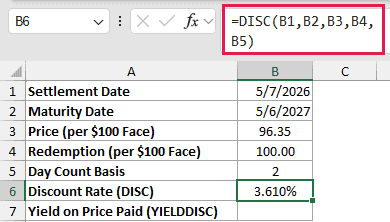
DISC returns 3.610%. It divides the $3.65 discount by the $100.00 face value before annualizing it.
For comparison, YIELDDISC measures the return against the price actually paid.
Here is the YIELDDISC comparison formula:
=YIELDDISC(B1,B2,B3,B4,B5)
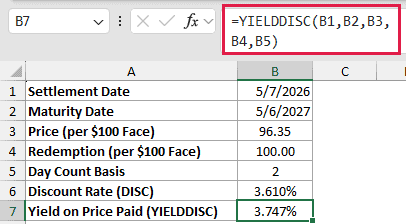
The comparison cell returns 3.747% because YIELDDISC divides the discount by the $96.35 purchase price. It’s the investor-yield comparison, not another DISC answer.
T-bill auction results quote discount rates. TBILLEQ can convert a discount rate to a bond-equivalent yield when that comparison is needed.
Example 7: Fix DISC Errors
Finally, let’s put the common input failures into worksheet rows.
Below is the dataset. It lists one valid case and five deliberate error cases, with a Discount Rate column ready to show each outcome.
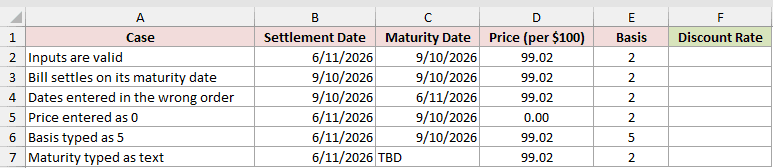
We want to calculate every row so each bad input reveals its own error. Redemption is typed as 100 per $100 of face value in every row.
Enter this formula in F2 and copy it down:
=DISC(B2,C2,D2,100,E2)
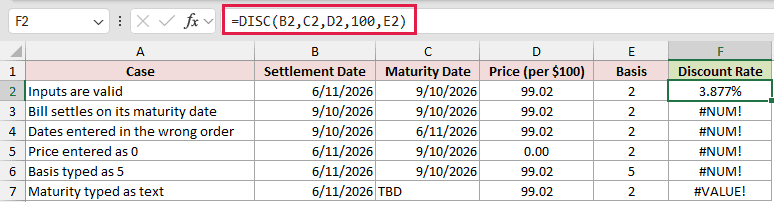
The valid row returns 3.877%. Cells F3:F7 are deliberate error demonstrations, not discount-rate answers.
- F3 returns
#NUM!because settlement equals maturity. - F4 returns
#NUM!because settlement is later than maturity. - F5 returns
#NUM!because the price is 0. - F6 returns
#NUM!because basis 5 is outside the accepted basis codes. - F7 returns
#VALUE!because the maturity entry is the textTBD, not a date Excel can use.
Fix the invalid input instead of wrapping DISC in IFERROR. Hiding these errors can leave a swapped date or bad price unnoticed.
Tips & Common Mistakes
- Use DISC for short-term discount securities such as Treasury bills and commercial paper. It isn’t suitable for coupon bonds or multi-year bonds.
- Keep price and redemption on the same per-$100 scale. If your confirmation shows dollar amounts, convert the purchase cost as shown in Example 3.
- Choose the basis deliberately. Omitting it selects basis 0, while Treasury bills use basis 2.
- Remember that DISC returns a bank discount rate based on face value. YIELDDISC measures the yield against the price paid.
- PRICEDISC works in the opposite direction by returning a price from a discount rate. The PRICE function prices coupon bonds with periodic interest.
- INTRATE and TBILLYIELD handle related short-term return calculations.
Use DISC when you need the quoted bank discount rate for a short-term discount security.
For Treasury bills, use basis 2, then compare YIELDDISC if you need the return on the price paid.
Related Excel Functions / Articles:
